
How to Incorporate Accessibility in Software Development
Accessibility in software development is an inclusive approach to building digital products that more people can use. It helps ensure that websites, apps, and software tools are usable for people with different abilities, devices, and interaction needs. In this article, we’ll look at what accessibility means in software development and why it matters for both users and businesses.

Accessibility in software development is an inclusive approach to building digital products that more people can use. It helps ensure that websites, apps, and software tools are usable for people with different abilities, devices, and interaction needs. In this article, we’ll look at what accessibility means in software development and why it matters for both users and businesses.

Anwiti Mishra
Anwiti is a software professional with more than 10 years of experience contributing to enterprise and consumer software products for corporations and startups. She has worked across multiple roles in the software development process, including developer, program manager, and database administrator, though most of her work has been as a quality analyst and Scrum Master. She especially enjoys working on mobile apps and new-age technology. Anwiti strongly believes that together, the internet, software, and mobile technology can be both an enabler and a democratizing force. Outside of technology, she enjoys traveling, learning about different cultures, and cooking.
Accessibility in software development is an inclusive approach to building digital products that more people can use. It helps ensure that websites, apps, and software tools are usable for people with different abilities, devices, and interaction needs. In this article, we’ll look at what accessibility means in software development and why it matters for both users and businesses.
Table of Contents
- Accessibility in Software Development Has Seen Drastic Improvements
- Products Should Be Designed for People of All Abilities
- Accessibility Requirements Come in Many Forms
- How Great Is the Need for Accessible Technology?
- Accessibility Also Makes for Good Business Decisions
- How to Better Enable Accessibility in Your Product
In product development, accessibility refers to the degree of ease with which a product can be used by its intended users. The principles of accessibility in software development can be applied to almost any product or experience.
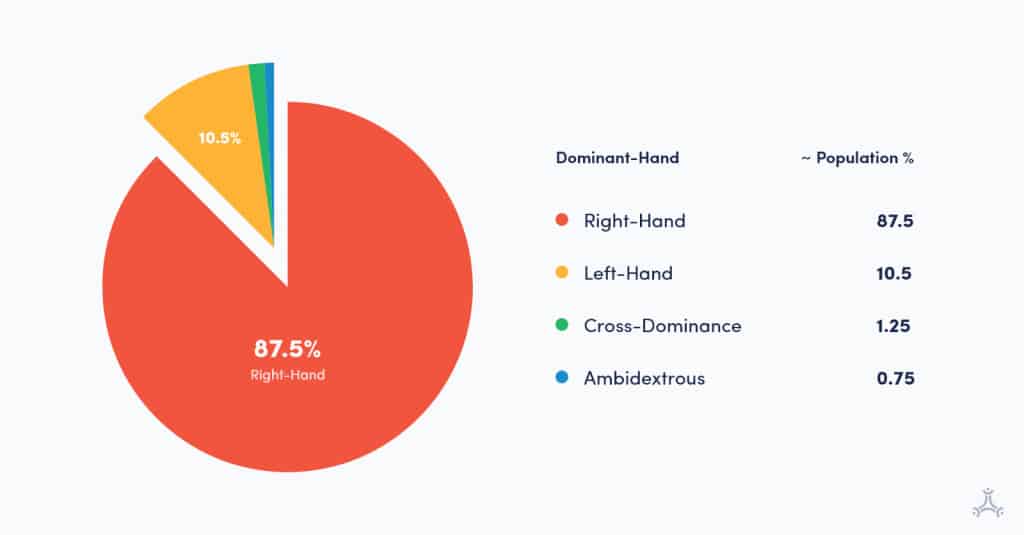
For example, many cars, especially older stick-shift models, were designed with right-handed drivers in mind. Left-handed people make up a smaller portion of the population, yet they often have to adjust to products designed primarily for right-handed users. This may seem like a small inconvenience, but it shows how design choices can affect how easily different people use a product.
This has started to change in recent years. Many car manufacturers are moving away from stick shifts, and physical control panels are increasingly being replaced by touchscreen controls and automated features. In the future, autonomous vehicles may change the driving experience even more.
Software development follows a similar principle. The more thoughtfully a product is designed, the easier it becomes for different users to access, understand, and use it.
Accessibility in Software Development Has Seen Drastic Improvements
The vehicle industry is heavily hardware-driven, so changes often take a long time to become mainstream. The computer industry is different because most user interfaces are driven by software.
One example of accessibility in software is a mobile app designed for right-handed users that can also be redesigned for left-handed users. To support this, the engineering team can create an option that changes the layout based on the user’s dominant hand.
This became more practical in 2007 with the rise of physical-keyboard-less, all-screen smartphones. With these devices, software could display buttons and controls dynamically, based on touch rather than physical keys. Not everyone realizes it, but this was a major leap for everyday software accessibility.
An even higher degree of accessibility is an app that can be operated through speech.
Many newer products are eliminating the need to physically touch a device at all. For example, products such as Amazon Alexa, Google Home, and Apple HomePod allow users to interact with technology through voice commands, as long as they are within audible range.
Products Should Be Designed for People of All Abilities
With that said, we can surmise that accessibility in software development means creating products and services that are usable by people of different abilities.
Broadly, there are five different human faculties often considered in accessibility assessments:
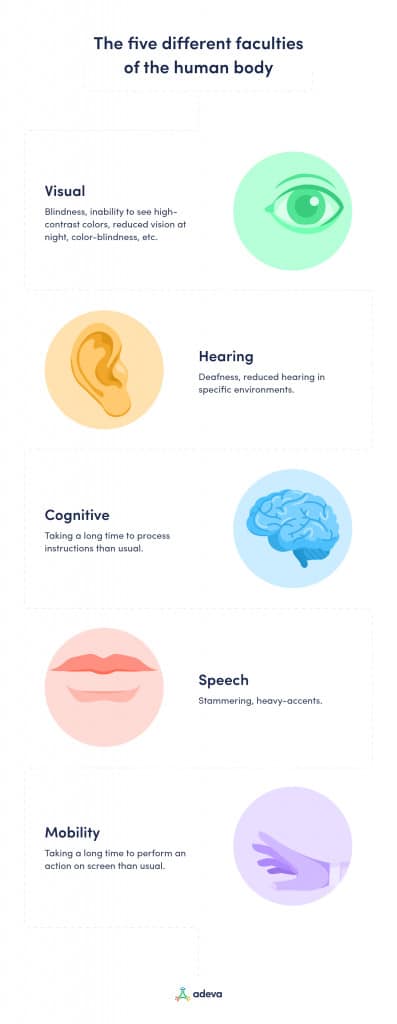
Accessibility Requirements Come in Many Forms
Accessibility needs can come in a wide variety of forms. They may be visible or invisible, temporary or permanent, and they can affect any of us at any time. Whether we want to accept it or not, we are all aging into accessibility needs.
Examples include:
- Temporary disabilities, such as lost glasses, tooth extraction, or a broken arm.
- Situational limitations, such as the inability to see clearly in bright sunlight or hear fine audio in a noisy environment.
- Changing abilities due to aging, which can affect vision, hearing, mobility, memory, and other faculties.
- Technical limitations, such as slow internet connections or limited bandwidth.
How Great Is the Need for Accessible Technology?
According to the World Health Organization:
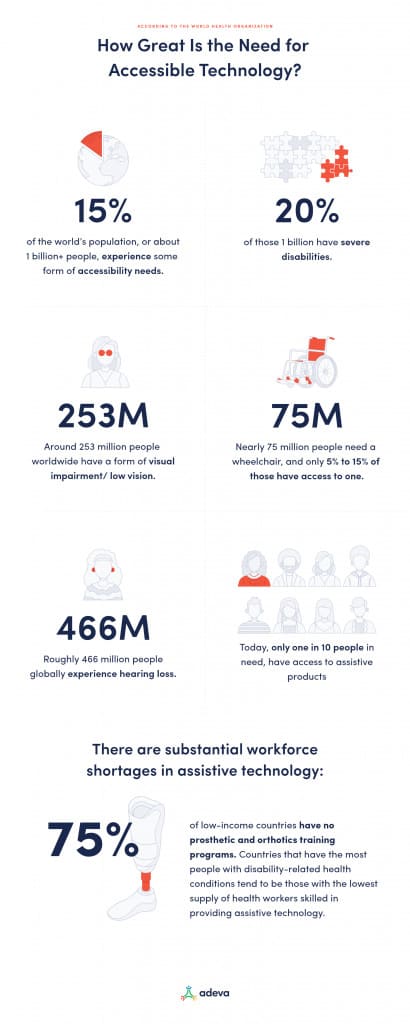
Accessibility needs can affect people with visual, auditory, mobility, cognitive, temporary, situational, or age-related limitations.
The degree to which a product team must enable accessibility depends on the ability distribution of the intended audience or user group.
If a solution is built for a very specific group of people, such as trained military personnel in Switzerland, the accessibility requirements may be highly specific and limited in scope.
In contrast, if a product is being built for a large section of the general public, such as a social media app, it needs to account for a much wider range of accessibility needs.
Accessibility Also Makes for Good Business Decisions
Creating accessible products and services can have tangible business advantages. These benefits can include reaching a broader user base, expanding the potential talent pool, improving user experience, and reducing risk by aligning more closely with accessibility expectations and regulations.
Globally, more than 1 billion people have some form of accessibility need. The more people your product can support, the more opportunities you have to increase adoption, impact, and customer satisfaction. When products exclude people with disabilities or accessibility needs, businesses may limit both their reach and their long-term value.
Most people also have someone in their life with accessibility needs, such as a partner, parent, child, colleague, or friend. If your product or service is highly accessible, it becomes easier for those users and the people who support them to engage with it.
Computers and the internet can provide access to services, education, and jobs for people with disabilities. However, accessibility barriers still limit participation for many people. This population represents an important and often overlooked talent pool, especially at a time when many companies need skilled, capable professionals.
Regulatory frameworks around the world increasingly expect digital products to be accessible, even though the requirements can vary by region and may still be unclear in some digital contexts. Companies that ignore accessibility may expose themselves to avoidable business, reputational, or legal risks.
The challenges are real, and the opportunity is tremendous.
How to Better Enable Accessibility in Your Product
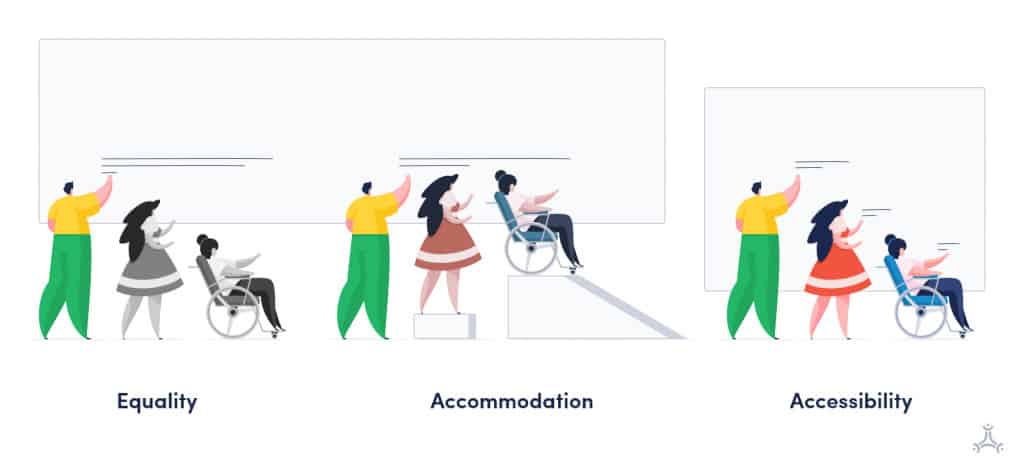
As software developers, we can build more accessible products by considering accessibility every time we design a feature or write code. Accessibility in software development is not something that should be added only at the end. It should be part of the product design and development process from the start.
For design, here are some suggestions:
- Design workflows so users can move through the product in a clear, predictable path, rather than forcing their eyes or mouse movements to jump around the screen.
- Choose colors and contrast levels with color blindness and low-vision users in mind.
- Design product features so that different users can meet the basic requirements for using the product, regardless of how they interact with it.
This is similar to the earlier examples of right-hand-dominant design, left-hand-dominant users, and speech-enabled products. The goal is to make the product easier to use for a wider range of people, not only for the “default” user the team may have imagined first.
For engineering and writing code, there are many helpful accessibility resources created by people and organizations working in this space.
Here are a few useful places to start:
Web accessibility
To dive deeper:
To benchmark software products (Android, Windows, Web) for accessibility requirements:
FAQs
Q: What do we mean by accessibility?
In product development, accessibility refers to the built-in ease with which a product can be used by its intended users. In software development, this means designing and building websites, apps, and tools that people with different abilities, devices, and interaction needs can use effectively.
Q: What is an example of accessibility?
One example of accessibility is a mobile app that allows users to change the layout based on their dominant hand. If an app is originally designed with right-handed users in mind, the engineering team can add an option that makes the interface easier for left-handed users to use. This kind of accessibility feature helps more people interact with the product comfortably and effectively.
Q: What is the use of accessibility options?
Accessibility options help make software products usable for people with different abilities and interaction needs. For example, an app may include text-to-speech features for users with limited vision, or speech-recognition features that allow users with limited mobility to control the product with their voice. These options help more people access and use digital products effectively.