
What Is Cloud Computing: Principal Models, Their Benefits, and Limitations
In the world we live in today, the majority of companies are transforming their businesses using data. Companies are moving from a traditional business to a “Technology company that solves X problem.”

In the world we live in today, the majority of companies are transforming their businesses using data. Companies are moving from a traditional business to a “Technology company that solves X problem.”

Mariana Carvalho
Mariana is a Solutions Engineer holding a Master’s in Computer Science. She is the co-founder of Brazilians in Tech and is passionate about Technology and how it can positively impact the world. She writes about Cloud Technologies and Women in Technology.
In the world we live in today, the majority of companies are transforming their businesses using data. Companies are moving from a traditional business to a “Technology company that solves X problem.”
To be agile and efficient, increase time-to-market, and provide an excellent delivery of products and services to customers, we frequently see organizations leveraging cloud capabilities, both on-premises and off-premises. Connectivity, agility, and speed are the forerunners of digital transformation.
This article will explain the models and advantages of cloud computing, and look at the benefits of using multiple clouds.
Table of Contents
- What Is Cloud Computing?
- Cloud Deployment Models: Private, Public, Hybrid, Multi-Cloud
- Cloud Service Models and Their Limitations: IaaS, PaaS, SaaS
- Benefits of Leveraging Cloud Services
What Is Cloud Computing?
According to the National Institute of Standards and Technology (NIST) definition, Cloud Computing is a model for ubiquitous, convenient, on-demand network access to a shared pool of configurable computing resources (e.g., networks, servers, storage, applications, and services) that can be rapidly provisioned and released with minimal management effort or service provider interaction.
The cloud model consists of five essential characteristics, three cloud computing service models, and four deployment models.
These characteristics create guidelines for companies that are providing cloud services to clients, and for companies establishing data centers and creating a private cloud.
The five characteristics of Cloud Computing are:
- Self-service: The ability to take advantage of computing resources (e.g., memory, storage, and computing) and other services easily and efficiently, in which the customer consumes, provisions, and monitors its resources.
- Broad Network Access: The ability to leverage a wide network that can be accessed by multiple users in multiple regions. It is important to take into account the connection’s bandwidth and also the latency that the business is willing to endure.
- Resource Pooling: Cloud computing relies on a large pool of shared resources to deliver on its capabilities. Grouping these resources makes it possible to efficiently allocate computing power for different needs while optimizing overall resource usage.
- Elasticity: The ability to resize computing resources (CPU, memory, and storage) manually or automatically according to the demand for access to services available in the cloud. Elasticity helps in periods of peak access, such as Black Friday.
- Measured Service: The ability to measure and monitor resource consumption in the cloud. This makes it possible to allocate resources more effectively and adjust them according to demand.
Cloud Deployment Models: Private, Public, Hybrid, Multi-Cloud
When choosing a cloud strategy, a company can select from four different implementation methods:
- Private Cloud: All services and computing resources (memory, CPU, networks, and storage) reside on your premises, and there is no sharing of resources with other companies. The private cloud can be managed by your company or by a third party.
- Public Cloud: All services and computing resources are available in a virtual cloud computing environment and can be accessed over the internet. The most common public cloud computing providers are: Amazon Web Services (AWS), Microsoft Azure, Google Cloud Platform (GCP), and Alibaba.
- Hybrid Cloud: This model consists of two or more types of cloud computing (e.g., the company’s data and applications are in the private cloud, and other workloads are in the public cloud). In this model, it is essential that the company has good management, orchestration, and portability between the clouds to ensure that the infrastructure is offering efficient resources to all of its users.
- Multi-cloud Strategy: While hybrid cloud computing refers to two of the same type of cloud coexisting, multi-cloud strategy refers to two or more clouds, regardless of type (for example, a company using Azure services and AWS).
Each cloud model requires the presence of the five characteristics we mentioned above.
Whether your company is building its private cloud infrastructure, outsourcing its management, or simply using public cloud services, you must ensure you have the structure to accommodate all resources in a user access portal with the defined consumption metrics.
Cloud Service Models and Their Limitations: IaaS, PaaS, and SaaS
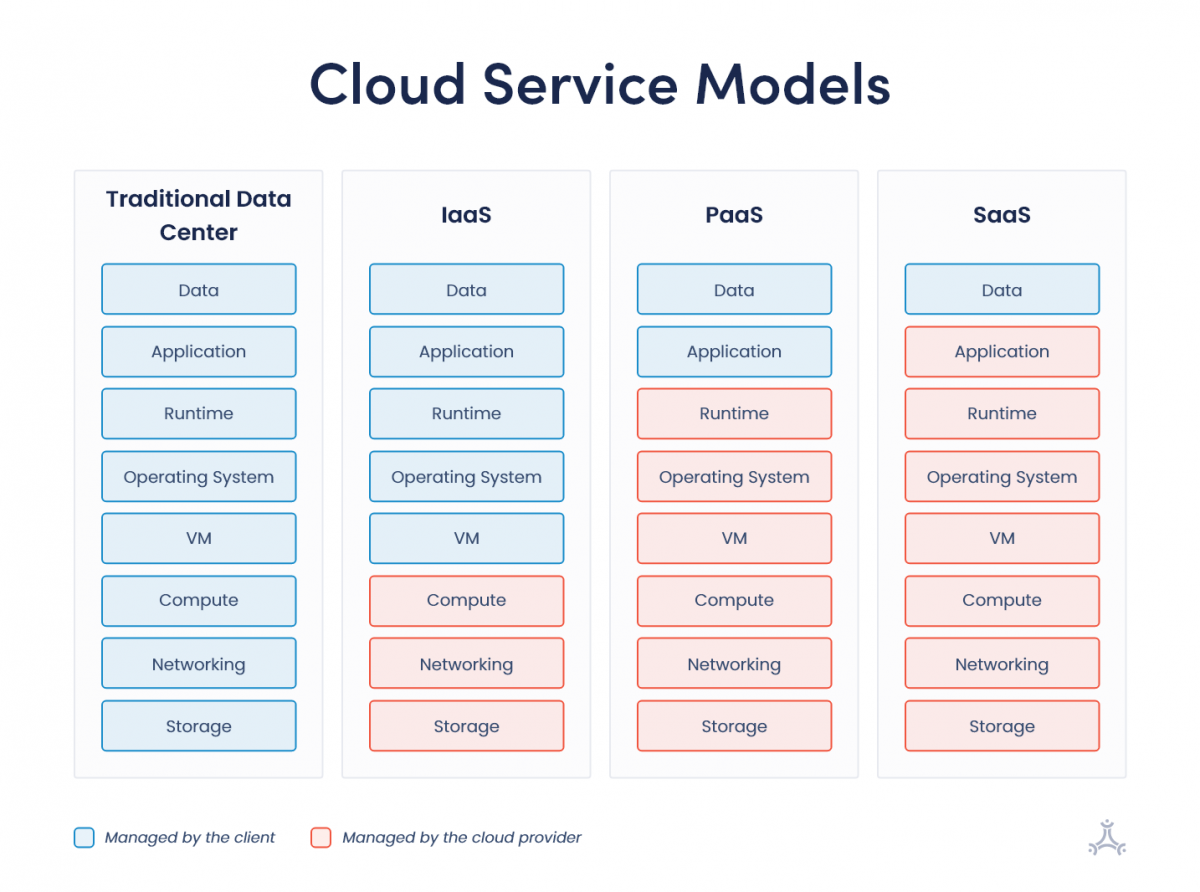
When defining Cloud service models, we must consider which layers of the infrastructure are the service provider’s responsibility and which will be in the hands of the user. For each cloud service model, infrastructure responsibilities must be well-defined.
IaaS: Infrastructure-as-a-Service
In the Infrastructure-as-a-Service service model or IaaS, the cloud service provider is responsible for the computing infrastructure. However, the company is responsible for managing virtual machines, configuring networks, and choosing the operating system.
IaaS is similar to managing and maintaining servers in a private data center. Still, the company does not need to “touch” the servers or worry about having administrators dedicate hours building the entire IT infrastructure.
Still, the company needs employees who know how to manage infrastructure services, as IaaS does not remove all responsibilities from the customer.
Limitations of IaaS
It is important to remember that downtime is a possibility with any cloud service provider, leaving clients’ websites and other applications out of service.
PaaS: Platform-as-a-Service
In Platform-as-a-Service (PaaS), the customer is responsible for the application and software, while the service provider manages the virtual machine and operating system. Providers typically offer different configuration options, allowing customers to choose the environment that best fits their needs.
Limitations of PaaS
While the customer is responsible for fewer layers of the infrastructure, their choices are also limited to what the service provider can offer.
Some applications run better on one type of server and configuration, so it’s up to the customer to know which PaaS service is best to host their application.
An example of PaaS is Cloud Run from Google Cloud Platform (GCP). The client can create and deploy applications in different programming languages, compatible with the service: Go, Python, Java, Node.js, and NET.
SaaS: Software-as-a-Service
Software-as-a-Service (SaaS) solutions are delivered directly to end users, typically through a web browser. Users do not need to manage the application environment, storage infrastructure, or computing resources.
The service provider is responsible for application updates, bug fixes, and ongoing maintenance, allowing users to focus on using the software rather than maintaining it.
One example of SaaS is Slack, where you have all the infrastructure being offered by the company. When you open Slack on your work or personal computer, all your files are still there (“in the cloud”), accessible from any device and any location worldwide. The user’s only concern is putting their data and information in the software or application.
Small companies and startups can benefit from using SaaS services since investing in infrastructure and creating your own data center (even if it is small) is not cost-effective.
Amazon, for example, has a program that offers credits to small business owners and startup founders. Other examples of SaaS platforms are Gmail and Salesforce.
Limitations of SaaS
As the customer uses ready-made software, they have no control over its functionality. When choosing the best SaaS solution, it is important to consider the needs of the business applications and the service provider’s limitations.
Benefits of Leveraging Cloud Services
Resource pooling, scalability, and measured services are some of the core characteristics and benefits of the cloud computing model. Other benefits include:
- High availability: Resources remain available through redundancy and distribution across multiple geographic regions.
- Agility: Cloud services improve agility in provisioning, deployment, and resource consumption. Software developers and teams can provision infrastructure much faster, often reducing setup times from weeks to hours.
- Geographic distribution: Companies serving global markets can benefit from the expanded geographic distribution that cloud providers offer.
- Disaster recovery: Due to the redundancy and geographic distribution of resources, cloud services data, and workloads in a given region can be effectively returned and saved in another region, reducing risks and helping business continuity.
- OpEx model (Operational Expenses): Instead of the company buying servers and machinery for a data center that comes with hard costs such as rent or energy, the cloud consumption model is less complex. The company does not need to have a physical data center and only pays for what it consumes. The cost of this consumption is allocated to the operating costs column on the balance sheet. There is no asset depreciation as in the CapEx (Capital Expenses) model. Instead, an organization’s money can be invested in acquiring, maintaining, and improving fixed assets, such as equipment, machinery, factories, or additional technology.
Leveraging cloud solutions and working with different cloud models or providers can deliver greater agility to your company, improve team efficiency, and accelerate digital transformation efforts.
FAQs
Q: What is cloud computing?
Cloud computing is a model for convenient and on-demand network access to a shared pool of computing resources that can be quickly provisioned and released with minimal service provider interaction or management effort.
Q: What are the types of cloud computing?
There are four primary types of cloud computing; public clouds, private clouds, multi-clouds, and hybrid clouds.
Q: How do I prepare my company for the cloud?
Communication is essential when preparing a company for cloud adoption. Keep stakeholders informed throughout the process and ensure the IT team is involved in key decisions. It is also important to identify internal leaders who can support cloud adoption and help employees transition effectively through proper training and guidance.