
A Quick Guide for How To Use Laravel With Vue.js 3
Although I’ve worked as a full-stack developer for many years, I like to define myself as a back-end developer. This is because I lack the creativity crucial for building high-quality frontends, and my knowledge of front-end frameworks is limited within the boundaries of Vue.js. I could create a complex application using vanilla JavaScript, but Vue.js is where I feel at home. This is what led to me choosing Laravel over other frameworks.

Although I’ve worked as a full-stack developer for many years, I like to define myself as a back-end developer. This is because I lack the creativity crucial for building high-quality frontends, and my knowledge of front-end frameworks is limited within the boundaries of Vue.js. I could create a complex application using vanilla JavaScript, but Vue.js is where I feel at home. This is what led to me choosing Laravel over other frameworks.

Farhan Hasin Chowdhury
Farhan is a passionate full-stack developer and author. He’s a huge fan of the open-source mindset and loves sharing his knowledge with the community.
Although I’ve worked as a full-stack developer for many years, I like to define myself as a back-end developer. This is because I lack the creativity crucial for building high-quality frontends, and my knowledge of front-end frameworks is limited within the boundaries of Vue.js. I could create a complex application using vanilla JavaScript, but Vue.js is where I feel at home. This is what led to me choosing Laravel over other frameworks.
Laravel has always had great support for Vue js developers. According to Vue.js: The Documentary, Taylor Otwell, creator of Larvel, was one of the first in the developer community to endorse Vue.js publicly.
Vue.js has evolved drastically since its early days and I’ll discuss Laravel along with the Vue.js 3 tutorial.
Table of Contents
- Bootstrapping a New Project and Installing the Dependencies
- Installing Vue.js and Writing Your First Component
- Conclusion
Bootstrapping a New Project and Installing the Dependencies
For this tutorial you’ll need to have a project. You can use any project that you have available, or create a new one to follow along with this article.
composer create-project laravel/laravel guide-to-laravel-and-vue
After the project has been bootstrapped, you’ll have to install the npm dependencies. To do so, execute the following command inside your project directory:
npm install
Once the dependencies finish installing, execute the following command to compile the assets and make sure everything’s working:
npm run dev
If everything works out, you’ll see something similar to this:
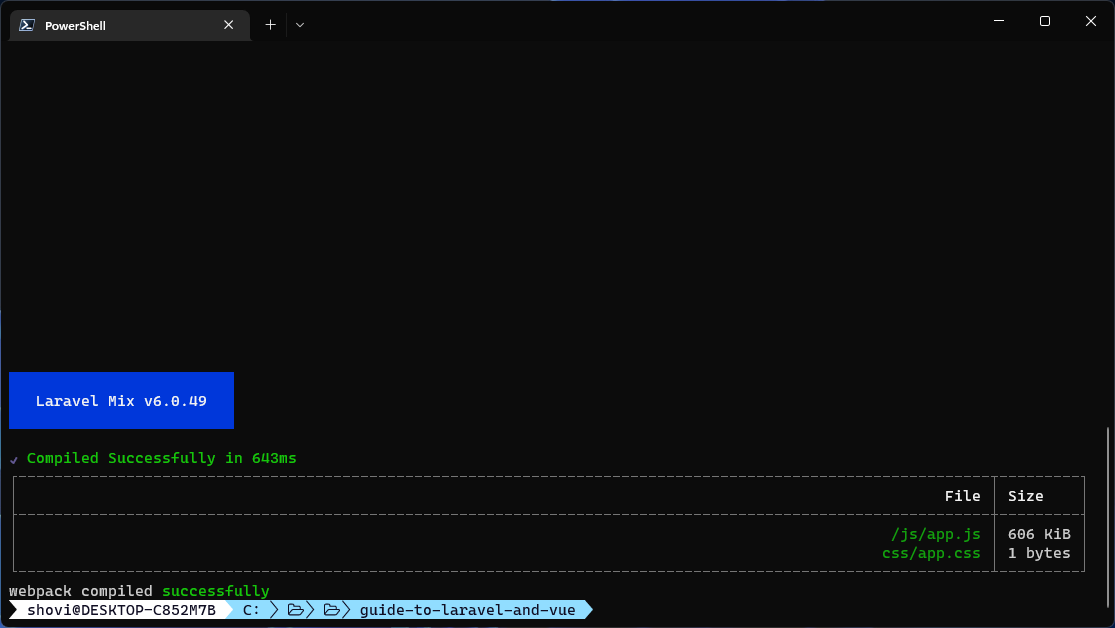
When you executed the npm run dev command, Laravel Mix compiled the resources/js/app.js file and the resources/css/app.css file into public/js/app.js and public/css/app.css files.
Installing Vue.js and Writing Your First Component
Now that your project is set up you can install Vue.js 3 and configure the Vue simple progress package with Laravel. To do so, execute the following command on your project directory:
npm install --save-dev vue
This will install Vue.js 3 as a development dependency. After the assets are compiled, the production JavaScript bundle is self-contained, so installing Vue.js 3 as a development dependency is sufficient.
To make sure that Vue.js 3 has been installed properly, open the package.json file and look for "vue" under the "devDependencies" section:
// package.json

{
    "private": true,
    "scripts": {
        "dev": "npm run development",
        "development": "mix",
        "watch": "mix watch",
        "watch-poll": "mix watch -- --watch-options-poll=1000",
        "hot": "mix watch --hot",
        "prod": "npm run production",
        "production": "mix --production"
    },
    "devDependencies": {
        "axios": "^0.21",
        "laravel-mix": "^6.0.6",
        "lodash": "^4.17.19",
        "postcss": "^8.1.14",
        "vue": "^3.2.37"
    }
}
The version number indicates that Vue.js 3 has been installed. You’ll need to to initalize an app instance before creating a new component. Open resources/app.js and update its content as follows:
// resources/app.js

require('./bootstrap');

import { createApp } from 'vue';
import HelloVue from './components/HelloVue.vue';

createApp({
    components: {
        HelloVue,
    }
}).mount('#app');
We haven’t discussed the HelloVue.vue file. This file is where the Vue.js application instance is defined. The process differs slightly from how it worked in Vue.js 2, but it’s the recommended approach for using Laravel with Vue.js 3. You can consult the official Vue.js docs to learn more.
Create a new file resources/components/HelloVue.vue and add the following code:
// resources/components/HelloVue.vue

<template>
  <h1>Hello Vue!</h1>
</template>

<script>
export default {
    name: 'HelloVue'
}
</script>
This is a basic Vue.js component that prints out Hello Vue! on the page. Open the webpack.mix.js file on the project root and update its content as follows:
// webpack.mix.js

const mix = require('laravel-mix');

mix.js('resources/js/app.js', 'public/js')
    .vue({
        version: 3,
    })
    .postCss('resources/css/app.css', 'public/css', [
        //
    ]);
This .vue() call compiles the Vue.js code and bundles it into the production JavaScript file. The function accepts an object that allows you to define the version of Vue.js being used. Although the version can be detected automatically, explicitly defining it makes the configuration cleaner.
Next, you’ll have to compile the JavaScript code. Execute the npm run dev command again. Instead of a successful compilation message, you’ll see something similar to this:
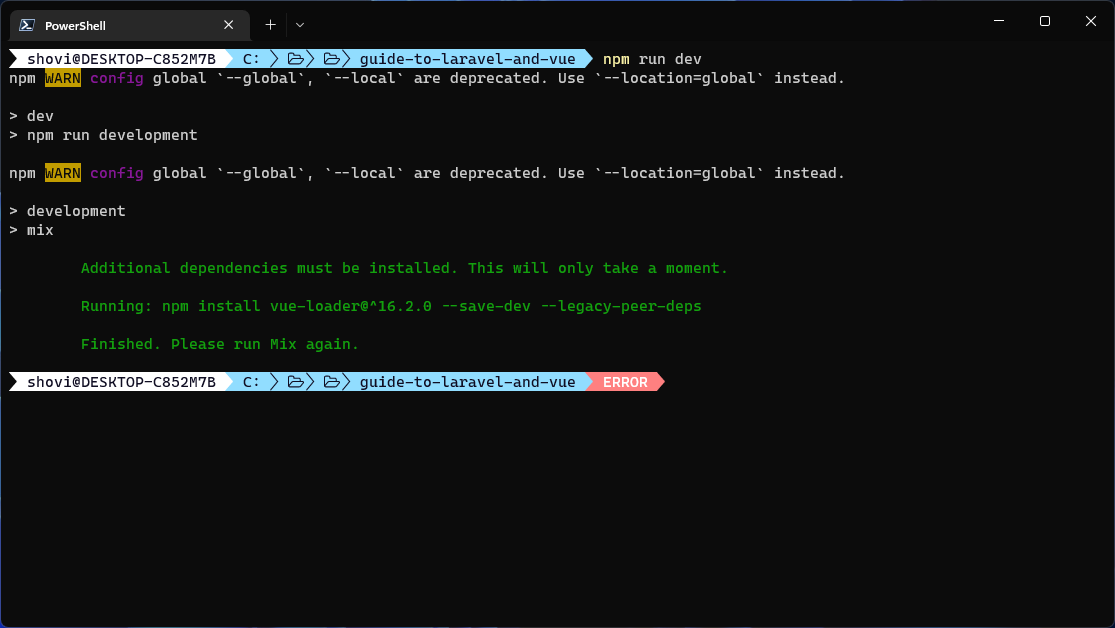
There is nothing wrong with this result. Laravel Mix requires the package to perform the compilation and it’s intelligent enough to install it automatically. Run the npm run dev command. This time you’ll get one of two possible outcomes.
Either the command will succeed and compile your code into a bundle, or it’ll fail with Error: Cannot find module 'webpack/lib/rules/DescriptionDataMatcherRulePlugin' error. If this error happens, try executing npm install --save-dev vue-loader and recompile the code.
Finally, open resources/views/welcome.blade.php and add the following code in it:
<!DOCTYPE html>
<html lang="en">
<head>
    <meta charset="UTF-8">
    <meta name="viewport" content="width=device-width, initial-scale=1.0">
    <meta http-equiv="X-UA-Compatible" content="ie=edge">
    <title>Laravel Vue</title>
    <script src="{{ asset('js/app.js') }}" defer></script>
</head>
<body>
    <div id="app">
        <hello-vue />
    </div>
</body>
</html>
If you remember the code from the // resources/app.js file, the Vue.js instance will be mounted on an HTML element with app ID. Inside that element you can add any custom Vue.js components that you’d like.
Run your application using php artisan serve and open it in your favorite browser:
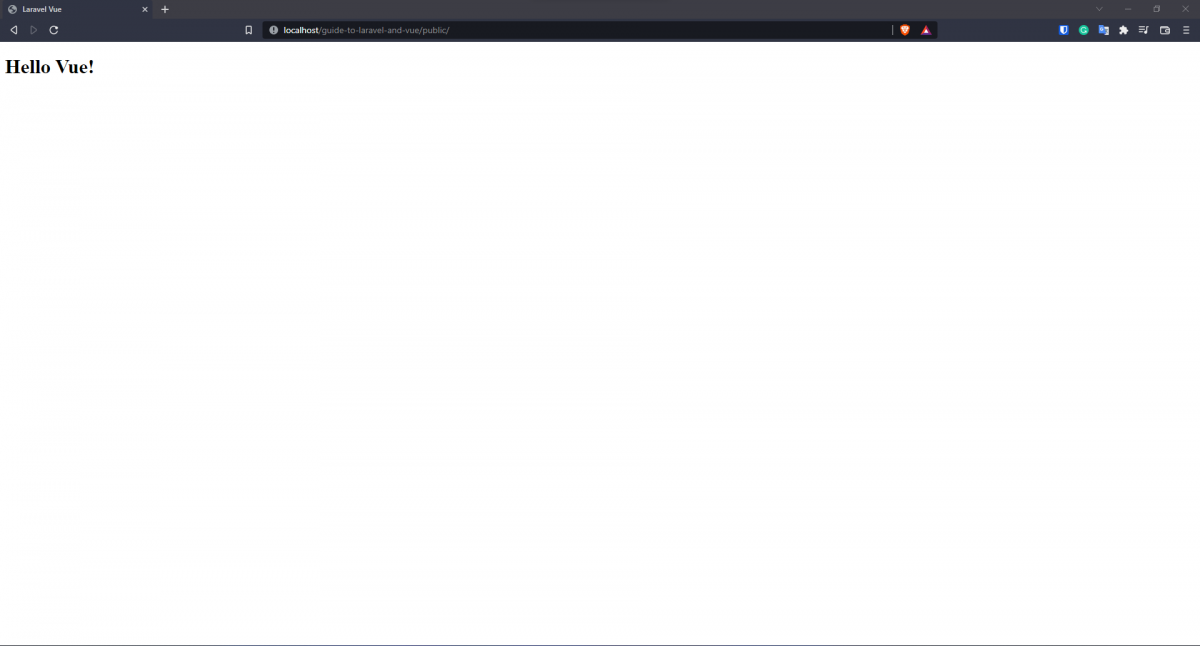
There you go. Vue.js is up and running on your Blade template.
There are other concepts to note, such as making requests to the backend, or Laravel passport API authentication, but as there are multiple methods for accomplishing them, I’ll leave it to the developer’s preference.
Conclusion
Thank you for reading this article. I hope you enjoyed it and learned some valuable things about using Vue with Laravel. I suggest reading through the official Laravel docs on Compiling Assets (Mix) to learn about concepts like cache busting, environment variables, vendor extraction, and more.
If you have any questions, feel free to reach out to me. I’m available on Twitter and LinkedIn and always happy to help.
FAQs
Q: Can I use Laravel with Vue.js?
Yes, you can use Laravel with Vue js. They both support single-page applications, and this combination allows you to be a full-stack developer within a single project.
Q: Do I need Laravel with Vue.js?
You don’t need to use Laravel with Vue js, but there are various benefits to doing so, especially for full-stack development.
Q: Is Laravel good with Vue.js?
The Laravel Vue.js combination is a perfect choice for any single-page app development and its popularity continues to grow among developers worldwide.