
Virtual Desktop for Small Business: Is It Worth the Investment?
A Gallup report surveying chief human resources officers from Fortune 500 companies has confirmed that hybrid and remote work flexibility is here to stay. Remote tech hiring is a strategic way to optimize team maintenance and free resources for business development.

A Gallup report surveying chief human resources officers from Fortune 500 companies has confirmed that hybrid and remote work flexibility is here to stay. Remote tech hiring is a strategic way to optimize team maintenance and free resources for business development.

Ann Kuss
Ann is a growth-oriented tech leader with more than 13 years of experience building and scaling remote teams for startups and global brands. She has helped companies expand internationally across 17 countries. A Kyiv-Mohyla Business School graduate and MIM Kyiv alumna, Ann is also an active mentor supporting the development of junior tech talent.
Table of Contents
- Why Consider Small Business VDI?
- How to Pick the Optimal VDI Solution
- VDI Is About Globalization and a Systematic Approach
- FAQ
A Gallup report surveying chief human resources officers from Fortune 500 companies has confirmed that hybrid and remote work flexibility is here to stay. Remote tech hiring is a strategic way to optimize team maintenance and free resources for business development.
Can small tech companies managing remote teams benefit from implementing virtual desktop infrastructure (VDI)?
This article examines the pros and cons of VDIs for small businesses to help determine whether a VDI is right for them.
Why Consider Small Business VDI?
VDI technology enables businesses to host desktop operating systems and applications on a centralized server, boosting security and minimizing the risks of remote work.
This isn’t about trying to afford what large organizations use. Even big banks and healthcare companies with huge databases don’t buy powerful computers for each corporate system user. Instead of running software and storing data on individual physical devices, their specialists access virtual desktops remotely through thin clients, PCs, or mobile devices.
Virtual desktop infrastructure for small businesses consumes less resources, and there are many benefits to consider.
Benefits of VDI for Small Businesses
The benefits of VDI for small businesses extend beyond remote team management to help companies streamline a wide range of business operations.
Enhanced Security
Centralized management and desktop environment controls improve security by reducing the risk of data loss, malware infections, and unauthorized access. Most virtual desktop solutions for small businesses offer advanced encryption, authentication, and access control.
Flexibility and Mobility
VDI enables all your team members to access their desktops and applications from any device connected to the internet. This flexibility enhances productivity and allows businesses to support remote work and BYOD (Bring Your Own Device) policies.
Scalability
A VDI for small businesses is great when you’re planning to scale tech teams, as it allows businesses to easily add or remove virtual desktops as needed. This scalability is ideal for growing businesses with fluctuating workloads.
Cost Savings
With a virtual desktop for small businesses, you don’t need expensive hardware upgrades. Since resources are centralized, you can save costs through lower energy consumption and longer hardware lifecycles.
Simplified IT Administration
Because virtual desktop management is centralized, it simplifies IT administration tasks like software updates, patch management, and troubleshooting, freeing IT staff to focus on more critical tasks.
Easy Team Management
Team members can quickly get answers to common HR questions or access HR services without leaving their virtual desktop environment by integrating an HR assistant into a VDI environment. These virtual assistants can also guide new hires through the onboarding process, provide access to training materials and resources, and even help newcomers complete required paperwork or tasks.
How to Pick the Optimal VDI Solution
Assess Requirements
Before deploying a virtual desktop for small businesses, consider:
- Number of users
- Types of applications used
- Performance requirements:
- Network bandwidth
- Storage performance
- Server resources
The performance of a small business VDI depends on choosing the right VDI platform, skillful installation, and testing, as part of a comprehensive VDI setup plan.
The installation processes are different for on-premises VDI compared to cloud-based solutions, typically called Desktop as a Service (DaaS).
VDI vs. DaaS
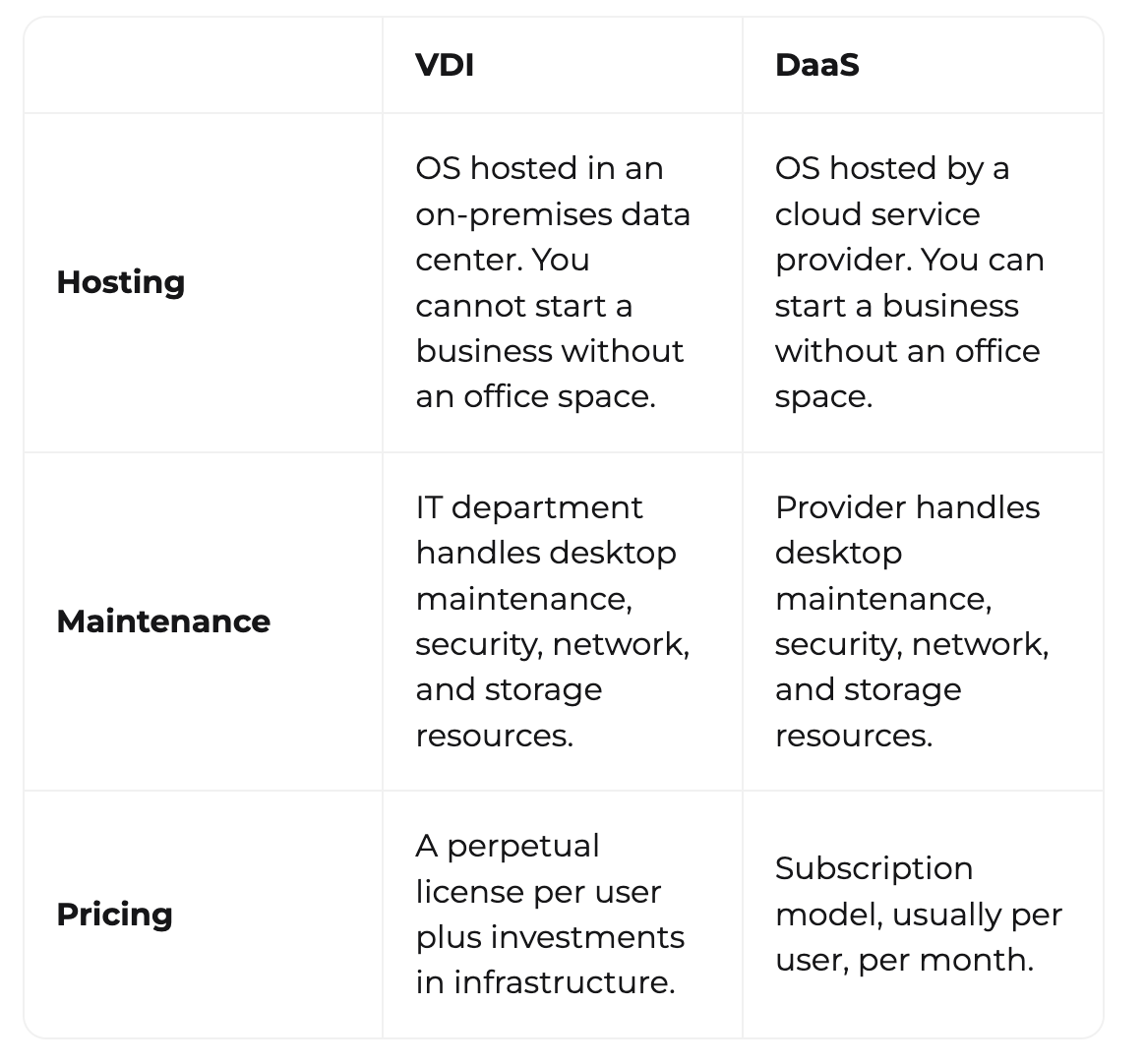
VDI has been around for over 20 years and is a proven business tool. This on-premises solution gives small businesses more control over their virtual desktop management.
DaaS grew quickly on the heels of traditional on-premises VDI adoption and offers a more accessible way to implement VDI for small businesses.
- DaaS is a good option when your team lacks the expertise to set up components like Citrix, VMware, networking, and security systems. Without proper server resource management, small business VDIs can become vulnerable to security breaches.
- DaaS doesn’t require a huge investment in office space or hardware. This flexibility helps many small businesses achieve their business goals faster.
VDI Platforms
Selecting the right VDI software for your business is crucial for VDI implementation success.
VDI Checklist
- Scalability
- Industry-standard security and compliance
- Management capabilities
- 24/7 support from the VDI solution provider
- Application responsiveness
- Graphics performance
- Network latency
- AI options
- Cost efficiency
- Integration with existing systems
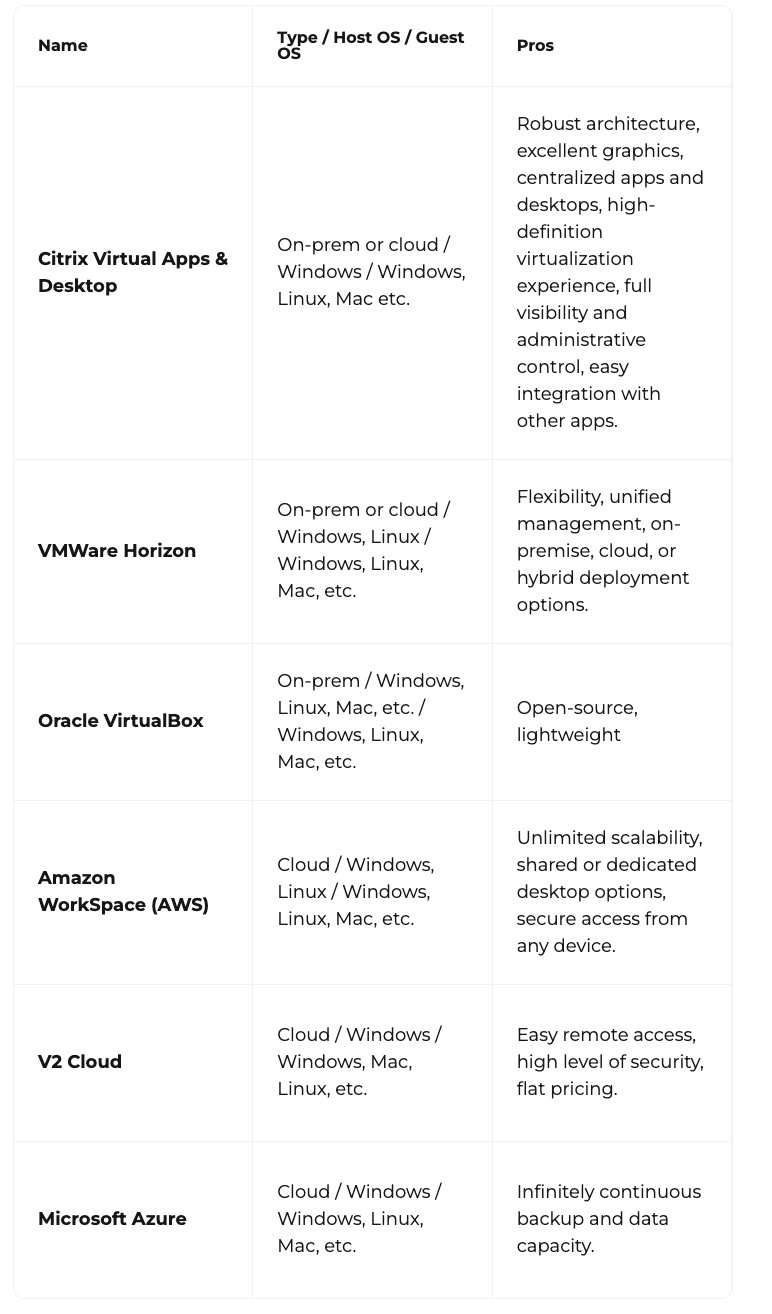
Here are the top 6 VDI platforms suitable for small companies:
Calculate Total Cost of Ownership (TCO)
A comprehensive TCO analysis can help determine the long-term value of VDI for your business by answering two primary questions:
- How much will a VDI solution cost for your specific use case?
- Is budget allocation available?
According to Workspot’s VDI comparison, TCO factors in the costs necessary for each VDI project stage and the potential cost savings.
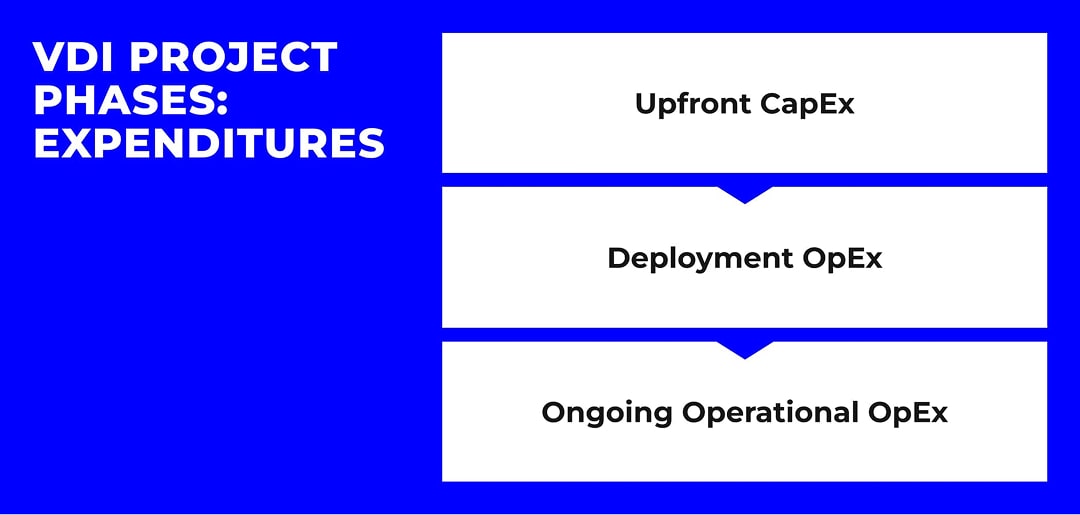
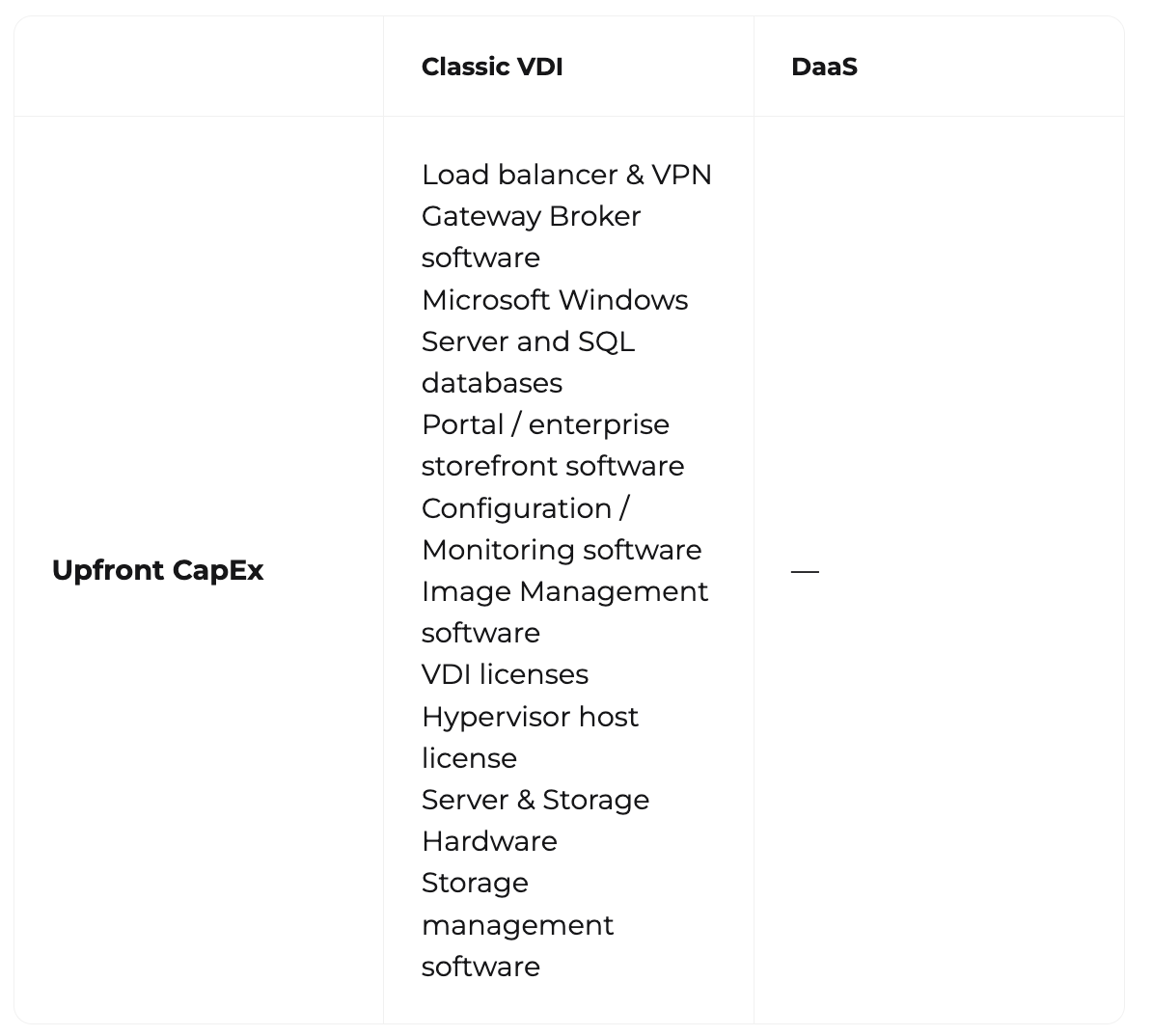
1. Upfront Capital Expenditure
There are many things to buy when starting a VDI project, but DaaS can optimize the resources you have and potentially reduce hardware capital expenditure by up to 56% annually and reduce TCO by up to 50%, as you only pay for VDI licenses.
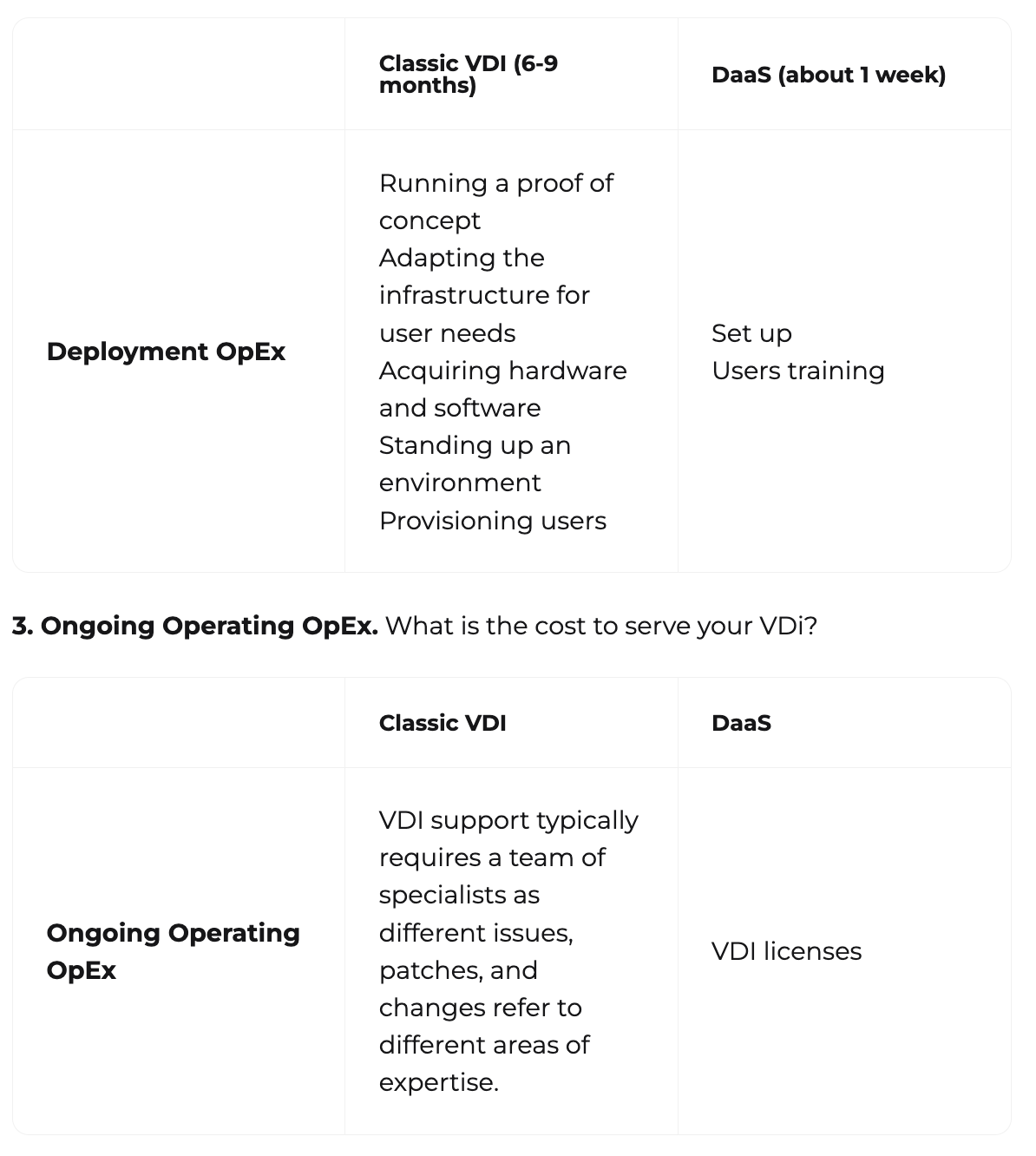
2. Deployment Operational Expenses
What does a VDI project rollout include?
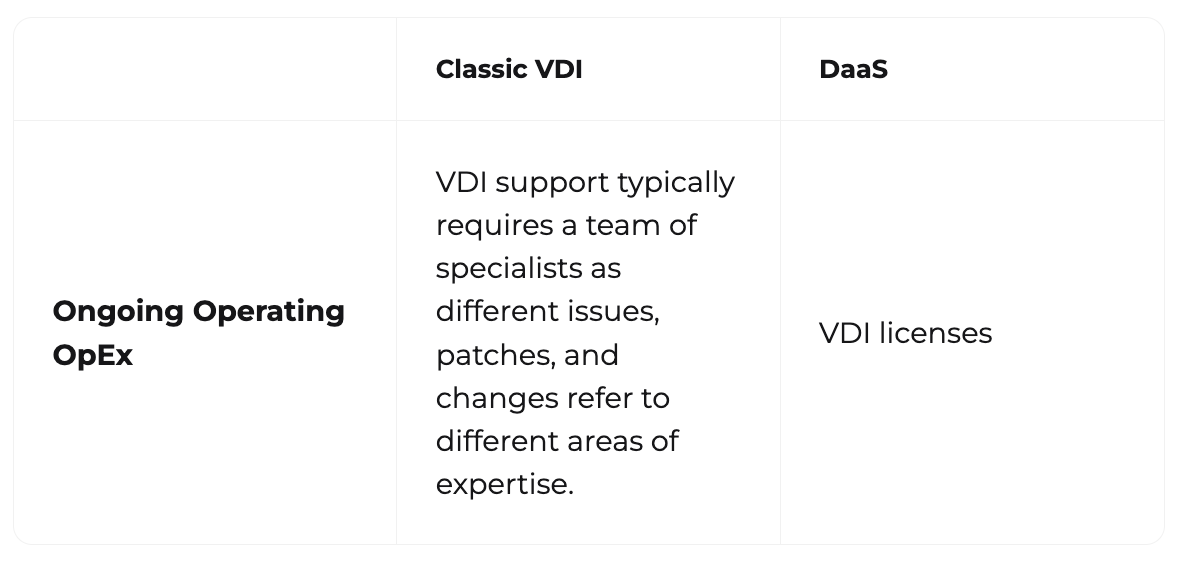
3. Ongoing Operating OpEx
What is the cost to serve your VDI?
Design the Infrastructure
If you decide to build an on-premises VDI, it’s especially important to determine the matching hardware and software components needed to support your VDI deployment.
Test and Optimize
Your VDI solution is unlikely to be 100% optimal on the first try. Plan time to properly test the VDI environment and fine-tune system performance to ensure reliable, secure operations.
VDI is About Globalization and a Systematic Approach
For many small businesses, investing in a virtual desktop infrastructure is a strong strategic choice. If configured correctly and implemented on time, modern VDIs offer:
- Cost-effective, flexible, secure solutions for managing desktop environments
- Reduced hardware costs
- Protection for sensitive shared data
- Seamless work access for employees from any location, on any device
One of the biggest advantages of VDI is the removal of geographical barriers, allowing businesses to overcome staffing shortages or budget restrictions by hiring remote talent.
FAQ
What is the difference between a virtual computer and VDI?
Virtual Desktop Infrastructure (VDI) and Virtual Machines (VMs) are two different software emulation technologies.
VMs are software-based emulations of physical computers. They allow multiple operating systems and applications to run on a single physical device.
VDIs host desktop operating systems on a centralized server. They allow remote users to securely access a complete virtual workspace using any device, from anywhere.
What is a virtual desktop infrastructure (VDI)?
Virtual Desktop Infrastructure (VDI) is a desktop virtualization technology. It allows users to access a desktop environment, typically Microsoft Windows, and any installed apps by connecting virtually to a central data center. Users don’t need their own hardware, as they don’t have to store any data locally.
What are the disadvantages of VDI?
It should be noted that Virtual Desktop Infrastructure performance depends entirely on network quality. This is not an issue in regions with a well-developed internet infrastructure.