Resume Templates That Work: Formats, Examples, and How to Choose
The right resume template depends on your goals and experience, not your design preference. Here’s how to choose one that works for both ATS systems and human reviewers.


AUTHOR
Borislav Stojkov
Principal Resume Writer
Borislav Stojkov is a Principal Resume Writer at Toptal Resume. His professional track record includes personally reviewing and rewriting more than 2,000 resumes for professionals across industries. In his direct work with clients and the development of AI-based resume-writing services, he focuses on ATS-optimized structure, modern template design, and recruiter-aligned writing and formatting standards.
Choosing a resume template shouldn't be a matter of personal preference, but a strategic, structural choice. Four things determine whether a resume template performs well, and they aren't related to color choices or to a universal rule on font weight. The best resume examples are those that match your experience level, field, work well with applicant tracking systems (ATS), and export properly in the format the employer expects. This guide will help you choose the best resume template for your needs by providing and explaining different resume template examples, their purposes, and targeted layouts. We'll show the same content using three real Toptal Resume's professional resume templates, so you can clearly see what actually changes in them before deciding.
How to Choose a Resume Template for Your Experience
The resume template you use determines what is emphasized in your document, which varies depending on your career goals and level of experience. The table below covers five different candidate profiles to help you make an informed choice. While no specific template can guarantee exact ATS or interview outcomes, all the recommendations are based on years of experience working with job seekers across industries and at all career levels.
| Candidate Profile | Suggested Layout | Why It Helps | Best Practice |
|---|---|---|---|
| Students or entry-level candidates | Simple, single-column | Emphasizes education, skills, projects, and internships | Use specific coursework or project results instead of filling it with generic claims |
| Experienced professionals | Clean, chronological | Makes roles, dates, and measurable work achievements easy to scan | Cut older or less relevant experience so key results do not get buried |
| Career changers | Skills-based, with clear work history | Highlights transferable achievements and skills while keeping employment history visible | Don’t hide your career transition, but reframe it to match your goals |
| Creative professionals | Restrained visual design | Offers visual personality while preserving a clear content hierarchy | Avoid excessive decorative elements that reduce text legibility or export |
| Senior candidates | Minimal, accomplishment-led | Emphasizes leadership scope and business outcomes | Prioritize recent and most relevant impact instead of listing every career detail |
If you're unsure which one to use, the safest choice is a clean template with a chronological resume format, a one-column structure, and no excessive graphic or design elements. To learn more about the differences between chronological, functional, and combination (hybrid) resumes, see our complete guide on different resume formats.
Three Resume Template Examples, Compared
The three resume examples below use the same resume content in three real Toptal Resume templates: Entry-level, Modern Professional, and Creative. All the facts remain the same, but the templates' structures serve different purposes. Before diving deeper into each, the table below summarizes their main features and how to use them at a glance.
| Layout | What You’ll See | Best-use Explanation | What to Verify in the Export |
|---|---|---|---|
| Entry-level resume template (single-column) | Full-width sections with education and skills near the top and no professional summary | Good choice as a student resume template and for candidates whose education and skills are stronger evidence than their work history | Check whether the copied text follows the expected reading sequence from top to bottom |
| Modern Professional resume template (single-column) | The same content with an achievement-led structure, a stronger hierarchy, plus a professional summary | Shows clear progression and visual hierarchy, and is the right default for most experienced candidates | Make sure that all the roles, dates, and section headings are easy to read |
| Creative Resume Template (two-column) | Skills and secondary details move to the sidebar, while work history stays prominent in the main column | Useful for candidates who want to fit more content on one page, and when additional details are important enough to be placed in a sidebar | Make sure that the content from both columns isn’t scrambled and mixed |
Although Word resume templates are the easiest for editing, resumes are most often expected to be submitted as PDF files, and you should always verify that all the content is parsable and that the file isn't image-based. If the job posting requires sending your resume as a .docx file, that overrides the common practice, and you should keep your resume template in Word.
Entry-level Resume Template: Best for Students and Junior Candidates
The resume template shown in the image below works well for entry-level resumes and as a student resume template.
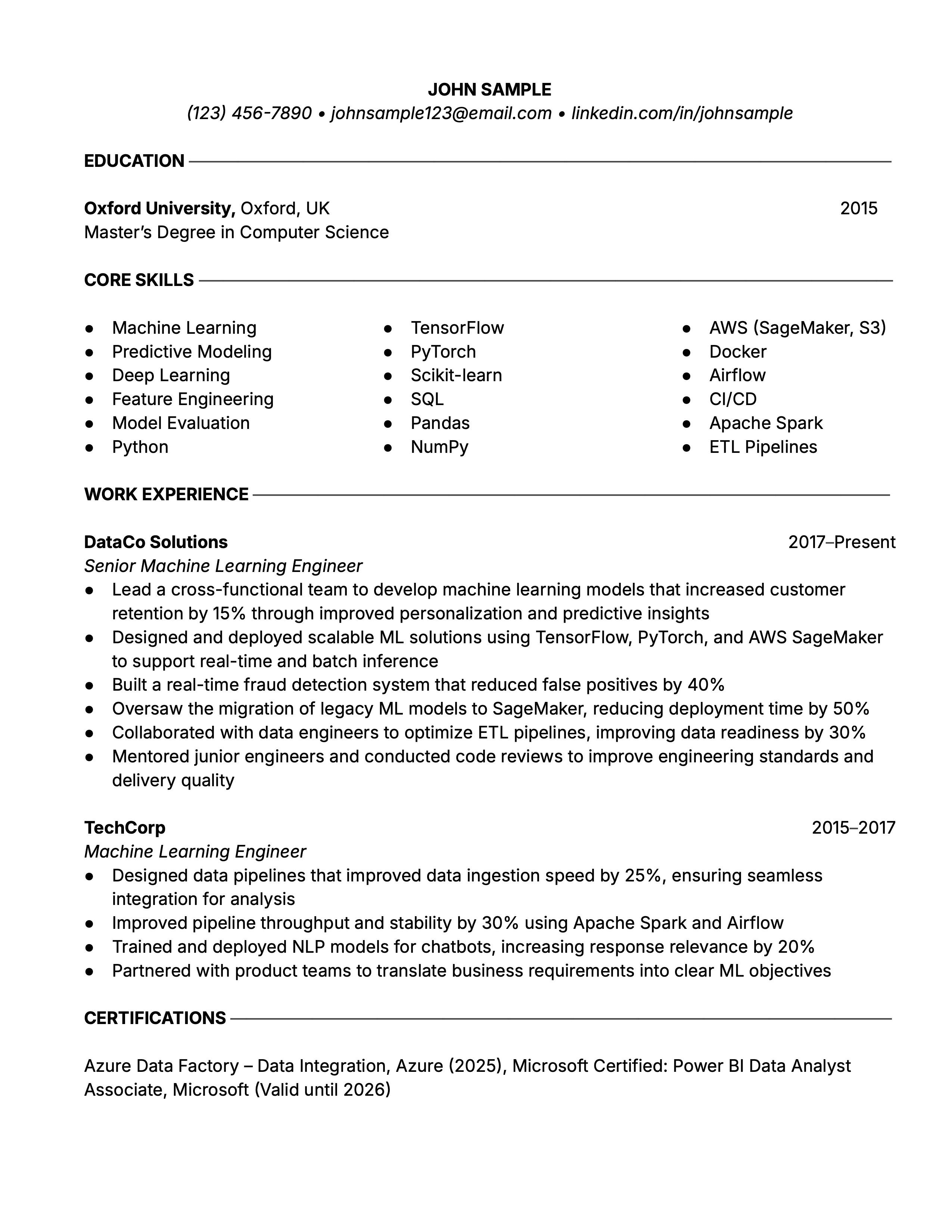
Here's what and when makes it a good choice:
- It leads with education and skills, which typically provide the strongest evidence for candidates with little professional experience.
- There's no professional summary, which is a good choice when there's not much experience to summarize.
- Clean, single-column layout that uses standard section headings.
Modern Professional: Standard, Simple Resume Template for Most Professionals
The Modern Professional resume template shown in the image below is a prototype of a standard, ATS-friendly resume template with a clean, clear structure.
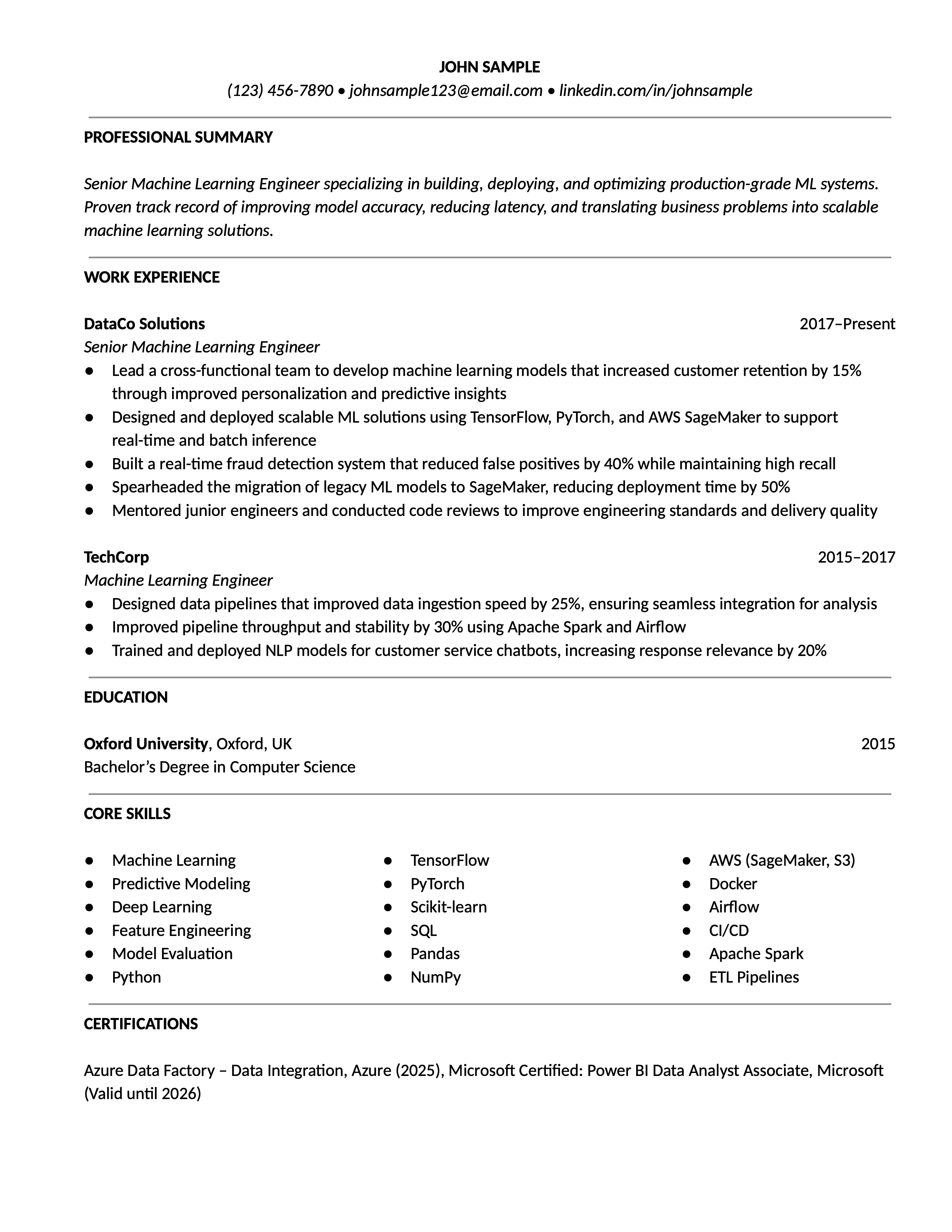
Here's what works well in this resume template:
- It's a chronological resume template with a clear hierarchy and career progression from most recent to oldest work experience, followed by supporting sections.
- The professional summary at the top serves as an introduction, highlighting the most relevant details (strongest skills and achievements).
- One-column layout, which is the safest option for ATS and recruiter readability.
Creative Resume Template: Combines Visual Identity With ATS Compatibility
The Creative resume template shown in the image below uses more design elements while remaining compliant with ATS software.
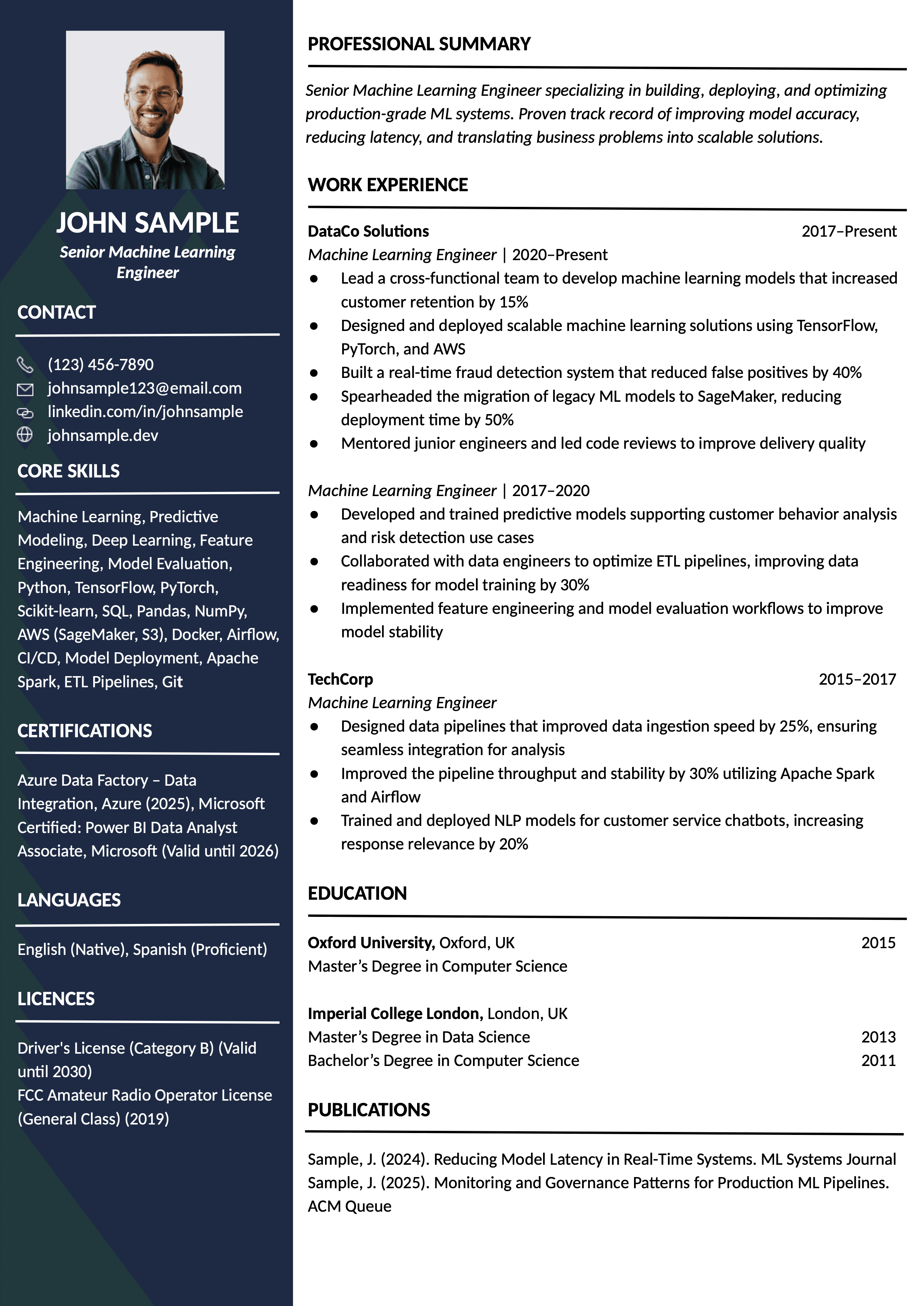
The main advantages of this resume template are:
- Allows for a touch of personal identity by including a photo and a bit of color.
- The content is organized in two columns, with the sidebar being reserved for secondary and supporting sections.
- The main work experience column is still prominent and easily readable by both humans and machines.
Most modern ATS scanners can handle a two-column resume template perfectly. The risk remains with excessively complex visual elements, but two columns don’t mean automatic rejection.
— Borislav Stojkov, Principal Resume Writer, Learnist
Besides Toptal Resume’s free resume template gallery, all of the templates are incorporated in the AI resume builder, and its preview option makes it easy for you to switch between the different resume templates and decide which one works best for your situation.
ATS Resume Templates: What Makes a Resume Template ATS-Friendly?
When we talk about an ATS-friendly resume template, it's not about its visual quality or appearance. Compatibility with ATS software means its scanners can easily read your resume and sort the information it contains. A resume template that looks minimal can still have graphic elements that cause parsing problems or non-standard section headings. Here's what really matters:
- Standard headings: ATS match content to expected fields, so you should always use "Work Experience" and "Professional Summary" rather than inventing labels such as "My Journey" or "Who I Am."
- Selectable text: You should be able to copy and paste the text in your resume, which indicates that all ATS systems will be able to read it. Image-based documents require technology based on optical recognition.
- Reading order: In some multi-column layouts, the ATS scanners reading from top to bottom can mix content from different sections. Always make sure that the text copied from your document appears in a logical order when pasted into a plain text editor.
- Contact details in the body: Avoid placing your contact information in the document's header or footer, as some ATS systems may skip it.
- Clean file output: Exporting the resume you've created as a PDF will keep its original structure or layout. Submit a resume in Word only if it's required.
To make sure your resume is ATS-friendly, run it through Toptal Resume's ATS resume checker, which provides a detailed analysis of its formatting, structure, readability, and more. All Toptal Resume templates have been tested with the tool and against all major ATS systems to make sure you get a reliable, professional resume template.
How to Customize a Resume Template in Five Steps
Choosing the best resume template for your situation is the first step, and customizing it for your job application is the second. Here are the five steps to follow in the listed order:
- Choose the right format for your background. Use the guide in the table at the top of this page to make the most appropriate choice. If you're still unsure, use a safe, simple resume template with one column and a chronological format.
- Adapt the sections to your experience. You don't have to use all the sections found in a resume template. A graphic designer most likely doesn't need a languages section, and a driver doesn't need a publications section.
- Rewrite the experience to match the job description. A professional resume template offers a well-structured format, but the resume's content is your job. Emphasize the most relevant details and cut or condense the others.
- Tailor the skills section. You should tailor your resume for each application, especially the skills section. Always include all the skills that reflect the job requirements, as long as they reflect your actual experience.
- Check the exported file. Whether you're editing your resume template in Google Docs or Word, always make sure that the exported PDF file keeps its original structure (can be copied and pasted without losing a logical order).
Common Resume Template Mistakes
There are several common resume template mistakes that we see in practice, and the guide below can help you avoid them and create the best resume template for your needs.
Too small font
Problem: Using a font that is barely visible to fit more content on the page.
Fix: Trim the content by removing anything that doesn't strengthen your application.
Inappropriately designed template
Problem: Choosing a highly creative resume template for a conservative field, such as legal or finance.
Fix: Match the industry expectations.
Non-standard section titles
Problem: Inventing creative section labels that recruiters don't expect and ATS can't link to the appropriate field.
Fix: Use standard headings, such as "Professional Summary," "Work Experience," "Education," and "Skills."
Wrong section order for the role
Problem: Leading with a wrong section, such as educational details before work experience in an executive resume (or any resume for an experienced candidate).
Fix: The most important parts that prove your fit for the job should be prominent and that recruiters expect to see first.
Untested file output
Problem: Submitting a resume before checking if the content in the exported file will be parsed correctly.
Fix: Copy and paste the content into a plain-text document. If everything looks as it should, your resume is ready to go.
Conclusion
The best resume templates are those that make your most relevant and most effective content easy to find. In addition to choosing the right one for your career stage, field, and experience, your resume template must be easy to read by both machines and humans. Explore Toptal Resume's gallery of professional resume templates and find a resume template that suits you best. After making that decision, you can use the AI resume builder to customize it for your job application, as all the resume templates are already incorporated in the tool.
FAQ
ATS Resume Score Checker
for Professional Roles
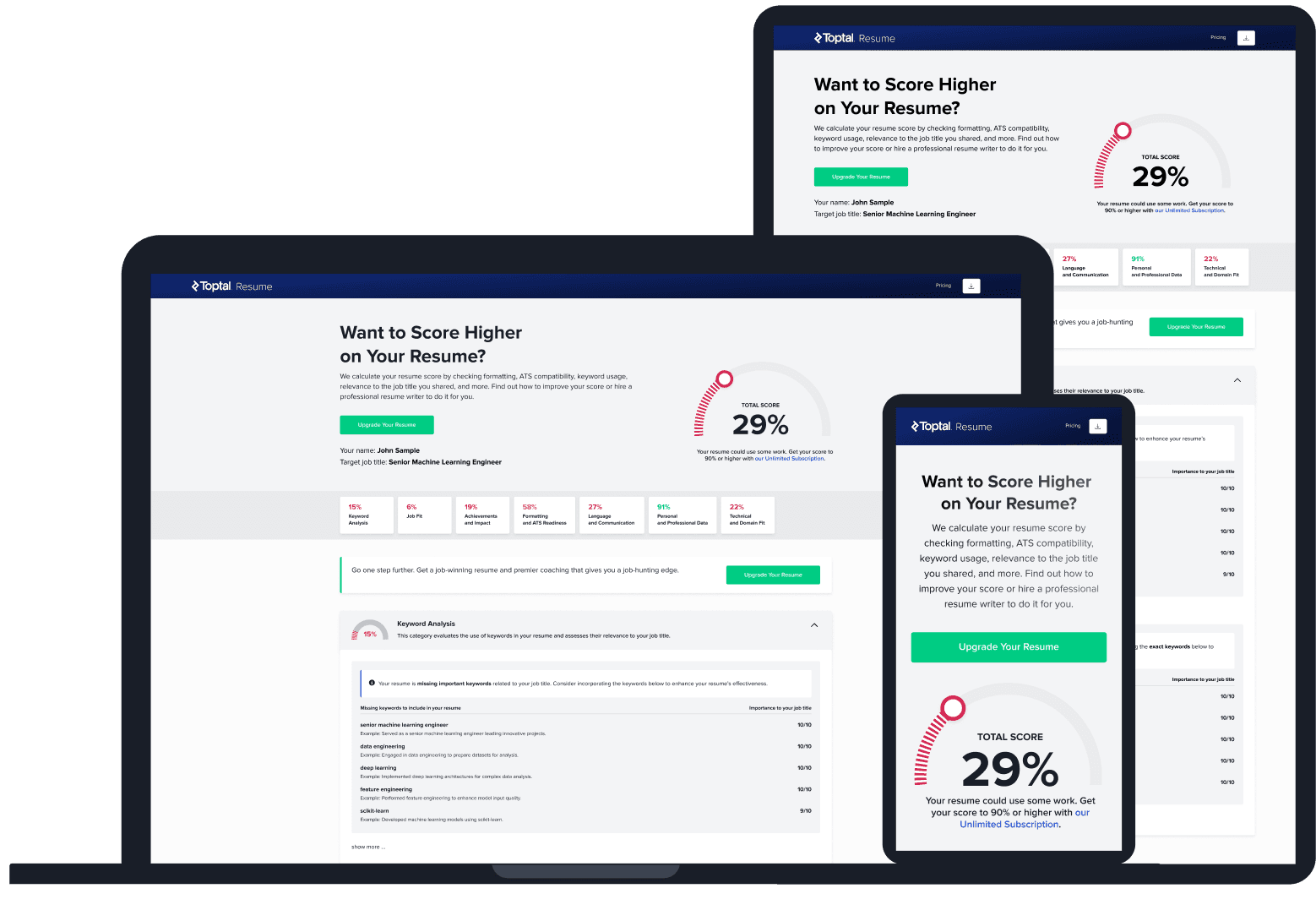
Upload your resume and tell us your target job title. Our system will analyze it the way a recruiter and ATS would—scoring it across core hiring dimensions and giving you personalized, role-specific feedback you can implement right away.
Read Next
Resume Tips
Follow-up Email After Applying for a Job: Templates and Tips
A follow-up email after applying should be sent once, at the right time, and with something worth saying. Here’s how to do it without hurting your chances.

By Borislav Stojkov
Principal Resume Writer
Borislav Stojkov is a Principal Resume Writer at Toptal Resume. His professional track record includes personally reviewing and rewriting more than 2,000 resumes for professionals across industries. In his direct work with clients and the development of AI-based resume-writing services, he focuses on ATS-optimized structure, modern template design, and recruiter-aligned writing and formatting standards.
Resume Tips
Hard Skills vs. Soft Skills: What They Are and Where They Go on Your Resume
Hard skills go in your dedicated skills section. Soft skills go in your experience bullets. Here’s why that distinction matters and how to apply it.
By Borislav Stojkov
Principal Resume Writer
Borislav Stojkov is a Principal Resume Writer at Toptal Resume. His professional track record includes personally reviewing and rewriting more than 2,000 resumes for professionals across industries. In his direct work with clients and the development of AI-based resume-writing services, he focuses on ATS-optimized structure, modern template design, and recruiter-aligned writing and formatting standards.

Resume Tips
Entry-level Resume: How to Write a Resume With Little or No Experience
An entry-level resume with no work experience isn’t empty: it’s built from projects, coursework, volunteering, and other evidence that proves you’re ready.
By Borislav Stojkov
Principal Resume Writer
Borislav Stojkov is a Principal Resume Writer at Toptal Resume. His professional track record includes personally reviewing and rewriting more than 2,000 resumes for professionals across industries. In his direct work with clients and the development of AI-based resume-writing services, he focuses on ATS-optimized structure, modern template design, and recruiter-aligned writing and formatting standards.