Best Free ATS Resume Checkers: Tools Tested and Compared
One resume and one job description run through seven ATS checkers to show what each really offers for free and how useful the reports are.

AUTHOR
Borislav Stojkov
Principal Resume Writer
Borislav Stojkov is a Principal Resume Writer at Toptal Resume. His professional track record includes personally reviewing and rewriting more than 2,000 resumes for professionals across industries. In his direct work with clients and the development of AI-based resume-writing services, he focuses on ATS-optimized structure, modern template design, and recruiter-aligned writing and formatting standards.
Before applying to a posting, job seekers often turn to online ATS resume checkers, tools that analyze resumes to assess their compatibility with applicant tracking systems (ATS) and overall performance. Those tools can vary in how they work and which aspects of your resume are scored, but what makes them really valuable is what they offer beyond the numerical ATS score. Also, many are advertised as free ATS resume checkers, and the main question becomes which checker offers useful feedback for free, not just a score.
We've tested some of the widely used online resume analysis services not simply to proclaim a winner, but to help you decide which one is the best ATS resume checker for your needs, and how you can use it for free to optimize your resume. Let's clear the air right away and leave no unspoken concerns: Toptal Resume publishes this comparison and is one of the seven tools reviewed, so we made sure to use the same approach for all and clearly documented each step so you can make an informed decision.
Our test showed that Toptal Resume and Jobscan gave the most useful free feedback, with Toptal Resume’s being more detailed and specific, while the other five mostly showed scores, general tips, or locked the analysis in paid resume builders. That said, which resume checker suits you also depends on whether you want a standalone report or editing help.
Quick picks from our test:
- Best for actionable free feedback: Toptal Resume (all 7 categories visible and include specific recommendations)
- Best for matching skills to a target role/job description: Jobscan (keywords included, missing, and highlighted in the resume) and Toptal Resume (keywords included, missing, and semantically included skills and adds keyword ranking and usage examples)
- Best with no sign-up: Toptal Resume and Enhancv (Toptal’s report includes a target role/job description, while Enhancv’s is a quick score check)
- Best for bullet rewrites: Resume Worded (three rewrites) and Rezi (10 updates in its editor)
What’s Really Free in ATS Resume Reports: Which Ones Were Tested and How
ATS checker scores aren't comparable on their own, as different ATS resume checkers use different analysis methods, but what can be compared is whether they're genuinely useful and what kind of feedback you can get for free. Some tools focus more on resume parsing and formatting, some on keyword and job matching, and some include actionable suggestions related to the document's content and language. Although it's expected that a professional service can rarely be fully given away for free, an informed choice should be based on how valuable the analysis output is and the extent to which a tool is available to all users.
Quick Overview of the Seven Tools Tested
The table below shows the seven ATS resume checkers we tested, selected from the results when we searched online for a free ATS resume checker, regardless of whether each one actually turned out to be free. The search and testing of all of them were made on November 17, 2026, and the details compared in this initial overview cover the information you may find useful before trying them: whether you need to sign up first, which free ATS checker matches a resume to a job description or a specific target role, which files you can upload, and how much access to the full service costs (the lowest monthly price among the plans offered by each).
| Tool | Sign-up needed? | Compares Resume to a Role/Job Description? | File Types Accepted | Free Runs Allowed | Pricing | Trustpilot Score |
|---|---|---|---|---|---|---|
| Toptal Resume | No | Yes | PDF or DOCX file | Yes | Free report, then a $0.99 trial, and $6.99 monthly on the annual plan | 4.8 |
| Jobscan | Yes | Yes | PDF or DOCX file, or paste resume text | Yes | 5 limited monthly scans, then $29.98 monthly on a quarterly plan | 4.2 |
| Resume Worded | Yes | No (only seniority level selection) | PDF or DOCX file | Yes | Full access is priced at $9.54 per month on an annual plan | 4.8 |
| Teal | Yes | Yes | PDF or DOCX file, LinkedIn import, or paste text | No free resume analysis reports | About $14.92 per month on an annual plan | 4.3 |
| Enhancv | No | No (available only within the resume builder) | PDF or DOCX file | Yes | $13.75 per month on the semi-annual plan | 4.6 |
| Rezi | Yes | Yes | PDF or DOCX file | Yes | Human resume review: $39.30 per resume. Subscription: $13.01 per month on the quarterly subscription. | 4.6 |
| Kickresume | Yes | No | PDF or DOCX file | No free resume analysis reports | $8 per month on the annual plan and free premium for verified students and teachers | 4.6 |
Note: The pricing information in this table reflects publicly available information at the time of testing and may change over time.
Summary of Useful Feedback Offered for Free
Before going into more detail on each tool tested, the table below summarizes the useful first findings offered by the seven ATS resume checkers with free online access during our test. The goal was to compare which aspects of a resume were analyzed and whether the analysis included actionable feedback you can actually use to create an ATS-friendly resume.
As noted above, a score can mean different things in different tools, since they don't work in the same way, and seeing just a number or percentage can give you only a general idea of whether your resume is optimized or not. In addition to ATS checker scores not being comparable on their own, they don't represent a universal hiring threshold, as employers have their own systems for evaluating resumes. So, it all comes down to knowing which specific aspects of your resume are assessed, and what you can do with the findings reported.
| Tool | What the Report Covers for Free |
|---|---|
| Toptal Resume | 7 categories (25 dimensions), all visible for free, including keywords, target job fit, achievements and impact, formatting, language and communication, and personal and professional data. Presents key highlights, actionable recommendations, and scores. |
| Jobscan | 5 categories, 4 of which are visible: searchability, hard skills, soft skills, recruiter tips. The findings on formatting weren’t available. Provides general findings on which elements are present in the resume and offers a skills-matching feature. |
| Resume Worded | General resume advice on length, quantified impact, weak roles, unnecessary sections, repetition, dates, and contact details, along with a few rewrite suggestions. The number of additional sections couldn't be identified because they were blurred. |
| Teal | Displays the score, and there is no free resume analysis report available, but you can use some findings for resume editing (limited bullet rewrites to match the keywords). The Resume Analyzer feature is completely locked, except for the scores. |
| Enhancv | Shows scores for ATS parse rate, quantifying impact, repetition, contact information, spelling and grammar, missing sections, and file size and format, with no specific details beyond listing which bullets lack quantified results. |
| Rezi | Provides numerical scores for keywords, content, format, optimization, best practices, and application readiness, along with general resume writing advice. Indicates which aspects of your resume you should focus on, but lacks specific recommendations. |
| Kickresume | Besides the overall score, it indicates three categories that might benefit from optimization (design, structure, and content), but only with numerical scores. The entire in-depth feedback is locked behind the paywall. |
Note: All findings from this testing reflect the author’s experience, based on one test case per tool.
Methodology: How We Tested the ATS Resume Checkers and Compared the Results
To show what is truly free and helpful across all ATS checkers and their reports, we used the identical approach to test all the tools and obtain comparable results. All of them were tested on the same date, with the same parameters and the same resume (PDF) and job description. As previously specified, the most affordable price was listed for each of them.
The image below presents the resume used: A fictional Senior Project Manager, Alexander Morris, whose resume uses a two-column format and includes the following sections: Contact, Professional Summary, Work Experience (with three work entries), and Core Skills in the main column, and Education, Certifications, and Languages in the right sidebar.

The job description used for testing (where applicable) was a fictional job posting for a Digital Transformation Senior Project Manager role at the company Summit Ridge Technologies. They're hiring a person to lead a portfolio of technology initiatives across product, engineering, and business teams, and the specific responsibilities are:
- Own end-to-end delivery of multiple projects
- Manage annual budgets and report on financial risk
- Establish governance, status reporting, and KPI dashboards for executive stakeholders
- Identify and manage risks, issues, and dependencies across teams
- Coordinate vendors and external partners
- Apply Agile and waterfall practices as each project requires
The requirements for the job are:
- 7+ years of project management in technology or digital transformation
- PMP or equivalent certification
- Experience with Jira and Confluence, while Microsoft Project or Smartsheet are preferred
- Experience with scaled agile frameworks (SAFe) is preferred
- Strong stakeholder communication and cross-functional leadership
In addition to documenting which categories were included in the report and available for free, we examined and documented the following specific aspects of the analysis for each ATS resume checker: resume score, keyword analysis, formatting and parsing, writing quality tips, content/evidence analysis, contact details check, title match/job fit, and whether there were other aspects addressed. It’s important to note that many vendors combine multiple resume tools into a single service, but the scope of this research was limited to testing resume analysis.
Based on the findings from this test, we concluded what each of the tools tested is best for, what is truly free, their strengths and limitations, and who should choose them or avoid them.
Putting the Free ATS Resume Checkers to the Test, One by One
We applied the same methodology described above to test seven ATS resume checkers using the same steps: Toptal Resume, Jobscan, Resume Worded, Teal, Enhancv, Rezi, and Kickresume. The sections below describe the workflow and free outputs of each individually, as well as our conclusions based on the one observed case and scenario.
Toptal Resume
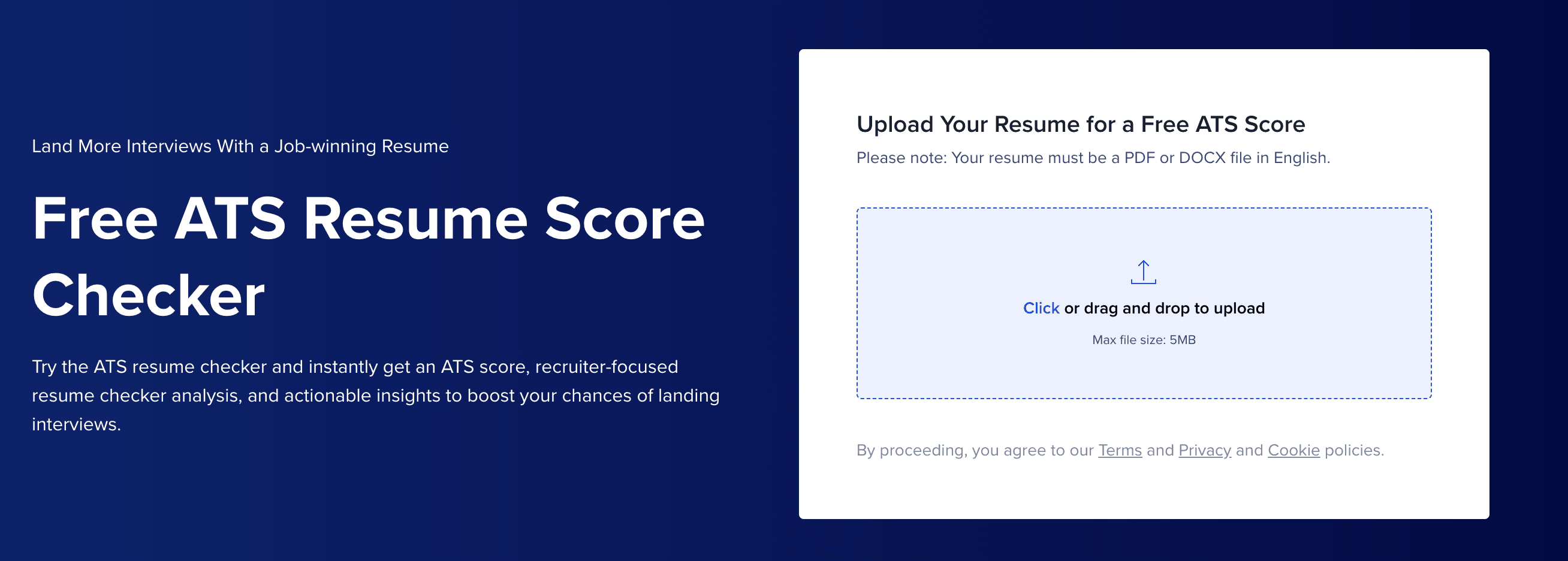
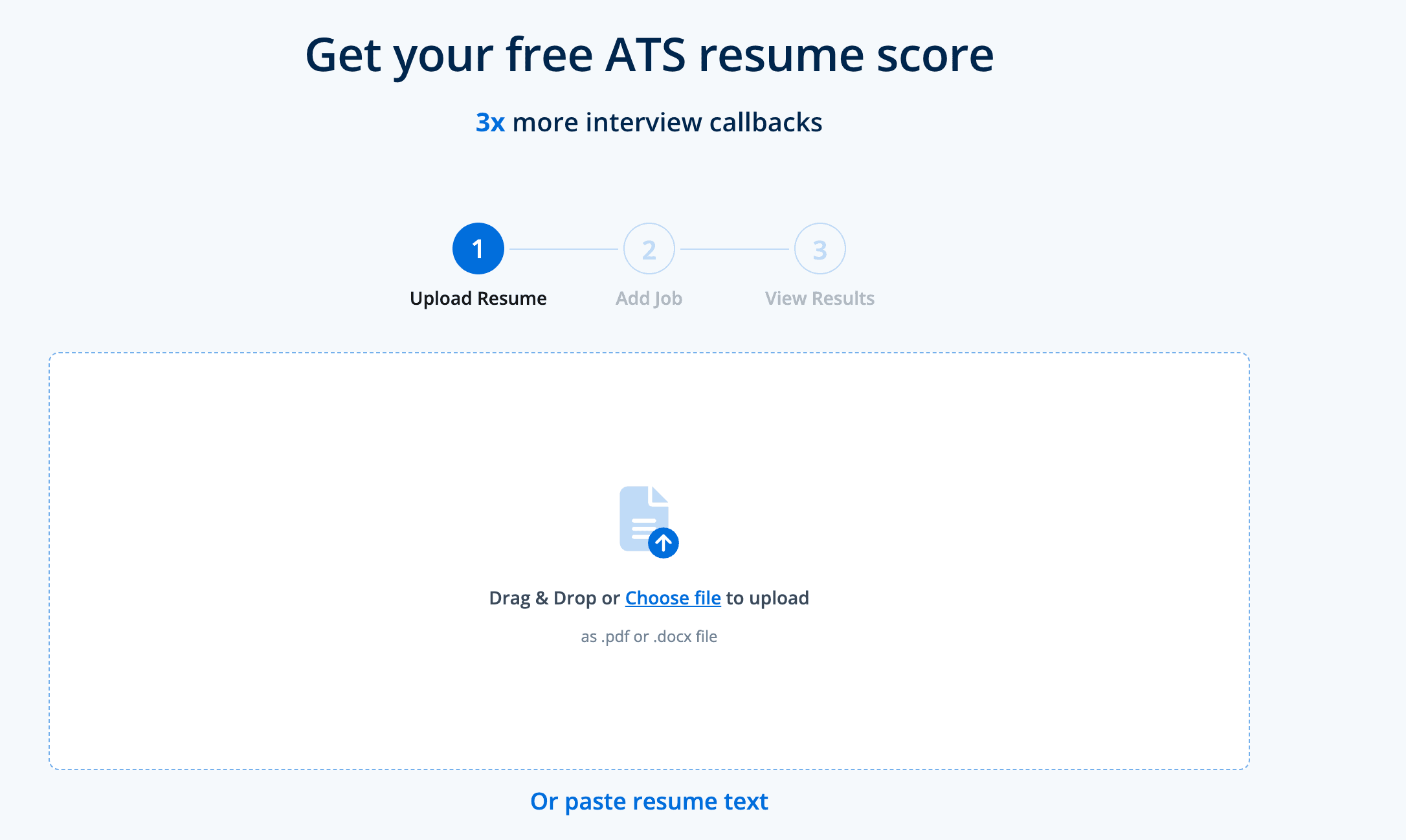
Right after landing on Toptal Resume’s ATS score checker homepage, you're prompted to upload the resume in the first step and enter the target role/job description in the second step, without the need to sign up, as shown in the screenshots below.

The report was ready in under a minute and showed the overall score (78%) and the score for all seven main categories analyzed: keyword analysis, target job fit, achievements and impact, formatting and ATS readiness, language and communication, personal and professional data, background and expertise, plus other role suggestions. They’re additionally split into dimensions, all with at least one actionable suggestion.

The table below summarizes what the tool checks in more detail:
| Category | Description |
|---|---|
| Resume score | Shows the overall score and scores for each category. |
| Keyword analysis | Covers keywords included and those that are semantically included, both listed by importance and relevance to your target job. |
| Formatting and parsing | Analyzes ATS compatibility, layout, and readability. |
| Writing quality tips | The language and communication section includes content conciseness, action-oriented language, language professionalism and quality, language quality and consistency, and professional summary quality. |
| Evidence analysis | The achievements and impact section covers job descriptions, problem-solving and innovation, project descriptions, and quantifiable results. |
| Contact details check | Analyzes contact information accuracy, education and certifications, employment history and experience, and professional branding and online presence. |
| Job fit or title match | The target job fit category assesses domain expertise, experience and achievements, and remote work experience. The background and expertise category covers industry alignment and skills presentation, including technical fit and soft skills. |
| Other | It includes a job-suggestion analysis that lists other roles that match your experience. |
The report for each category, except for the keywords section, is split into two sections: highlights and recommendations, with the first explaining what works in your resume, and the latter explaining what could be improved. At least one specific recommendation was listed in the free report for all the above categories and subcategories.
To examine how helpful the report was for our test case, let's first take a closer look at two resume aspects that are important for both ATS compatibility and overall performance with human readers: keywords and achievements.
The Keywords Analysis section score for Alexander Morris's resume and the Senior Project Manager job description was 63%. The missing keywords section listed the following keywords, each with a score indicating their relevance: Microsoft Project (9/10), scope management (9/10), strategic planning (8/10), change management (6/10), scheduling (6/10). This section is followed by a similar one, but it covers 5 keywords that are semantically included. For example, "portfolio management." The resume includes a bullet point that says, "Owned the delivery of a multi-year portfolio...", and an ATS that uses semantic matching would pick up that requirement, so it's up to the user to decide whether to include the exact keyword (in the skills list or elsewhere). In our opinion, this is useful for keyword matching, and in both segments, every skill is followed by a use example (e.g., “Managed project timelines and resources using Microsoft Project”).
The guiding principle in building our checker was translating the insights of our hiring experts into a tool that answers whether the ATS software can read a resume correctly and whether a recruiter will want to keep reading it. That’s why the report covers a wide range of categories, weighted by importance, from job fit and keywords to achievements and language, each with specific recommendations. The same expert guidance shaped the content suggestions and tailoring features in Toptal Resume’s AI resume builder.
Periklis Vasileiou, Engineering Manager, Toptal Resume
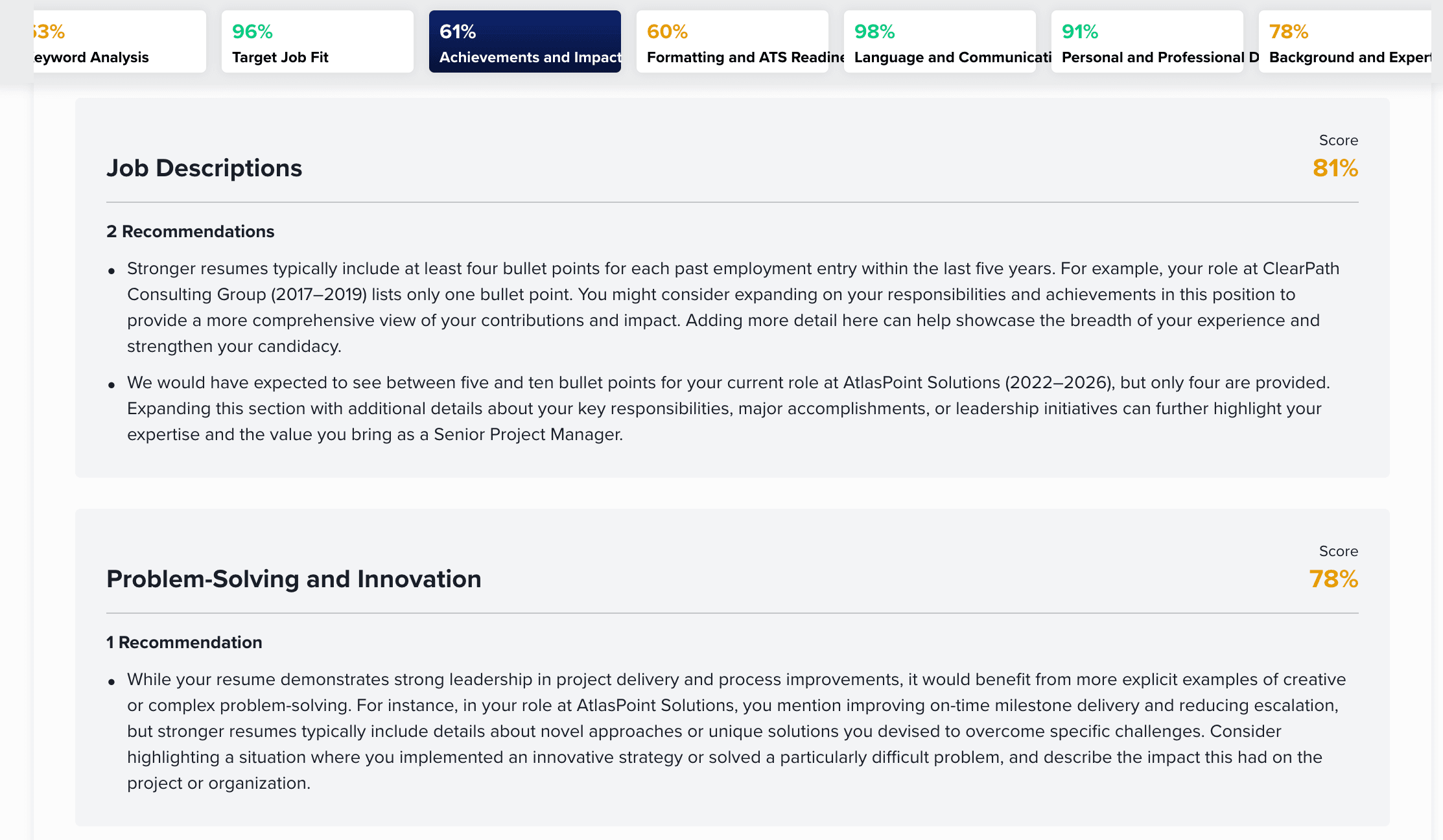
The rest of the report sections follow the highlights-and-recommendations pattern. In the "Achievements and Impact" section, the report acknowledges that the resume demonstrates a clear progression in responsibilities and skills over time, moving from Project Coordinator to Senior Project Manager, and that it includes important metrics such as reducing escalations by ~20% and improving delivery by 28%. But what's more useful are the suggestions provided, and, as you can see in the screenshot below, it identified, for example, which work experience lacks them and suggests including specific achievements for a specific job: cost savings and percentage improvements to the Northbridge Technologies experience.
There are many categories and subcategories reported, so let's mention only a few more, as all the categories list a total of 25 dimensions (see the table above, as addressing every single segment in this guide is omitted for practical reasons). This section is the longest in the article because Toptal Resume’s report has the most categories.
The recommendations on skills are presented within the "Background and Expertise" section, and in our test, the score was 87%, and the free report included an important recommendation. In addition to providing a general piece of advice that skills should be demonstrated, not only listed, it provides a concrete, resume-specific example: "...while Jira, Confluence, and Power BI are listed in your skills section, it would be beneficial to mention how you used these tools in your project management roles, such as specifying if you managed sprints with Jira or generated reports with Power BI.”
Finally, there were four specific recommendations on ATS compatibility, such as: "Important sections such as Education, Certifications, and Languages are currently placed in a sidebar rather than in the main body of the document." The general formatting and ATS compatibility score was 63%.
Although the report is comprehensive and all categories were visible for free, some recommendations in each category were blurred out, and full details are available with a subscription. Still, we find the resume feedback helpful for users who want to improve their resumes, as it includes specific insights related to the target job and the current resume content.
Jobscan
After accessing the Jobscan homepage, the initial steps are similar to Toptal Resume's ATS resume checker: we first uploaded the resume, then the job description, with the difference that we needed to sign up to proceed to the report. The scan was very quick, and the report appeared with five sections, of which four were unlocked: searchability, hard skills, soft skills, and recruiter tips. Formatting wasn't available, and there was a note that it's only supported for .docx format.
The following table covers all categories analyzed by the tool:
| Category | Description |
|---|---|
| Resume score | Shows the overall score (83%), while the per-category score is presented through a progress bar. |
| Keyword analysis | Lists hard and soft skills, compares them to the job description, and highlights them in the resume. |
| Formatting and parsing | Partially, as the free report included searchability, but not formatting. |
| Writing quality tips | Only the general tone of the resume. |
| Evidence analysis | It determines whether the resume includes measurable results. |
| Contact details check | It determines whether your resume includes contact information and a website link. It also confirms that you listed your education. |
| Job fit or title match | Partially, by establishing whether you mention the exact job title and years of experience. |
| Other | It included a job-suggestion analysis that lists other roles that match your experience. |
Although no insights on formatting were available, the Searchability category of the report can be useful for ATS optimization. It primarily works by identifying whether any resume sections are missing from your resume. For example, as you can see in the screenshot below, it correctly noted that the resume used doesn't include a street address, while all the other elements were included. Also, it suggested using the full role title from the job description, which in our case was "Senior Project Manager, Digital Transformation," instead of "Senior Project Manager." Discussing whether the resume-writing standards chosen are reasonable is out of scope for this test.
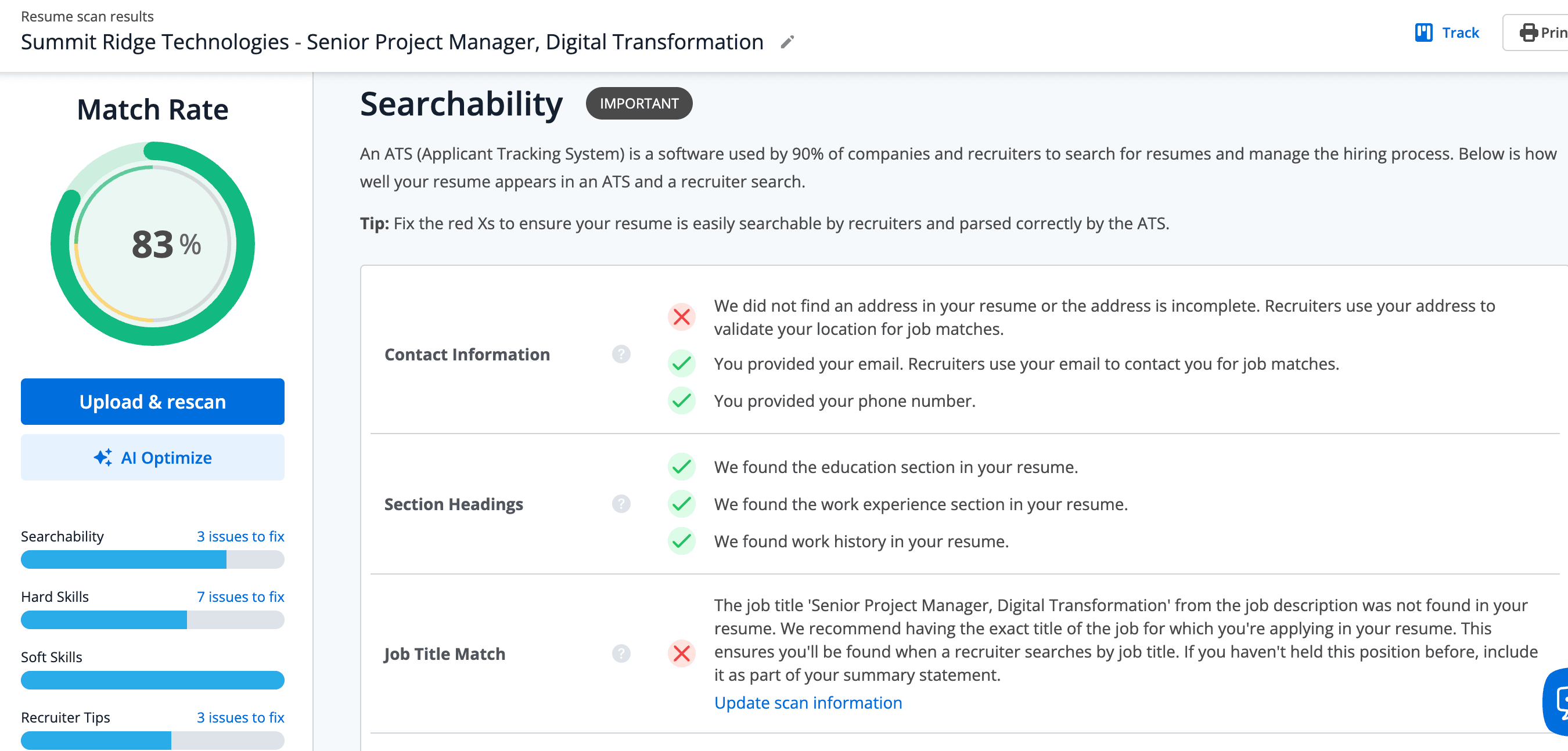
The skills analysis section compares the resume's content with the job description using a different approach compared to Toptal Resume. Both skills included and those missing were listed, with the first three being blurred, while four missing and five included were visible. The missing ones were: waterfall, Microsoft Project, Smartsheet, SAFe. There were no missing soft skills in our case, and each skill row indicates how many times it appears in the resume.
What we found particularly useful is the "Highlighted Skills" tab, which shows the following in the resume's content: matching skills (highlighted in green), skill variation (similar to Toptal Resume's semantically included skills, highlighted in yellow), and missing skills (highlighted in red in the place where they belong).
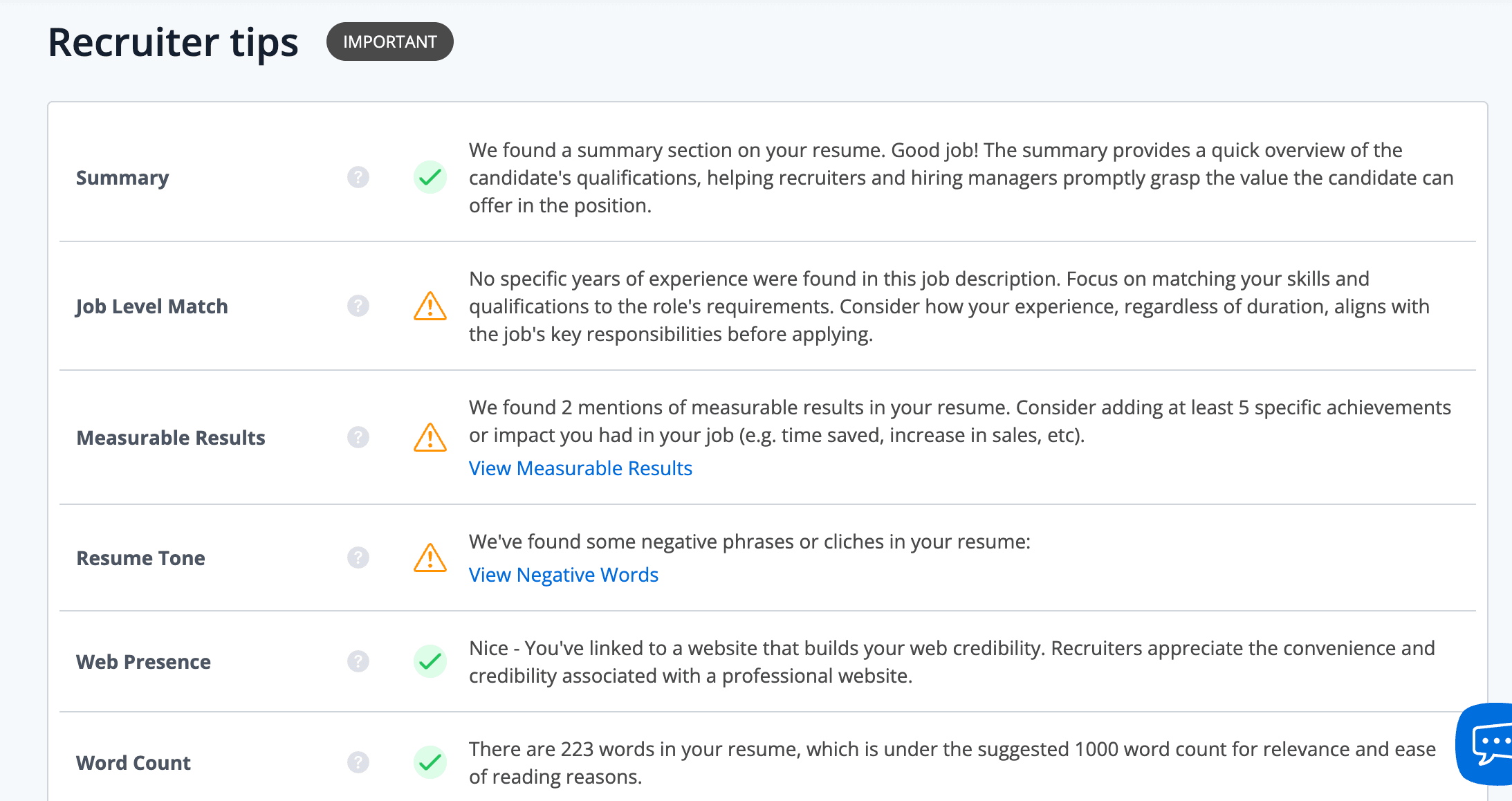
The skill-matching feature is the most useful in this report, in our opinion, while the other recommendations mostly focus on identifying missing sections and providing general resume tips that aren't specific to the analyzed resume. As you can see in the screenshot below, the "Recruiter Tips" category includes the following sections:
- Summary: Acknowledges that the summary is included and explains what a summary is in general.
- Job-level match: Identifies that the resume doesn't say how many years of experience the applicant has.
- Measurable results: It counts how many bullets contain quantified results and recommends adding at least five (the report notes two in our example, while there were actually three in the AtlasPoint Solutions work entry).
- Resume tone: The report says, "We found some negative phrases or clichés," and when we clicked to show them, it only specified "proactive" as a negative word.
- Web presence: Identifies a link to a website, which in our case we can assume refers to Alexander’s LinkedIn profile link, as no resume-specific wording was used.
- Word count: Correctly counted 224 words in our resume and suggested a minimum of 1000. It's important to note that the resume used is one full page long.
Although there were notably fewer categories and resume aspects analyzed than in Toptal Resume's report (four visible categories against Toptal’s seven), and Jobscan's report contained fewer resume-specific suggestions, we found the feedback fairly actionable. Implementing them, in our opinion, would improve the resume, particularly regarding which skills to include and where.
Resume Worded
Resume Worded allows you to upload a PDF or DOCX file to their resume scanner, and in the second step, you get to choose between three career levels: entry level, mid level, and senior level, without the possibility of entering your target role/job description. To continue, you need to create an account.

After your resume is scanned, you don't get a standard unified report, but you navigate accessible tabs in a dashboard to view feedback (the screen is split between a report area and a resume-editing area). The overall score is expressed on a 0-100 scale (52 in our case), while the per-category scores are on a 1-10 scale.
As summarized in the table below, the scored categories included length (4), quantified impact (7), weak roles (5), unnecessary sections (10), repetition (10), dates (7), and contact details (10), while the findings related to the summary were completely hidden, and there are additional blurred sections that can't be identified with free access.
| Category | Description |
|---|---|
| Resume score | Shows the overall score and per-category scores. |
| Keyword analysis | Two general industry keywords were listed. |
| Formatting and parsing | No |
| Writing quality tips | Through rewrite suggestions. |
| Evidence analysis | It determines whether the resume shows quantified impact. |
| Contact details check | It determines whether your resume includes key contact details. |
| Job fit or title match | No |
| Other | Rewrite suggestions |

Regarding more resume-specific feedback, there was almost none, and we were provided more general resume advice. For example, the “Quantified impact” tab showed: "Your resume needs more hard data to support your senior-level experience. That's the #1 thing hiring managers look for at your level," followed by general advice on what hard numbers and quantifying impact mean.
"ATS keywords" were offered as a separate tool, which was locked and showed only two general industry keywords: "management" and "project management."
That said, the most specific suggestions were offered through the rewrite suggestions for specific resume bullets. As you can see in the screenshot below, in the “Weak roles” tab, we were offered examples of three "stronger" rewritten bullets. It's mostly about rephrasing, which is expected when a resume isn't compared to a specific job description.
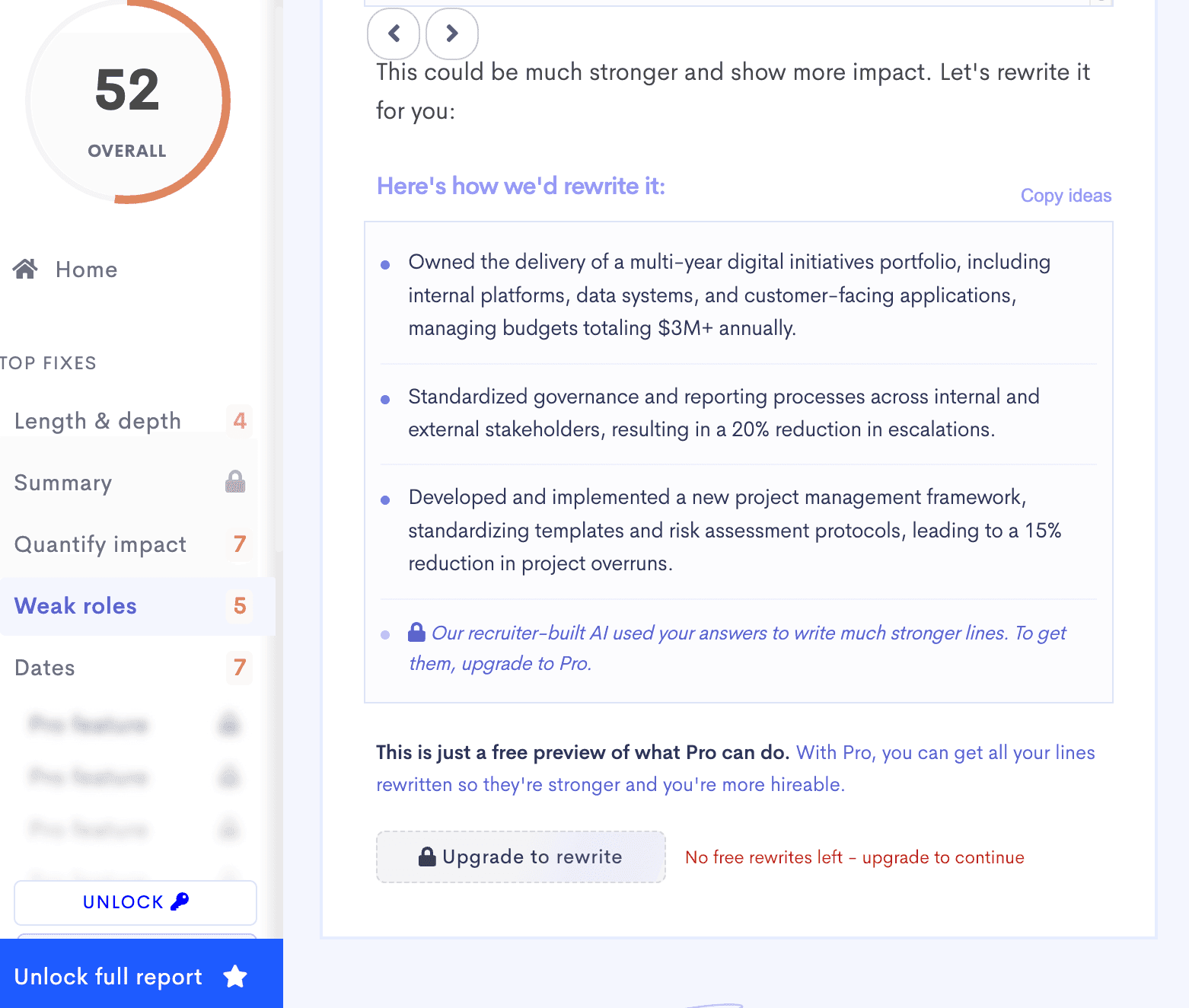
The resume bullet point "Standardized governance and reporting, reducing escalations by ~20%" was rewritten to say "Standardized governance and reporting processes across internal and external stakeholders, resulting in a 20% reduction in escalations." This might be useful, depending on the accuracy of the output, but the suggested rewrites also included a bullet with an achievement that isn't supported by the resume analyzed: "Developed and implemented a new project management framework, standardizing templates and risk assessment protocols, leading to a 15% reduction in project overruns." Although you can rescore a resume, the rewrite feature could be run only once.
If we wanted to decide which free scan is more useful, Jobscan vs. Resume Worded, in our opinion, and for our tested case, Jobscan provided more actionable feedback for a broader range of categories, while Resume Worded can be more practically helpful when it comes to rewriting a few bullet points.
Teal
To access Teal's resume checker, you need to sign up first, and it allows you to add a job description against which the resume is analyzed. The resume can be uploaded as a Word document or PDF, or you can paste the text or import your LinkedIn profile.
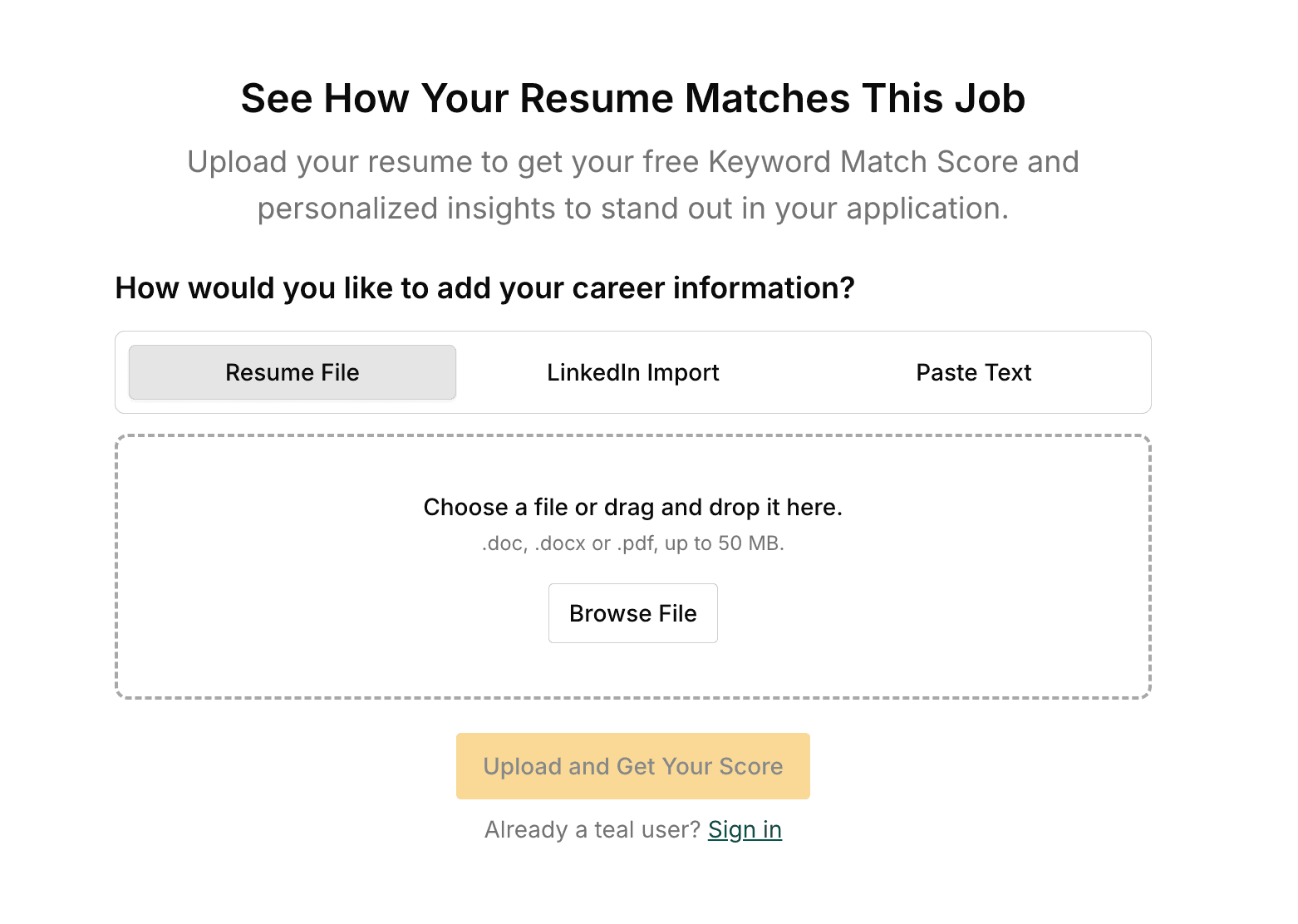
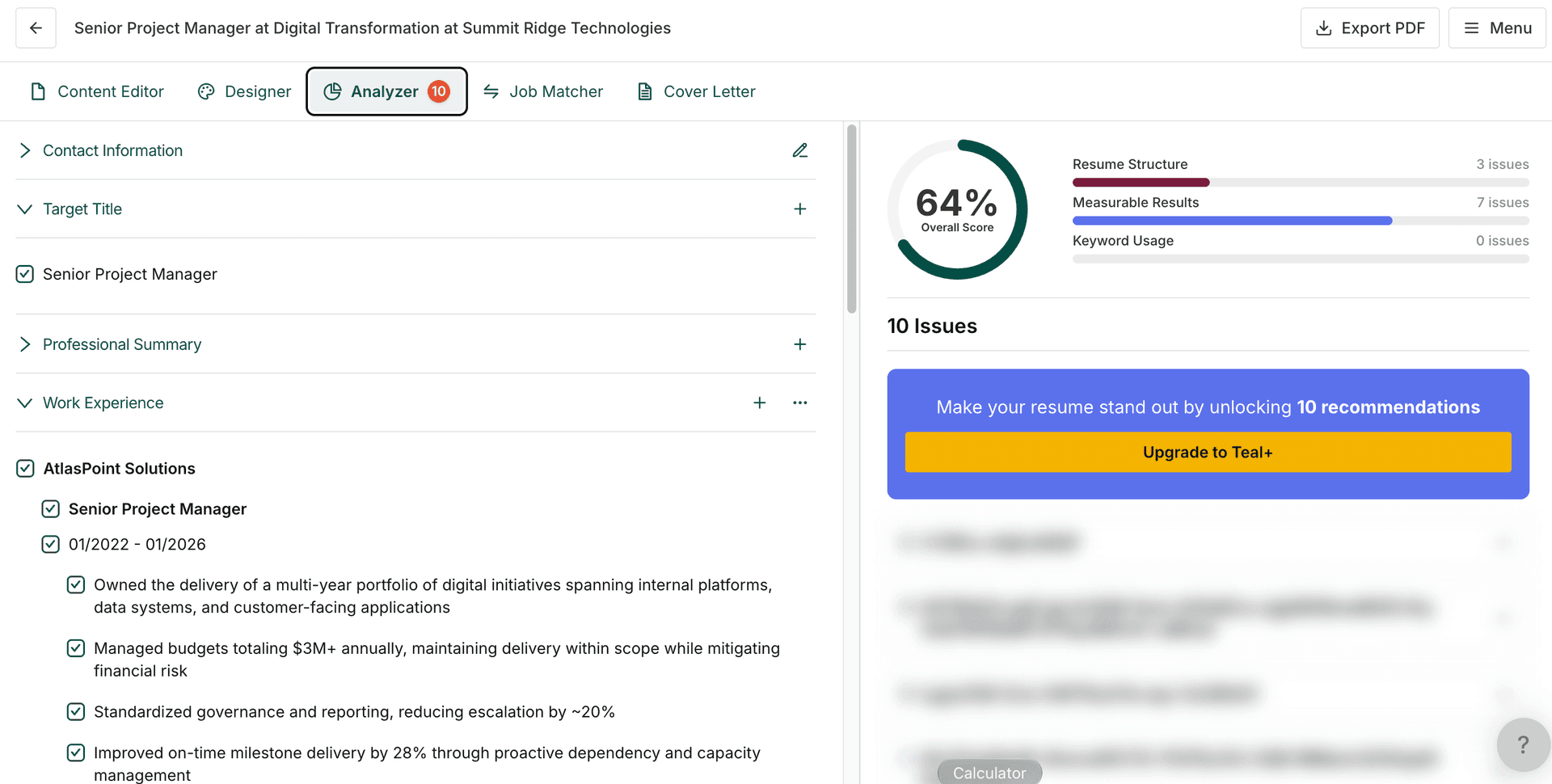
Once the resume is scanned, you're taken to the resume builder, and there's no standard resume report. Alexander's resume received an overall score of 64%, and 10 recommendations were indicated in the "Analyzer" tab of the resume builder, but all the details were locked, as shown in the screenshot below, and the fixes couldn't be viewed.
There's a separate "Job Matcher" tab, which indicates the missing keywords from the job description, and you can add up to five to your resume (one or more bullet points). The tested resume got a 66% match score, and the keywords were correctly recognized. For example, it identified Microsoft Project as a missing keyword, while Jira and PMP were detected as already included.
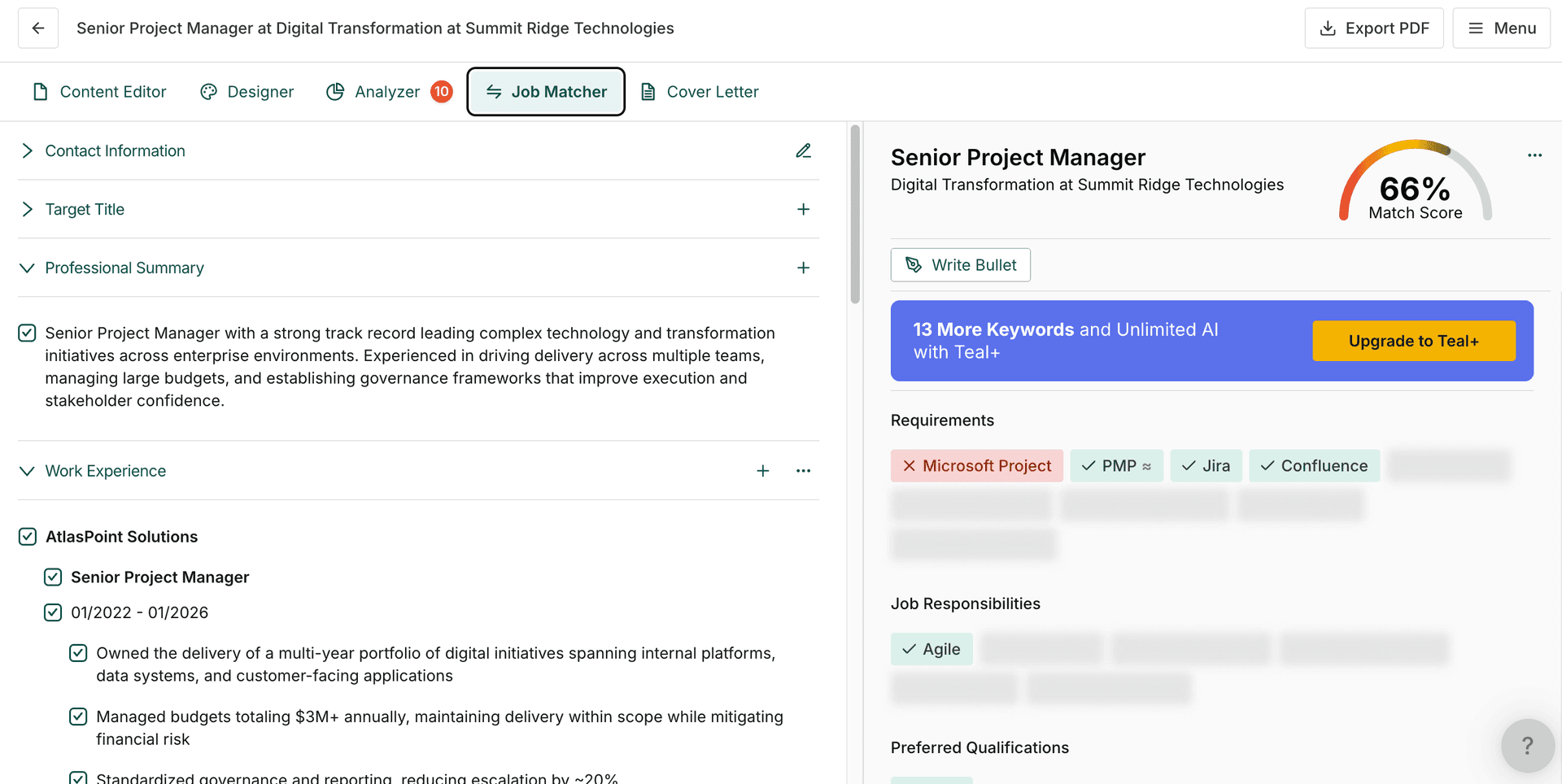
In this test, with free access, the main impression is that there was no free resume report, only a keyword-matching option within their resume builder. The table below summarizes our findings.
| Category | Description |
|---|---|
| Resume score | Shows the overall resume score. |
| Keyword analysis | Yes, by mapping which ones are missing. |
| Formatting and parsing | No |
| Writing quality tips | No |
| Evidence analysis | No |
| Contact details check | No |
| Job fit or title match | Only keyword matching |
| Other | N/A |
Enhancv
Enhancv allows you to upload your resume as a PDF or .docx file and takes you to the score report with no sign-up needed. We landed on a report page showing the overall score (80/100) and per-category scores, which included ATS parse rate, quantifying impact, repetition, contact information, spelling and grammar, missing sections, and file size and format.
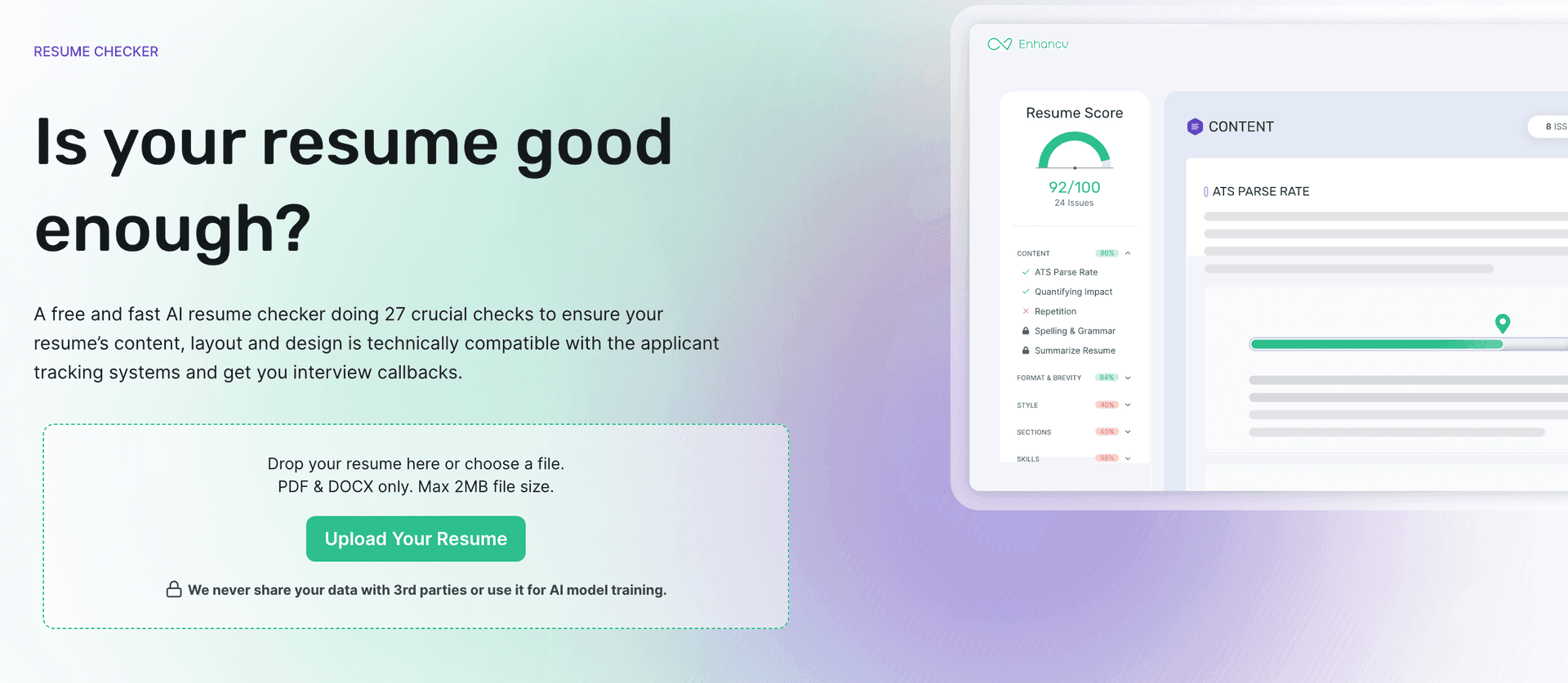
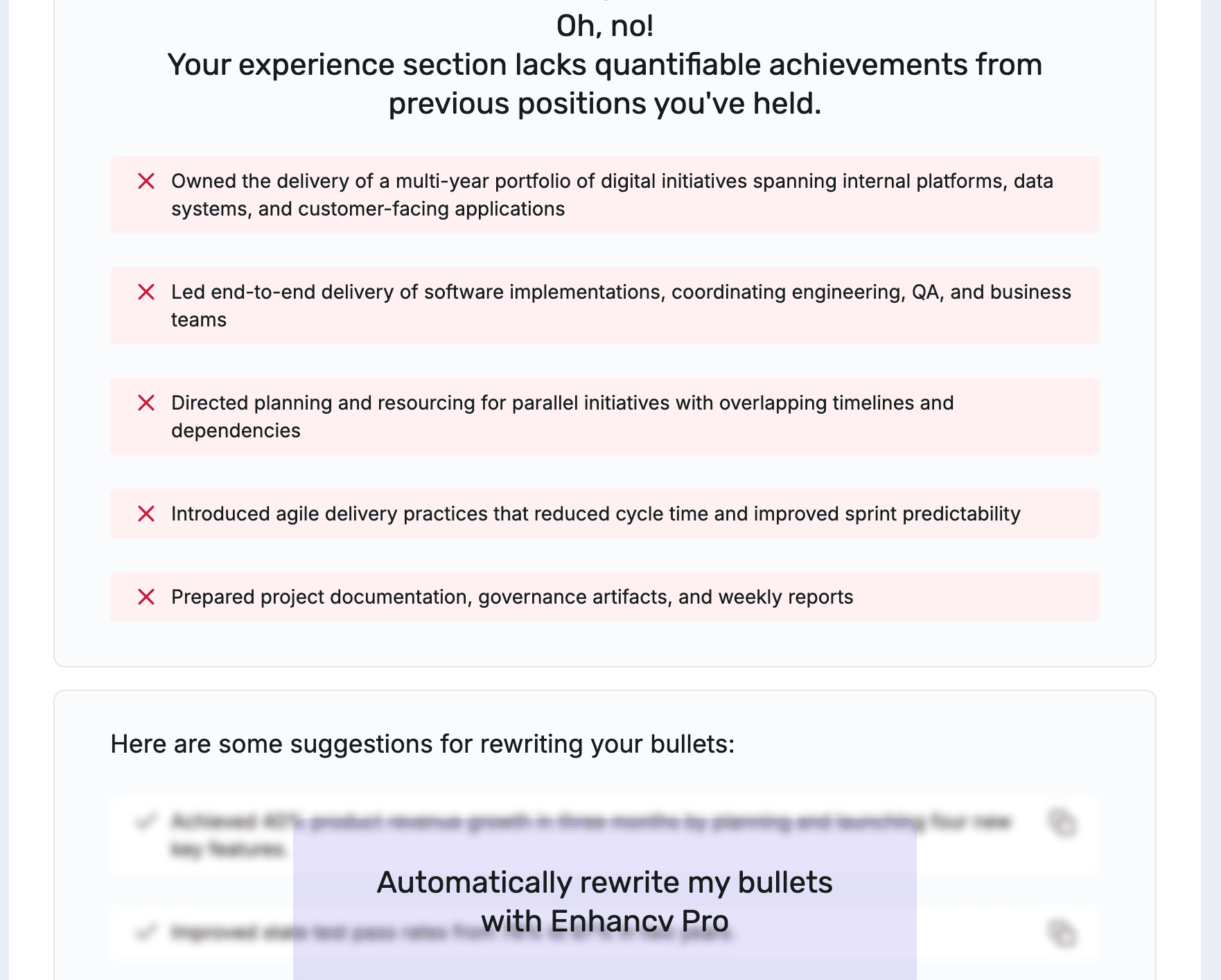
As seen in the screenshot below, the resume's ATS parse rate was 90%, but there were no details or suggestions. The same was true for individual categories indicating the number of issues, and any action related to fixes takes you to their resume builder. The only resume-specific aspect of the report was an indication of which bullet points lack quantified achievements (as you can see below, five bullets were extracted from Alexander's resume).

If you access the resume builder, there's a job-matching feature (for the job description used, it was 83%), but any fix would require an upgrade. Also, all "recruiter checks" were locked within the resume builder.
Similar to Teal, the ATS resume checker seemed to be a feature within the resume builder, and our main impression was that no truly actionable report was offered for free. Here's the full breakdown of free feedback available:
| Category | Description |
|---|---|
| Resume score | Shows the overall score. |
| Keyword analysis | No, only within the paid resume builder. |
| Formatting and parsing | ATS parse rate (score only) and checks for missing resume sections. |
| Writing quality tips | All “recruiter checks” are locked within the resume builder. The “spelling and grammar” and “repetition” sections reported “no issues,” so couldn’t determine their usefulness. |
| Evidence analysis | Identifies bullets that don’t show quantified impact. |
| Contact details check | Yes |
| Job fit or title match | No, only within the resume builder (only the match score is free). |
| Other | File size and document type check. |
Rezi
Rezi's homepage combines two steps into one: uploading a resume and including a job description. Similar to Teal and Enhancv’s job matching, the scoring is integrated into their resume builder, and the "Explore My Rezi Score" feature opens as a window that shows numerical scores for keywords, content, format, optimization, best practices, and application readiness. The overall score for the resume and job description used was 86/100.
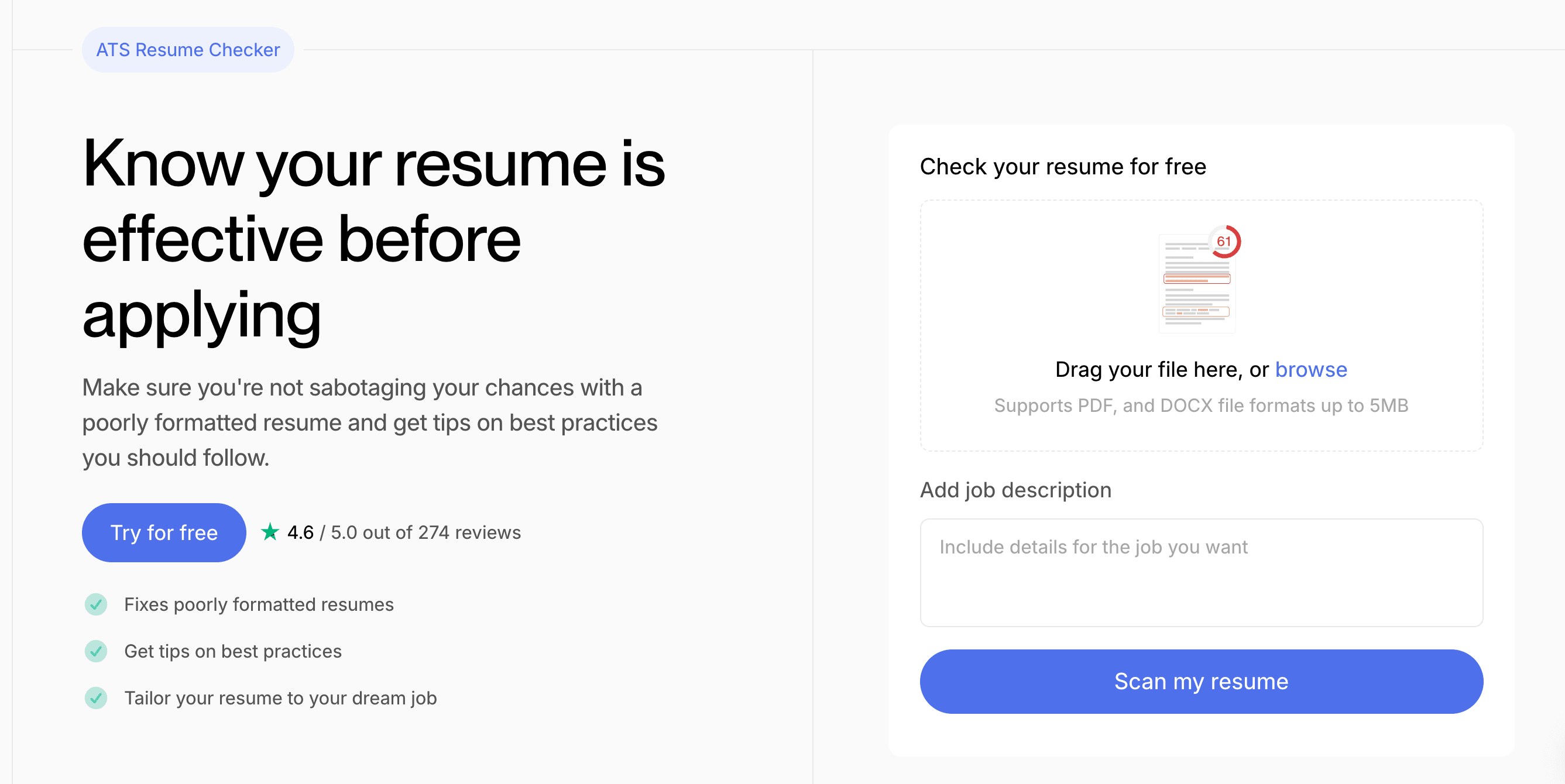
A full resume review is offered as a separate paid service performed by human reviewers, and the price depends on how quickly you need the review completed: from $39.30 (2 days) to $60.26 (12 hours).
In the builder’s report window, we were able to see individual scores for the categories listed above, and below each numerical score there's a list of identified issues, with general advice on that topic.

For example, the content category scored 51 and offered the following feedback: "Your resume has 2 experiences without measured responsibilities or achievements," followed by a piece of advice: "It's critical to give context to the size and scope of the work that you did." Some subcategories were locked, as shown in the table below:
| Category | Description |
|---|---|
| Resume score | Yes |
| Keyword analysis | Yes, listing a few missing skills, and allows you to include 2 for free in the resume builder. |
| Formatting and parsing | Format score and recommendations such as the expected number of bullet points or skills formatting. |
| Writing quality tips | Some advice on punctuation, but language aspects, such as pronouns, buzzwords, passive voice, filler words, and punctuation, are locked. |
| Evidence analysis | Yes, it indicates bullets without quantified achievements. |
| Contact details check | No |
| Job fit or title match | Keywords only |
| Other | N/A |
Rezi is another example of an ATS score analysis incorporated into the resume builder, and instead of offering a typical report, the fixes are handled by AI editing tools directly in the resume. Although testing the builder was out of scope for this article, Rezi seemed more generous with the update options and offered 10 bullet updates plus two keyword additions based on the job description.
Kickresume
Kickresume allows you to upload your resume as a PDF or DOCX file without a job description, and you need to sign up.
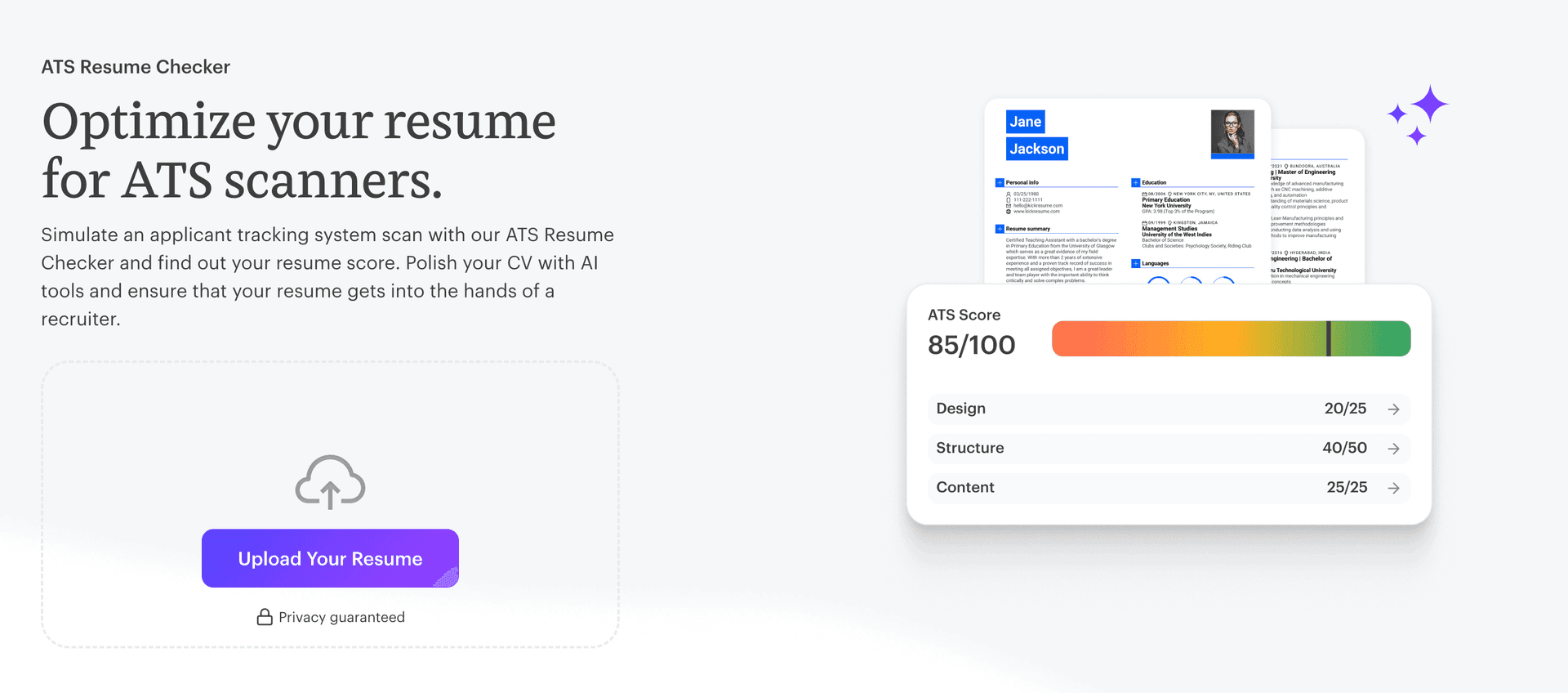
The "ATS Checker" feature is integrated into a dashboard that covers their broader range of resume and job-search tools, but beyond the overall score, the in-depth resume feedback was locked and required an upgrade.

The resume used in this test received a score of 84/100, and scores were displayed for three categories: Design (85/100), Structure (90/100), and Content (53/100).
| Category | Description |
|---|---|
| Resume score | Yes, the overall score, with numerical scores shown for three categories |
| Keyword analysis | No |
| Formatting and parsing | No |
| Writing quality tips | No |
| Evidence analysis | No |
| Contact details check | No |
| Job fit or title match | No |
| Other | N/A |
Which One Should You Use in 2027: A Hands-on Comparison
What the Tools Check at a Glance
While all the tested resume aspects covered by the selected ATS checkers are explained in detail in the previous sections, the table below summarizes what you can expect to see in a report before running a check based on the test we performed. If a category is marked "Yes," it was covered and provided at least some insights, even if only partially, while "No" means it either wasn’t included in the check or wasn't covered in a minimally useful way. For more specific information, consult the tool’s separate section in this guide.
| Tool | Score | Keywords | Formatting | Writing Tips | Achievements | Contact | Job Fit | Other |
|---|---|---|---|---|---|---|---|---|
| Toptal Resume | Yes | Yes | Yes | Yes | Yes | Yes | Yes | Job suggestions |
| Jobscan | Yes | Yes | Yes* | Yes* | Yes | Yes | Yes* | Job suggestions |
| Resume Worded | Yes | Yes* | No | Yes | Yes | Yes | No | Rewrites |
| Teal | Yes | Yes | No | No | No | No | No | N/A |
| Enhancv | Yes | No | Yes | No | Yes | Yes | No | File size |
| Rezi | Yes | Yes | Yes | Yes | Yes | No | No | N/A |
| Kickresume | Yes | No | No | No | No | No | No | N/A |
* Asterisk means that, based on the author’s judgment, the usefulness of the covered category was very limited during the test performed
Strengths and Limitations of the Checkers Tested and Why They Can Disagree
As our testing confirmed, not all ATS resume checkers follow the same product logic and use the same evaluation methodology. That is why a resume can score differently across tools, and why the feedback that supports the score matters more. For example, the scores for the same resume we used across tools ranged from 52 to 86 (Toptal: 78, Jobscan: 83, Resume Worded: 52, Teal: 64, Enhancv: 80, Rezi: 86, and Kickresume: 84).
To avoid using a single arbitrary criterion to claim a single universally best free ATS resume checker, the table below presents our conclusions on who they are best for and what they are best for, based on all the evidence gathered and explained in this article.
| Tool | Best for | Strengths | Limitations |
|---|---|---|---|
| Toptal Resume | Those who want an in-depth analysis (7 categories with 25 dimensions) with actionable, job-specific recommendations you can use to improve your resume. | No hidden categories and covers both ATS compliance and recruiter friendliness. The recommendations reviewed were specific, include examples, and keywords are ranked by importance to your target role. | Although the top findings for all categories were available to everyone for free, some details required a subscription. |
| Jobscan | Keyword matching, and those who want an overall check of what is included and what is missing from their resume. | In addition to the keyword/skills mapping, it included some recruiter tips. | Many recommendations were generic and less ideal for tailoring a resume, and the findings on formatting weren’t accessible for a PDF file. |
| Resume Worded | Rewriting parts of the existing content in your resume. | Combines resume analyses with resume updating. | The recommendations weren’t role-specific, and they were more like general resume tips. Rewrites also included an unsupported claim. |
| Teal | Job seekers who want to match a resume to a job description inside an editor: the free Job Matcher flagged missing keywords and let us add up to five (editing results not evaluated). Not for a free analysis report. | Combines keyword matching with resume editing. | The resume analysis section couldn’t be accessed at all without an upgrade. |
| Enhancv | Quick check of the overall score, or to identify bullets that don’t show quantified impact. | The free access appeared to be more aimed at resume editing, which wasn’t tested. | Didn’t offer an actionable ATS resume analysis report. |
| Rezi | Users who want quick fixes applied directly in a builder: it offered AI bullet updates and keyword additions next to the score (output quality not evaluated). Not for a detailed free report. | Quick writing tips incorporated in a resume editor. | Few job-specific insights and recommendations beyond keywords. |
| Kickresume | Verified students and teachers, who can get free premium access (not tested). For everyone else, only a quick overall score is free. | Free premium for verified students and teachers. | Everything except the numerical score required a paid plan. |
Final Verdict: The Best Free ATS Resume Checker for You
As our testing and analysis showed, different ATS resume checkers use distinct approaches to evaluating resumes. While some are standalone resume checkers that provide users with actionable feedback to improve their resumes, others combine ATS scoring with resume editing in a single tool. The choice depends on what best suits your needs and whether you're willing to use a paid service or only the free ATS resume analysis available.
If you need a truly free ATS resume checker, consider how much you get without paying. This testing was based on the premise that a well-performing resume should be ATS-friendly (formatting, parsing, contact details, keywords), effective on human readers (writing tips, evidence analysis), and tailored to your target role or job description. As the findings demonstrated, Toptal Resume's ATS resume checker and Jobscan covered the broadest range of resume categories, with Toptal Resume's report being more comprehensive and clearly more specific and actionable (7 categories with 25 dimensions, each with recommendations, against Jobscan’s four visible categories). While four tools compared our test resume with the target role (Toptal Resume, Jobscan, Teal, and Rezi), Teal's report was unavailable, and Rezi's didn't go far beyond a very limited keyword analysis and offered a paid human review.
The testing was limited to the free resume analysis options, without examining which tool is more helpful after you subscribe to a paid plan. The goal was to help you make an informed decision when choosing the best one for you, but whichever you choose, treat the numerical score as guidance, not a pass mark, and focus on the specific details a report offers.
FAQ
ATS Resume Score Checker
for Professional Roles
Upload your resume and tell us your target job title. Our system will analyze it the way a recruiter and ATS would—scoring it across core hiring dimensions and giving you personalized, role-specific feedback you can implement right away.
Read Next

Resume Tips
Cover Letter for Internship: Examples, Template, and Writing Tips
No paid experience? Coursework, projects, and volunteering can prove your fit. Here’s how to turn them into a letter.

By Borislav Stojkov
Principal Resume Writer
Borislav Stojkov is a Principal Resume Writer at Toptal Resume. His professional track record includes personally reviewing and rewriting more than 2,000 resumes for professionals across industries. In his direct work with clients and the development of AI-based resume-writing services, he focuses on ATS-optimized structure, modern template design, and recruiter-aligned writing and formatting standards.
Job Market Trends
How Understanding Applicant Tracking Systems (ATS) Can Land You a Top Tech Job
Nearly all Fortune 500 companies use ATS to screen applicants. Understand how these systems parse resumes so yours doesn't get filtered out.

By Amanda Menin
HR & Career Strategy Expert
Amanda Menin is a Talent and Organizational Strategy expert specializing in hiring practices, resume optimization, and applicant tracking systems (ATS). With more than 20 years of experience across technology, healthcare, and consulting, she offers practical insight into how employers evaluate candidates. She holds a master’s in industrial and organizational psychology and is a SHRM Senior Certified Professional (SCP).
Resume Tips
Resume Format for Career Changers: Why a Combination Resume Usually Works Best
A guide to choosing a resume format for a career change: how chronological, functional, and combination resumes compare, and how to build the one that works for most online applications.

By Inge Miscevic
Principal Career Coach
Inge Miscevic is a Principal Career Coach at Toptal Resume with over a decade of experience reviewing and improving thousands of resumes across industries. In her work with clients, she focuses on clear resume structure, effective formatting, and content that presents real experience in a way recruiters can quickly understand.