What to Put in a Resume Header (and What to Leave Out)
A guide to the details a resume header needs, what to leave out, and how to keep it readable for recruiters and applicant tracking systems.

AUTHOR
Inge Miscevic
Principal Career Coach
Inge Miscevic is a Principal Career Coach at Toptal Resume with over a decade of experience reviewing and improving thousands of resumes across industries. In her work with clients, she focuses on clear resume structure, effective formatting, and content that presents real experience in a way recruiters can quickly understand.
A resume header should provide an employer with the information they need to identify and contact you: your full name, phone number, professional email address, city and state, and one relevant professional link. For a typical US resume, you can leave out your full street address and photo.
The layout of your header, sometimes called a resume heading, should stay simple to make sure key details are easy to find. You should make your name prominent, choose contact information that makes sense for your target role, and decide if you should include a website link or a professional credential here. The right choices depend on your industry and where you’re applying.
There’s also a technical detail worth paying attention to. Keep your contact information in the body of the document rather than in the actual header or footer field in Word or Google Docs. Some applicant tracking systems (ATS) can skip or misread information stored there.
This guide covers what to include, what to leave out, and how to format the header so it works for both a human reader and recruiting software. It also looks at common layout options, when resume conventions vary, and how to put together a header you can adapt for your own application.
Resume Header Elements at a Glance
Most resumes need only a few details at the top of the page. The table below gives you a quick reference for what to include, what depends on your circumstances, and what you can generally leave off a US resume. The sections that follow explain each choice in more detail, including when a professional headline or additional link can help.
| Element | Include | Guidance |
|---|---|---|
| Phone number | Yes | A number you regularly answer |
| Professional email | Yes | A simple, professional address |
| Location | Yes | City and state are usually enough |
| Recommended | Include your profile if it’s updated and relevant | |
| Portfolio or GitHub | When relevant | Add the link if it supports your application |
| Professional title or credential | Sometimes | Useful when it clearly matches your target role |
| Full street address | No | Usually unnecessary for US resumes |
| Photo | No | Not standard for most US applications |
| Date of birth, marital status, or similar personal details | No | These aren’t standard resume information in the US |
| Text boxes, images, tables, and columns in the header | No | These elements can confuse ATS systems and cause parsing issues |
Your header only needs to make the basic information easy to find. Everything else about your background can go in the summary, work experience, certifications, and other sections.
The Header Field Trap
There’s a difference between putting information at the top of your resume and putting it in a document’s actual header field. If you type your name and contact information as part of the main body, it’s part of the resume content. If you insert it through Word’s header function or a similar document feature, you’re storing it in a separate part of the file.
That distinction can matter when a resume is processed by an ATS. Greenhouse, for example, lists headers, footers, text boxes, columns, graphics, and other complex formatting among the issues that can contribute to an unsuccessful or partial resume parse. It specifically notes that name and contact info placed in a header, footer, or text box may not be interpreted correctly.
Microsoft also recommends avoiding important information in Word headers and footers because some accessibility tools may not scan them consistently. That doesn’t mean every ATS will have a problem with every resume that uses a document header. Modern recruiting systems vary, and parsing has improved over the years. But there's no need to take the risk when you can easily create the same visual effect in the document body and keep your resume ATS-friendly.
A simple test: save your resume, open it in a plain-text editor, and copy the content into it. If your name or contact information disappears from the copied text, check how you’ve placed it in the document.
For more on how resume parsing works, see Toptal’s ATS resume checker and this resume checker vs. ATS score checker guide.
Resume Contact Information, Field by Field
A resume header may hold only a handful of details, but each involves a small decision about what to include and how to style it. Penn Career Services’ resume guide tells students to put their name, email address, and phone number in the header. It treats a full street address as unnecessary, offers city and state as an option, and recommends adding a LinkedIn URL, plus a GitHub or personal website that can show relevant work. Here is how to handle each field.
1. Your Name
Your full name should be the most prominent item in the resume header, but that doesn’t mean that you need an oversized name that takes up a quarter of the page. A larger font size, capital letters, and/or a bold effect are enough to make it easy to spot.
Sources vary on the exact size. UT Dallas’ Career Center recommends 14 to 18 points, the University at Buffalo’s Career Design Center recommends 14 to 16, and some resume builders go as high as 24. For most resumes, 14 to 18 points is a good range. If you prefer to keep your name at the same size as the rest of the header, make it bold or use capital letters.
Use the same professional name across your resume, LinkedIn profile, portfolio, and other application materials to make it easier for recruiters to recognize you. If you normally use a middle initial or have a common name that could be confused with someone else’s, including your middle name can help.
2. Phone Number
Include a phone number that an employer can reach you at. For most candidates today, that’s a personal mobile number. Check that you haven’t accidentally included a wrong digit from an old number and that your voicemail greeting is professional.
You don’t have to label it as “Phone” unless the resume format already uses labels or makes this information unclear. It's usually enough to use a clean line such as: 555-123-4567 | name@mail.com | City, State.
3. Email Address
The simplest choice is to use a professional email address that contains your name or a variation of it. Addresses that look like usernames from another context or that could make your application feel less professional should be avoided.
There’s no reason to use a separate “resume email” if your existing address is appropriate. If you’ve already decided to create a separate email for job applications, make sure you check it regularly. Never use your current work email address when looking for a new job.
4. Your Location
If you’re based in the US, your city and state are enough to tell recruiters where you’re located. You typically don’t need to include your full street address, according to Penn Career Services’ guide. The same typically goes for a ZIP code or apartment number, unless the job posting asks for them. Employers don’t need your mailing address to contact you about an interview, and removing it gives you more space for information that helps your application. Also, if you’re targeting remote jobs, the city and state are still sufficient.
If you’re applying for jobs in another city, you can handle this field in different ways depending on the circumstances. If you’ve already relocated, use your current location. If you’re planning to move, you can mention that elsewhere in the resume or cover letter to help explain your situation. Being honest is essential here, so don’t use your location to imply that you’re already local if you aren’t.
5. LinkedIn, Portfolio, and Other Links
Add links that give the employer something useful to see instead of including everything you can think of. LinkedIn is a useful addition for most professional candidates, as long as your profile is up to date and supports the story your resume tells.
A portfolio can be more useful than LinkedIn for designers, writers, photographers, marketers, and other professionals whose work can be demonstrated online. GitHub makes most sense for software engineers and other technical candidates. Adding your personal website can work well when it contains relevant work, case studies, publications, or other evidence of your experience.
You don’t need to include every profile you have. If a link doesn’t strengthen your application, it's okay to leave it out. Don't forget to check the actual URL before submitting, as a broken portfolio link or an outdated LinkedIn profile can confuse the reader and weaken your application.
6. Should You Add a Job Title or Headline?
A professional title or headline is optional, but it can be useful when it immediately tells the reader what kind of candidate they’re looking at.
For example:
Maya Chen, Senior Product Marketing Manager
555-123-4567 | maya.chen@email.com | Austin, TX | linkedin.com/in/mayachen
A title can also be useful when you have a professional credential that carries meaningful weight in your field, such as Registered Nurse (RN) or Certified Project Management Professional:
Jordan Williams, RN
555-123-4567 ∙ jordan.williams@email.com ∙ Denver, CO
A title helps most on targeted applications, where it matches the role you’re applying for. On applications where you’re not targeting a specific role, such as a general inquiry, it’s easier to leave the title off, because a single title can narrow how the reader sees your experience. Be careful with titles at either end: broad or vague titles that cover multiple functions say little, and over-narrow titles can rule you out of related roles. If you’ve worked across several roles, don't copy the title from the job description unless it matches your experience. A headline that doesn’t align with the experience listed below can raise questions.
If you choose to use a title, keep it specific enough to show the recruiters where you fit. Your summary, experience, and achievements can tell the rest of the story.
Resume Header Design and Examples: Three Layouts That Work
There’s more than one good way to design a resume heading. The most common options are centered header, split header, and two-column header. The choice should match the rest of your resume layout, and here’s how they compare:
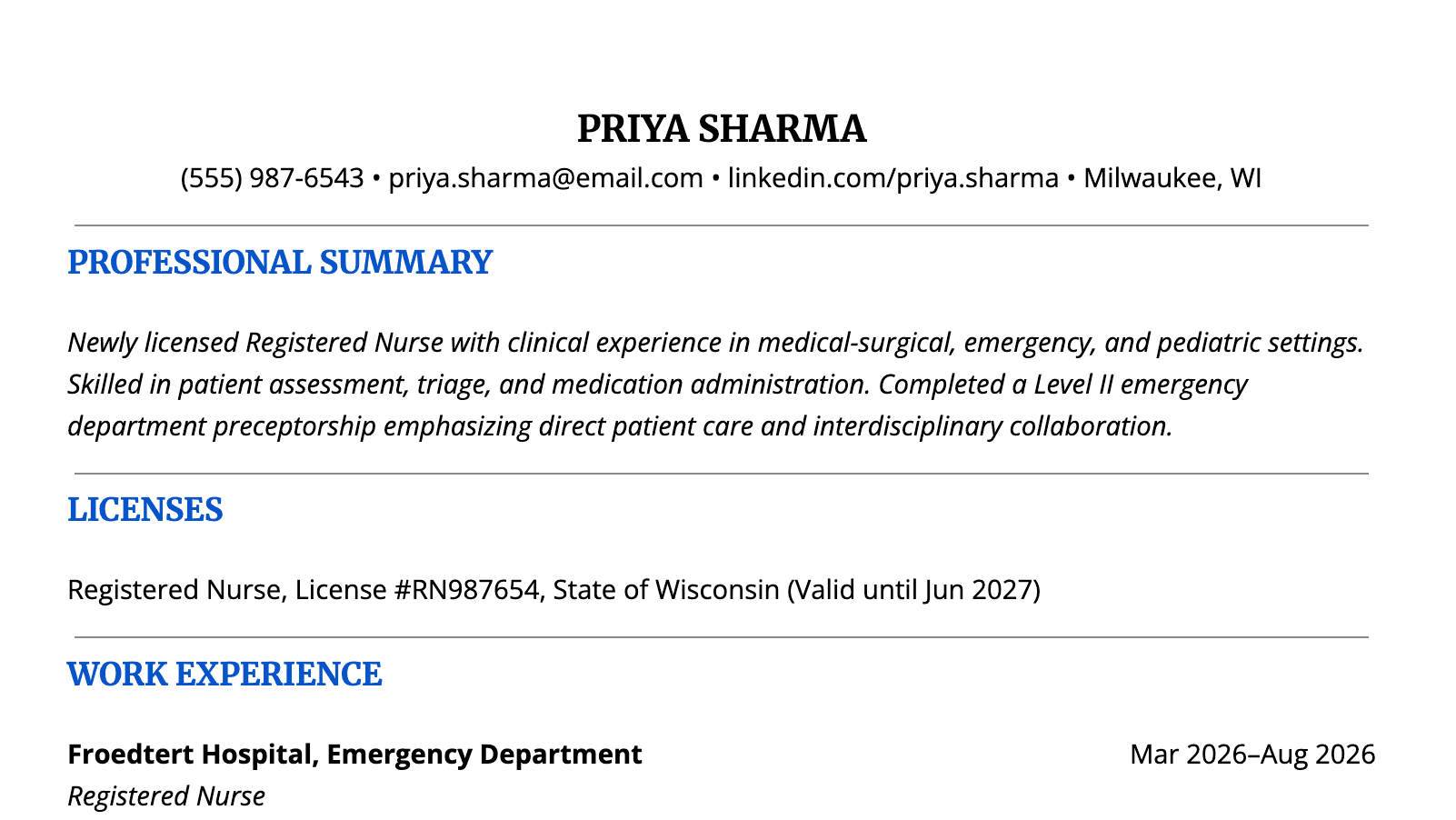
Centered Header
A centered header is simple and works well with traditional resume layouts. It's also easy to recreate in Word or Google Docs without adding tables, text boxes, or graphic elements, since each line is just a centered paragraph. You can also put contact details like phone, email, and LinkedIn on the same line if they fit, and separate them with bullet symbols or vertical bars.
Here’s a good example of the centered header:
Split Header
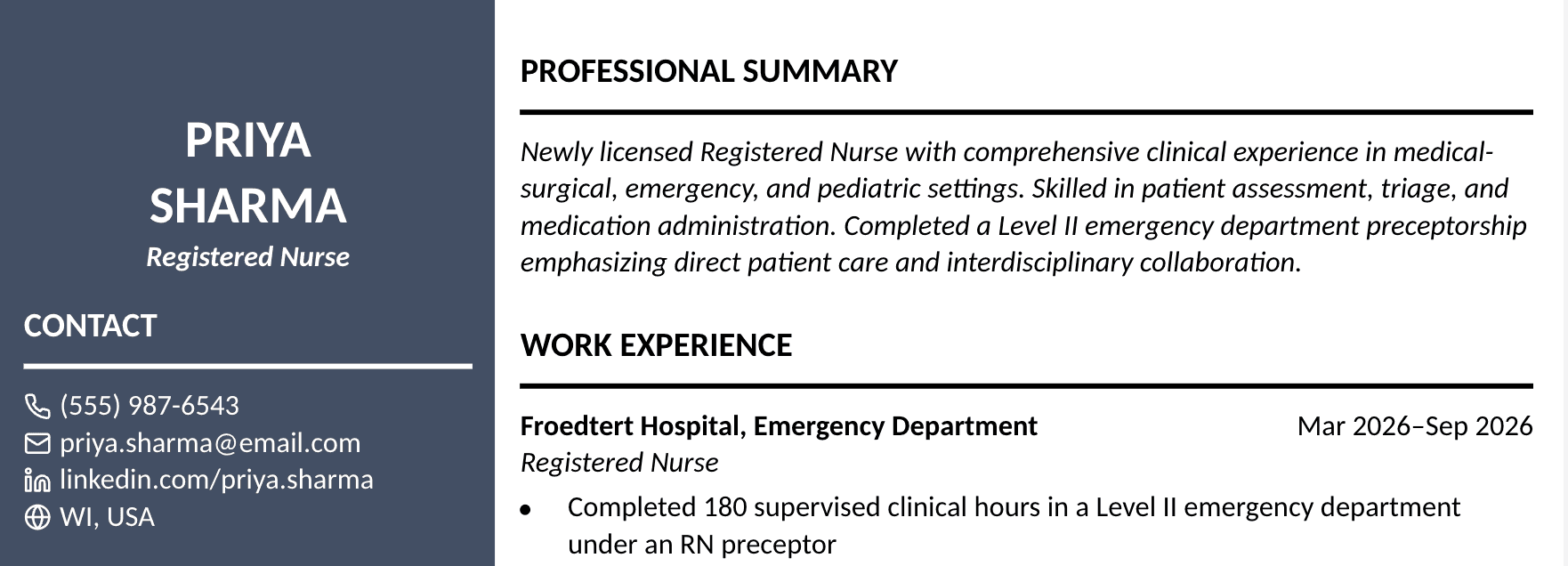
Your name and title are centered or placed on one side, with contact information arranged on the other. This can give the page a more designed feel without adding complicated graphics or formatting. The simplest way to build it is with a right-aligned tab stop: set the tab stop at the right margin, type the left detail, press Tab, and type the right detail. Avoid using spaces to line things up, as that alignment can break as soon as you change the text.
This is one of the ways of formatting a split header:
Two-column Header
A two-column structure can work when you have several pieces of contact information or want to separate your name from other details. It works best with your name and title on top and the contact details in two columns underneath them. If you're using Word, you can build the columns with a left tab stop set near the middle of the page and avoid tables.
Here's an example of the two-column header:
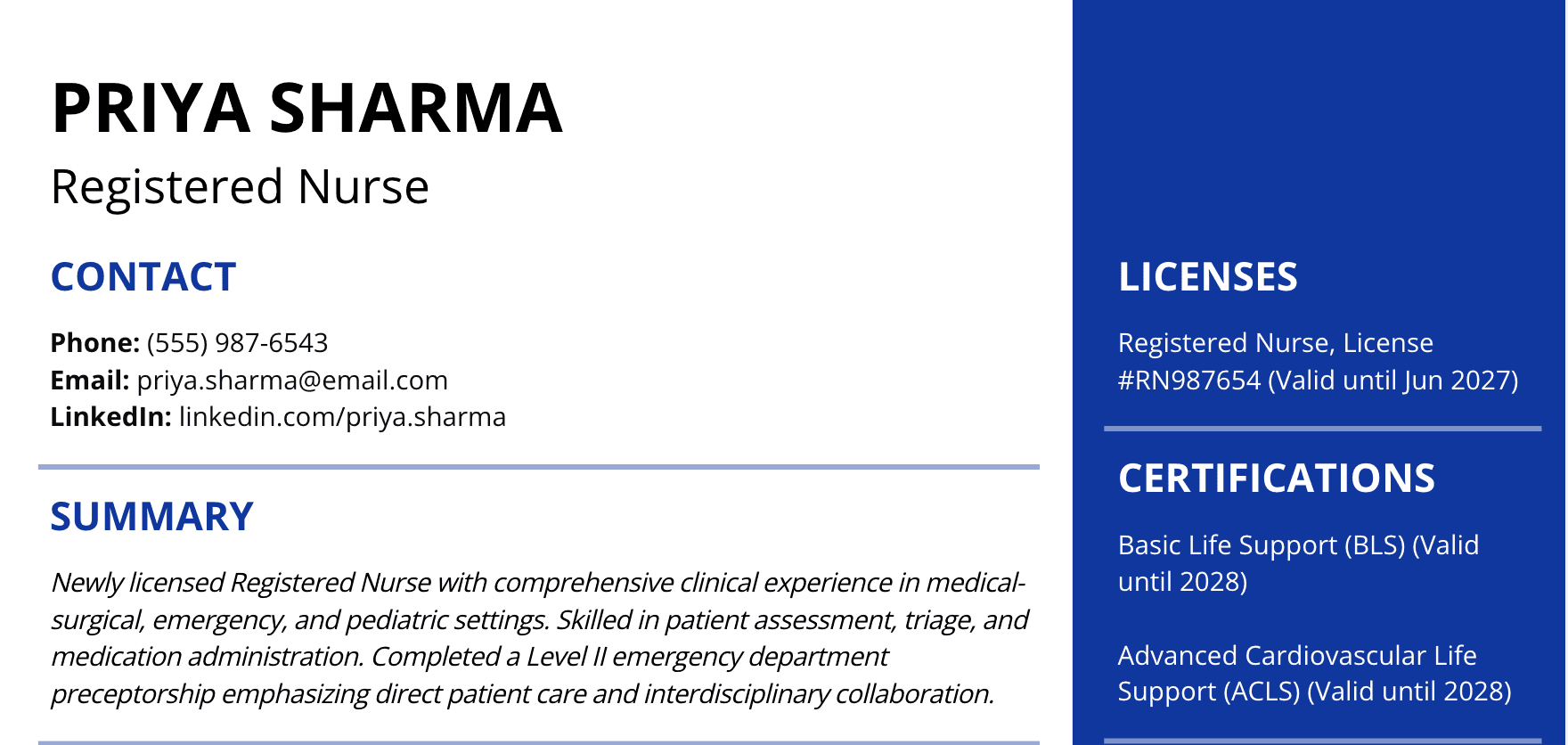
Of the three resume header examples, the centered header is the simplest to build. The split and two-column headers put two details on each line, so check the plain-text version after you build one.
It’s worth keeping the underlying structure simple. The University of Missouri Career Center advises avoiding tables, columns, and headers and footers because they can affect resume scans, and Penn Career Services adds that not every applicant tracking system can read decorative formatting. Complex columns and tables should never be added just for visual effect. If you’re submitting your resume online, a simple layout is generally the safer choice.
Resume Header Formatting Guidelines
You don’t need complicated formatting to get a professional-looking header. Your header should be easy to notice without taking over the whole page, and these are the details that matter most:
- Name: Make it stand out by using capital letters, bolding it, or increasing the font size. For most resumes, 14 to 18 points is a good range.
- Contact line: Keep contact details between 10 and 12 points. This range keeps your important information readable.
- Font: Use the same standard typeface across the resume, such as Arial, Calibri, or Helvetica, so the header matches the body text.
- Margins: Use the same margins as the rest of the resume, usually between 0.5 and 1 inch, so the header has room on both sides and doesn’t run to the edge of the page.
- Height: Aim for roughly one to one and a half inches of vertical space, measured from the top margin to where the next section begins. That fits the name, an optional title line, and one or two lines of contact details.
- Space: Leave enough white space around the header so it doesn’t feel crowded.
- Links: Make sure links are easy to find and don’t clash with the surrounding text.
- Readability: Ensure the contact line is readable when the resume is viewed as a PDF.
There’s no need to try to save space by making the header as small as possible. At the same time, a five-line contact block followed by a huge name and lots of blank space creates an imbalance and takes the valuable space from other sections. If necessary, create a hierarchy using bold, italics, or spacing instead of decorative graphics.
A resume header design should support the document rather than compete with it. If you’re deciding between an attractive design and a simple one, think about how the resume will be used. A hiring manager can read the PDF visually, while an ATS first extracts the text. Your header needs to work in both contexts to get you to the job interview.
When Resume Header Rules Change
Where you’re applying can affect what belongs in your resume header. What's expected in a standard private-sector resume in the US doesn’t always apply to international applications or federal jobs, which usually have their own requirements.
In the US, photos, dates of birth, marital status, and other personal details generally don’t belong on a standard private-sector resume. In some countries and industries, photos and additional personal information are more common. If you’re applying outside the US, check the conventions for the country and industry rather than assuming US resume rules apply.
Federal Resumes
Federal applications have specific requirements, so take the time to check the rules before adapting a standard resume. According to the USAJOBS Help Center, federal resumes must be two pages or less under the Merit Hiring Plan. USAJOBS also recommends including your full name, email address, and phone number at the top of the resume. The individual job announcement may require additional information.
There are also details you should leave out. USAJOBS advises applicants not to include Social Security numbers, photos, age, sex, or religious affiliation. Read the job announcement carefully before deciding what information to include, as federal applications can require details that wouldn’t normally appear on a private-sector resume.
Downloadable Resume Header Template
You can download the centered resume header example shown above as a Word (.docx) document or a PDF:
In the Word file, the header is typed into the body of the document, which avoids the header field problem described above. If you prefer Google Docs, you can upload the Word file to Google Drive and open it there. Replace the sample details with your own, and if you paste the header into an existing resume, paste it into the body as well.
We recommend submitting your finished resume as a PDF unless the job posting asks for a Word file. If you want help with the rest of your resume, you can build it directly in Toptal Resume’s resume builder.
Final Check
Before you send your resume, look at the header like you're the recruiter seeing it for the first time. Ask yourself these questions:
- Can you find the candidate’s name immediately?
- Is the phone number correct?
- Does the email address work?
- Are the links valid?
- Can you copy the resume into plain text and still find the contact information?
If the answer to those questions is yes, your header is doing its job.
Build Your Resume With Toptal Resume
A good header is only one part of a resume that needs to work for both hiring teams and recruiting technology.
If you’re starting from scratch, Toptal Resume provides resume-building tools and templates to help you organize your content. You can also use Toptal’s ATS resume checker to review your resume and identify any potential issues and areas for improvement before you submit it.
FAQ
ATS Resume Score Checker
for Professional Roles
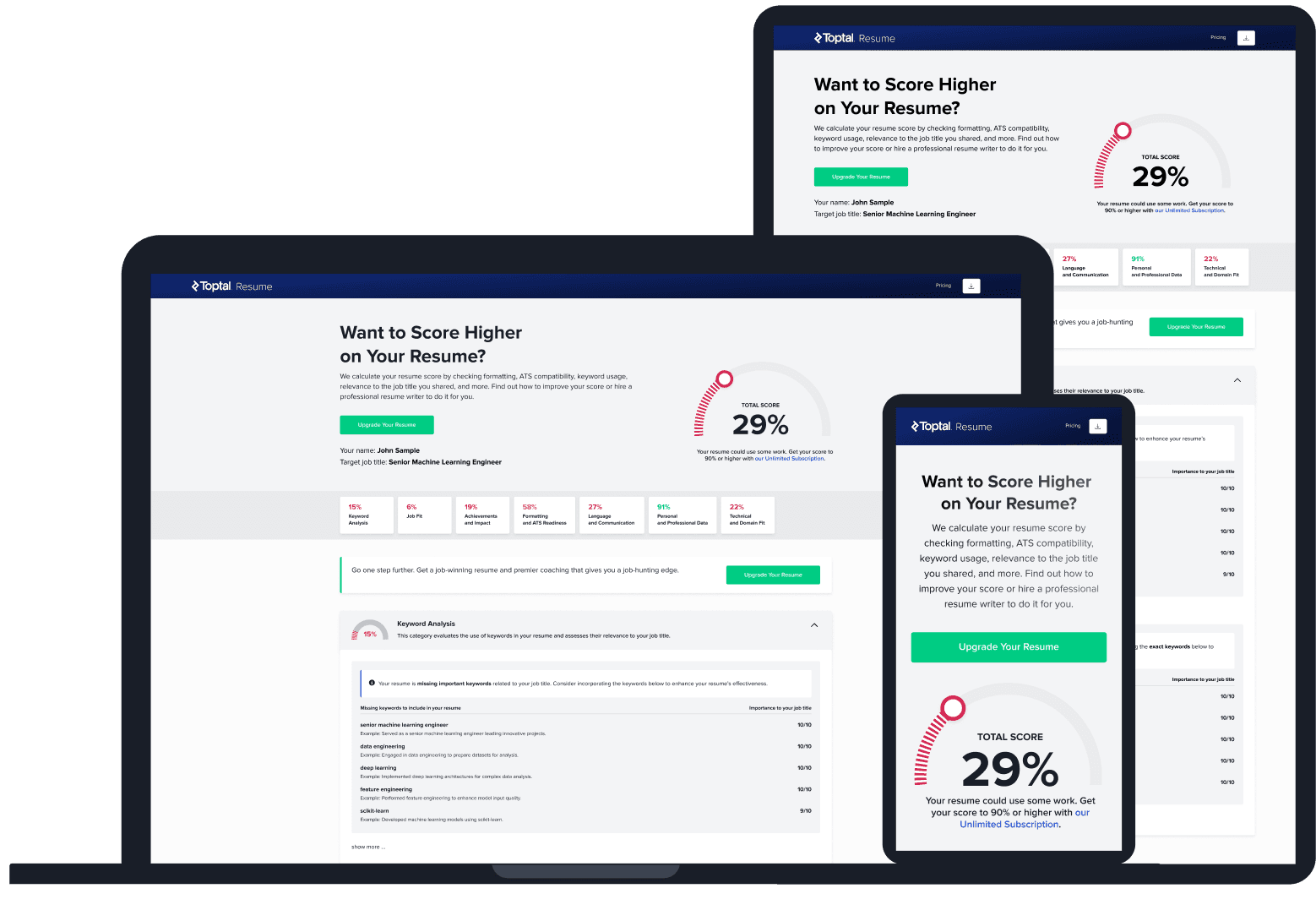
Upload your resume and tell us your target job title. Our system will analyze it the way a recruiter and ATS would—scoring it across core hiring dimensions and giving you personalized, role-specific feedback you can implement right away.
Read Next

Resume Tips
Resume Templates That Work: Formats, Examples, and How to Choose
The right resume template depends on your goals and experience, not your design preference. Here’s how to choose one that works for both ATS systems and human reviewers.

By Borislav Stojkov
Principal Resume Writer
Borislav Stojkov is a Principal Resume Writer at Toptal Resume. His professional track record includes personally reviewing and rewriting more than 2,000 resumes for professionals across industries. In his direct work with clients and the development of AI-based resume-writing services, he focuses on ATS-optimized structure, modern template design, and recruiter-aligned writing and formatting standards.
Resume Tips
Follow-up Email After Applying for a Job: Templates and Tips
A follow-up email after applying should be sent once, at the right time, and with something worth saying. Here’s how to do it without hurting your chances.
By Borislav Stojkov
Principal Resume Writer
Borislav Stojkov is a Principal Resume Writer at Toptal Resume. His professional track record includes personally reviewing and rewriting more than 2,000 resumes for professionals across industries. In his direct work with clients and the development of AI-based resume-writing services, he focuses on ATS-optimized structure, modern template design, and recruiter-aligned writing and formatting standards.
Resume Tips
Hard Skills vs. Soft Skills: What They Are and Where They Go on Your Resume
Hard skills go in your dedicated skills section. Soft skills go in your experience bullets. Here’s why that distinction matters and how to apply it.
By Borislav Stojkov
Principal Resume Writer
Borislav Stojkov is a Principal Resume Writer at Toptal Resume. His professional track record includes personally reviewing and rewriting more than 2,000 resumes for professionals across industries. In his direct work with clients and the development of AI-based resume-writing services, he focuses on ATS-optimized structure, modern template design, and recruiter-aligned writing and formatting standards.