
Spring Batch Tutorial: A Practical Guide to Scalable Batch Processing
Spring Batch keeps a long-running job from starting over when it fails. This tutorial builds a chunk-oriented customer report with Spring Boot and Java 21, then proves the job restarts safely.

Spring Batch keeps a long-running job from starting over when it fails. This tutorial builds a chunk-oriented customer report with Spring Boot and Java 21, then proves the job restarts safely.

Alexey is a Java developer with 20 years of server-side experience, eight of which he spent working directly with Spring Batch. His past projects include designing a Spring Batch application that runs a large set of scheduled jobs and migrating enterprise systems from EJB to Spring at T-Systems.
Expertise
Previous Role
Software ArchitectPreviously At

Spring Batch is a Java framework for processing data in bulk. Batch work runs in the background without ongoing user interaction, often for operations that run on a schedule: preparing bills, loading a day’s records, or generating reports. These jobs can take minutes or hours, so a failure near the end can be costly if the entire process has to start over. Saving progress as the job runs allows it to resume after a failure without repeating work that has already been completed and committed.
Those recovery mechanics come out of enterprise practice: Accenture and SpringSource built Spring Batch on Accenture’s decades of batch architecture work across mainframe COBOL, Unix C++, and Java, with the goal of standardizing batch processing for enterprise users.
My work focuses on Java and big data, and I’ve used Spring Batch to build document-processing pipelines, coordinate scheduled jobs, and distribute batch workloads across multiple Java processes. I value the framework for providing a structured way to manage both the processing and its recovery. Its reusable components help organize the work, handle failures, and restart jobs, reducing the amount of infrastructure developers need to build.
In this tutorial, I’ll show how these capabilities fit together as we build a customer report that reads a CSV file, filters customers by birthday month and transaction count, and writes the results to a database. We will configure jobs and steps, process records in chunks, add retry and skip policies, and test that a failed job restarts correctly. We will also cover scheduling and the options for scaling the work.
The example uses Spring Batch 6.0.4, Spring Boot 4.0.7, and Java 21. It is written for Spring developers who are comfortable with Java and the core Spring framework. The sample project includes the complete source, sample input, and automated tests. Code excerpts below come from that project; its source files include the imports and surrounding configuration.
What Is Spring Batch?
Spring Batch is a framework for building applications that process bounded collections of data: finite sets with a defined endpoint, such as the records in a CSV file or database records selected for a particular day. Unbounded data arrives continuously without a defined endpoint, such as an ongoing stream of sensor readings. A batch job can process a finite portion of that stream by selecting records within a specific time window. You supply the operations that read, transform, and write records; the framework supplies job and step execution, transaction integration, execution metadata, and configurable recovery behavior. Its reusable batch infrastructure reduces the amount of operational machinery each application has to implement.
A batch application might run every night, when a file arrives, or when an operator requests a backfill. Scheduling is a separate concern: Spring Batch manages the work after a job is launched. Spring Boot helps assemble the application and its dependencies.
When to Use Spring Batch: Common Java Batch Processing Use Cases
I reach for batch processing when the input is bounded, arrives on a schedule, and nobody needs the result more often than that schedule delivers it.
A document-processing pipeline I ran fit that pattern: We processed tens or hundreds of thousands of text documents in under an hour. Spring Batch let me log and skip malformed files so the remaining documents could still be processed. If a job failed, I could resume it from the last committed items without reprocessing the entire input.
The same need to process a defined set of records reliably comes up in other workloads:
- ETL pipelines: Extract a defined set of source records, transform them, and load a destination system.
- Data migration: Move a known population of records while tracking completed work and rejected items.
- Report generation: Produce a report from the data available at an agreed cutoff.
- Financial processing: Reconcile a day’s transactions or prepare periodic billing, with an execution history that supports investigation.
- Nightly maintenance: Refresh derived data or archive records during a scheduled processing window.
To decide whether batch processing fits your workload, consider how soon the results are needed. If each new record needs to trigger an immediate response, streaming or message-driven processing may be a better fit. If you need a report at the end of the day, a batch job can process that day’s records together, even when they arrive continuously.
Setting Up a Spring Batch Project With Spring Boot
For the tutorial, we will build a customer report that reads a CSV file, selects customers whose birthdays fall in the report month and who have fewer than five completed transactions, and writes the results to a database. First, we need a Spring Boot application with the dependencies and database configuration to support that work. We will use H2, a Java database we can run locally, to store both the report results and Spring Batch’s execution history.
By building this report, you’ll learn how to organize a batch job into steps, process records in manageable chunks, and handle invalid data and temporary failures. You’ll also learn how to test that a failed job resumes correctly, giving you a foundation for building reliable imports, reports, and other batch workflows.
Start with a Maven Java project from Spring Initializr, selecting Spring Batch and H2.
Project Dependencies
This example uses Maven to build the application and manage its dependencies, though the Spring Batch concepts also apply when using other build tools, such as Gradle. Maven’s pom.xml file lists the libraries the project needs and defines its build configuration.
Replace the generated pom.xml in the project’s root directory with the complete file below. It configures Java 21 and includes Spring Batch, the H2 database, and tools for monitoring and testing. Use this file to match the versions tested in this tutorial; the versions offered by Initializr change over time.
<?xml version="1.0" encoding="UTF-8"?>
<project xmlns="http://maven.apache.org/POM/4.0.0"
    xmlns:xsi="http://www.w3.org/2001/XMLSchema-instance"
    xsi:schemaLocation="http://maven.apache.org/POM/4.0.0
    https://maven.apache.org/xsd/maven-4.0.0.xsd">

    <modelVersion>4.0.0</modelVersion>

    <parent>
        <groupId>org.springframework.boot</groupId>
        <artifactId>spring-boot-starter-parent</artifactId>
        <version>4.0.7</version>
        <relativePath/>
    </parent>

    <groupId>com.example</groupId>
    <artifactId>customer-batch</artifactId>
    <version>1.0.0</version>

    <properties>
        <java.version>21</java.version>
    </properties>

    <dependencies>
        <dependency>
            <groupId>org.springframework.boot</groupId>
            <artifactId>spring-boot-starter-batch-jdbc</artifactId>
        </dependency>

        <dependency>
            <groupId>com.h2database</groupId>
            <artifactId>h2</artifactId>
            <scope>runtime</scope>
        </dependency>

        <dependency>
            <groupId>org.springframework.boot</groupId>
            <artifactId>spring-boot-starter-actuator</artifactId>
        </dependency>

        <dependency>
            <groupId>org.springframework.boot</groupId>
            <artifactId>spring-boot-starter-test</artifactId>
            <scope>test</scope>
        </dependency>

        <dependency>
            <groupId>org.springframework.batch</groupId>
            <artifactId>spring-batch-test</artifactId>
            <scope>test</scope>
        </dependency>
    </dependencies>

    <build>
        <plugins>
            <plugin>
                <groupId>org.springframework.boot</groupId>
                <artifactId>spring-boot-maven-plugin</artifactId>
            </plugin>
        </plugins>
    </build>

</project>
The <dependencies> section supplies the libraries we will use throughout the tutorial:
Dependency | Role in the Sample Project |
spring-boot-starter-batch-jdbc | Provides Spring Batch and the JDBC infrastructure for storing job execution history in a database |
h2 | Supplies the local database for customer-report results and batch execution history |
spring-boot-starter-actuator | Adds monitoring support, which we will use when discussing job metrics |
spring-boot-starter-test | Supplies general testing tools for the Spring Boot application |
spring-batch-test | Adds utilities for testing batch jobs, individual steps, and scoped components |
The dependencies marked <scope>test</scope> are used for testing and are excluded from the packaged application.
With the build configured, we need an application entry point: the class Java runs to start the program. The sample project’s BatchApplication class starts Spring Boot, which loads the application’s configuration:
package com.example.batch;

import org.springframework.boot.SpringApplication;
import org.springframework.boot.autoconfigure.SpringBootApplication;

@SpringBootApplication
public class BatchApplication {
    public static void main(String[] args) {
        var context = SpringApplication.run(
            BatchApplication.class, args);
        if (!context.getEnvironment().matchesProfiles("scheduled")) {
            System.exit(SpringApplication.exit(context));
        }
    }
}
For a command-line run, the application closes its context and returns an exit code after the job finishes. The scheduled profile keeps it running for future triggers.
Essential Spring Batch Configuration Properties
Save the following settings in src/main/resources/application.properties. They configure the local database and preserve batch state between application runs:
spring.application.name=customer-batch
spring.main.web-application-type=none
spring.datasource.url=jdbc:h2:file:./data/customer-batch
spring.datasource.username=sa
spring.datasource.password=
spring.batch.jdbc.initialize-schema=always
spring.sql.init.mode=always
spring.batch.job.enabled=true
spring.batch.job.name=customerReportJob
spring.datasource.hikari.maximum-pool-size=8
logging.level.com.example.batch=INFO
spring.batch.job.enabled=true lets Spring Boot launch the configured job at application startup. Set it to false when a scheduler or another launcher owns execution. spring.batch.job.name selects the job when needed. These are Boot integration settings, rather than a scheduling service inside Spring Batch.
spring.batch.jdbc.initialize-schema controls initialization of the batch metadata tables:
Value | Behavior |
embedded | Initialize for an embedded database, such as H2. This is the default. |
always | Attempt initialization regardless of database type. Use it for a self-contained demonstration. |
never | Leave schema management to your deployment process. |
spring.sql.init.mode=always separately runs our application schema.sql, which creates the customer-report table. For production, manage both schemas through migrations and disable these automatic initializers.
The example relies on Boot auto-configuration, so it does not add @EnableBatchProcessing. Adding that annotation opts out of Boot’s batch auto-configuration. In a manually configured Spring Batch 6 application, @EnableBatchProcessing configures common infrastructure, while @EnableJdbcJobRepository selects JDBC persistence. A resourceless repository cannot supply the durable restart behavior demonstrated here.
Spring Batch Architecture and Core Concepts
Spring Batch organizes a batch process as a Job containing one or more Steps. The job defines the overall work to perform, and each step handles a distinct phase of that work.
In a step that processes records in chunks, an ItemReader supplies the records, an optional ItemProcessor transforms or filters them, and an ItemWriter writes the results. A JobLauncher starts the job, while a JobRepository records its executions and progress.
Jobs, Steps, and the Batch Domain Language
Spring Batch distinguishes the definitions of jobs and steps from individual attempts to run them:
Concept | Meaning |
Job | The definition of a batch process, including its steps and how they are connected |
JobInstance | One unit of work identified by the job name and its identifying parameter values, which can require more than one attempt to complete |
JobExecution | One attempt to run a job instance, recording its outcome and execution details |
Step | A distinct phase of a job |
StepExecution | One attempt to execute a step, with its status, counts, and checkpoint state |
I have found JobInstance particularly easy for new developers to misunderstand. It helps to separate the work we intend to complete from each attempt to complete it. A JobInstance identifies that work using the job’s name and its identifying job parameters: Values supplied when starting the job that distinguish one unit of work from another. A JobExecution records what happened during a single attempt, including its status and start and end times.
For a restartable job, a failed attempt can be followed by another JobExecution for the same JobInstance, using saved progress. Once an execution completes successfully, that instance is complete and cannot be run again. Changing the identifying parameter values creates a different instance with its own execution history. This distinction between instances and executions allows Spring Batch to track both the work requested and the attempts needed to finish it.
JobLauncher and JobRepository
The launcher starts a job; the repository records its progress. In Spring Batch 6, JobOperator extends JobLauncher and adds operations such as restart and stop, while JobRepository also includes the exploration functionality previously accessed separately through JobExplorer. This infrastructure simplification lets us inject fewer separate collaborators than in older versions.
The JDBC batch starter we added during setup supplies a database-backed JobRepository. When we define the job and its steps, we will pass this repository to their builders so Spring Batch can record execution details.
The repository’s metadata is separate from the application’s business output. A completed-step status, for example, belongs to the repository; a row written to a customer-report table belongs to the application. Both can live in the same database, as they do in this tutorial.
Tasklet vs. Chunk-oriented Processing: Choosing a Step Model
To implement a step, we can use a tasklet or chunk-oriented processing. I generally choose a tasklet for a discrete operation, such as checking that a file is ready, moving it into place, or invoking a stored procedure. For record-by-record processing, I usually choose chunks so the job can commit completed groups of records as it runs.
For example, if 400,000 of a million records have been processed and committed before a failure, a restartable chunk step can resume processing the remaining records. Tasklets often handle preparation and cleanup around that main processing step.
The table below compares how tasklets and chunk-oriented steps organize work, handle transactions, and support recovery, so you can choose the model that suits each step in your job.
Consideration | Tasklet Step | Chunk-oriented Step |
Unit of Work | A call to Tasklet.execute() | A configured group of input items |
Good Fit | Preparation, cleanup, or a discrete operation | Repeated reading, processing, and writing |
Transaction Boundary | Each call to execute() is wrapped in a transaction | Each chunk commits as a unit |
Progress and Recovery | Depend on the tasklet’s implementation | Can use reader checkpoints and per-item processing statistics |
Throughput | Depends on the operation and its implementation | Chunk size trades transaction overhead against memory use and rollback work |
A tasklet can return RepeatStatus.CONTINUABLE and be invoked again; it is not inherently one transaction for the entire step. Also, a file system move does not become transactional merely because it happens inside a tasklet. The tasklet contract defines invocation and transaction boundaries; the resources involved determine what can actually roll back.
A Spring Batch Example: Building a Chunk-oriented Job
Our sample customer report will read a CSV file and apply two processors in sequence: One selects customers whose birthdays fall in the report month, and the other filters for fewer than five completed transactions. The customers who pass both filters will be written to the database.
Keeping the workflow simple makes it easier to follow how Spring Batch processes records and handles failures. You can later extend it to download input files from a server, apply more complex business rules, or send results to an external service.
Save the following six customer records and header in input/customers.csv, relative to the project root:
id,name,birthday,transactions
1,Ada,1990-09-12,2
2,Ben,1985-10-03,1
3,Cleo,1992-09-20,5
4,Diego,1988-09-30,0
5,Eve,1995-09-08,-1
6,Farah,invalid-date,1
The customer model is a Java record:
public record Customer(
    long id,
    String name,
    LocalDate birthday,
    int transactions) { }
For a September report, customers Ada and Diego qualify. Ben and Cleo are valid customers excluded by the selection rules. Eve’s negative transaction count is invalid, and Farah’s date cannot be parsed. Keeping those outcomes separate will make the filtering and skip counters useful.
Our report follows the three-step flow shown below: Prepare the input, import customers, and report a summary. The import step uses the reader, processor, and writer; preparation and reporting each use a tasklet.
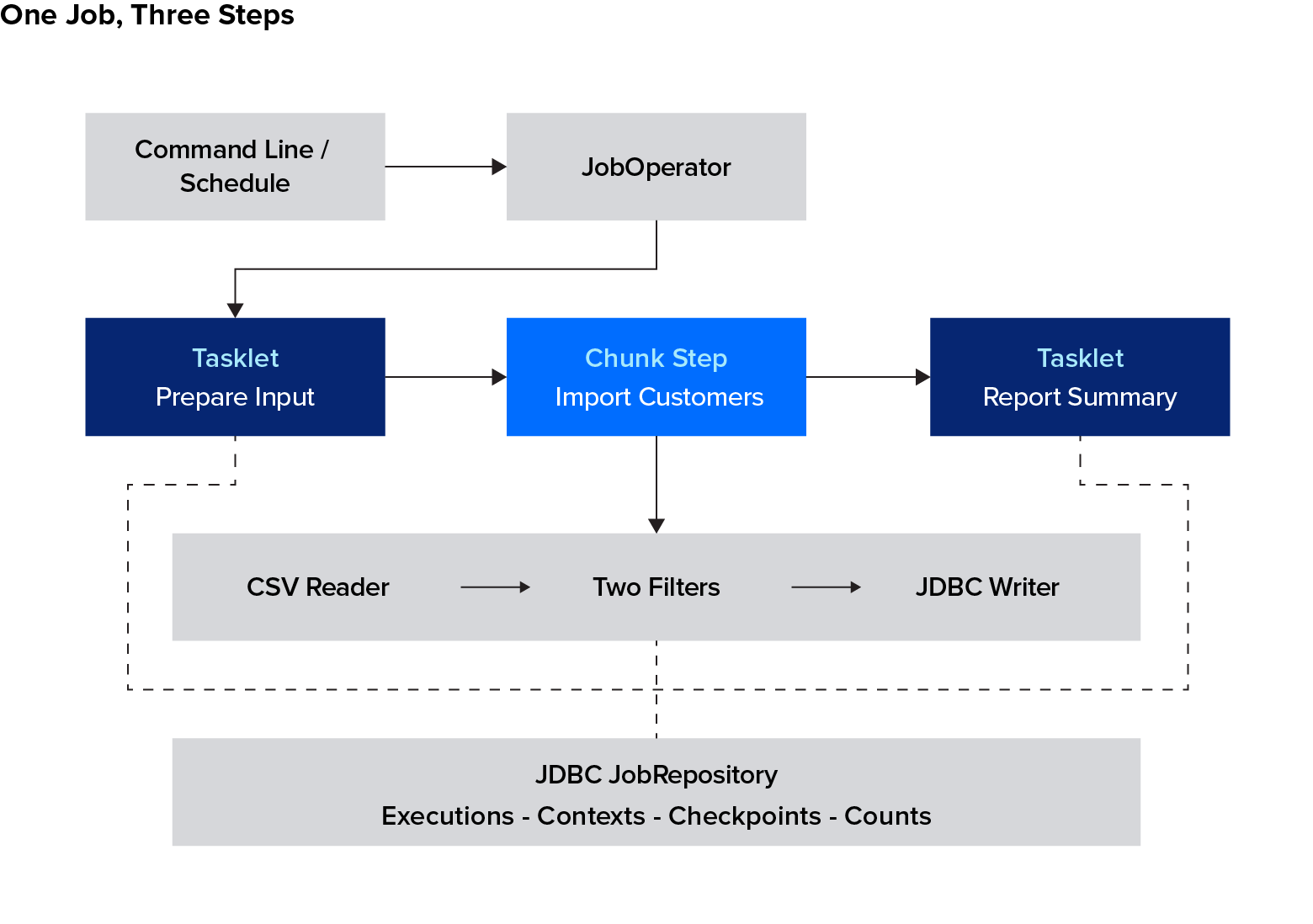
The job defines the sequence of operations. The JDBC repository records executions and restart state, and the writer stores the selected customers in an application table.
Configuring the Job and Step With JobBuilder and StepBuilder
The job definition specifies the step order and requires an input path and report date. These bean definitions live in a @Configuration class. The sample project keeps the linear job and its steps in CustomerJobConfiguration and puts the scaling, conditional-flow, and scheduling variants in separate configuration classes, each activated by a Spring profile. The @Profile expression below selects this job when none of those variants is active:
@Bean
@Profile("!flow & !partition & !parallel")
public Job customerReportJob(
    JobRepository repository,
    Step prepareInput,
    Step importCustomers,
    Step reportSummary) {

    return new JobBuilder("customerReportJob", repository)
        .validator(new DefaultJobParametersValidator(
            new String[]{"inputFile", "reportDate"},
            new String[]{"revision"}))
        .start(prepareInput)
        .next(importCustomers)
        .next(reportSummary)
        .build();
}
prepareInput validates the input, importCustomers processes it, and reportSummary queries and logs the selected-customer count. The import step is configured as follows:
@Bean
public Step importCustomers(
    JobRepository repository,
    PlatformTransactionManager tx,
    FlatFileItemReader<Customer> customerReader,
    CompositeItemProcessor<Customer, Customer> customerProcessor,
    JdbcBatchItemWriter<Customer> customerWriter,
    ObservationRegistry observations) {

    return new StepBuilder("importCustomers", repository)
        .<Customer, Customer>chunk(2)
        .transactionManager(tx)
        .reader(customerReader)
        .processor(customerProcessor)
        .writer(customerWriter)
        .faultTolerant()
        .retry(TransientDataAccessException.class)
        .retryLimit(3)
        .skip(FlatFileParseException.class,
            InvalidCustomerException.class)
        .skipLimit(10)
        .skipListener(new BatchListeners.RejectLogger())
        .listener(new BatchListeners.StepSummary())
        .observationRegistry(observations)
        .build();
}
The chunk size of two makes commits easy to inspect with a small file. Choose a production value through measurement: Larger chunks reduce commit frequency but increase the work that must be rolled back after failure.
The modern builders replace the old injected JobBuilderFactory and StepBuilderFactory. Notice the Spring Batch 6 form, .chunk(2).transactionManager(tx). It selects the new chunk implementation. The older .chunk(2, tx) overload is deprecated in 6.0. The explicit transaction manager matters because the writer uses JDBC. Spring Batch 6 also reorganized packages, including moving item APIs under org.springframework.batch.infrastructure.item; use the sample project’s imports when adapting older code.
The fault-tolerance and listener settings are included here so the example is runnable as presented. We will examine their behavior below.
Sharing Data Between Steps With ExecutionContext
The preparation step needs to make the validated input path available to the import step. Spring Batch provides an ExecutionContext, a collection of named values associated with a job or step execution, for storing this kind of state. Each step has its own context; the job has another context shared across its steps.
Putting a value into a step context does not automatically make it available in the next step. Use an ExecutionContextPromotionListener to promote selected values after successful completion.
Our preparation step checks the input file and records its path. The listener promotes that path into the job context:
@Bean
public Step prepareInput(
    JobRepository repository,
    PlatformTransactionManager tx) {

    var promotion = new ExecutionContextPromotionListener();
    promotion.setKeys(new String[]{"inputFile"});
    promotion.setStrict(true);

    return new StepBuilder("prepareInput", repository)
        .tasklet((contribution, context) -> {
            var step = contribution.getStepExecution();
            String input = step.getJobParameters()
                .getString("inputFile");
            var resource = new FileSystemResource(input);

            if (!resource.exists() || !resource.isReadable()) {
                throw new IllegalArgumentException(
                    "Cannot read input file: " + input);
            }

            step.getExecutionContext()
                .putString("inputFile", input);

            return RepeatStatus.FINISHED;
        }, tx)
        .listener(promotion)
        .build();
}
The reader will bind to that promoted inputFile value when the import step starts. This simple example demonstrates the mechanism without adding a file-download service. In a larger pipeline, preparation could produce a validated staging-file path or an import identifier.
Keep contexts small: Store paths, identifiers, and checkpoint values. Large datasets belong in files or tables. Values must also be compatible with the configured execution-context serializer.
Understanding @StepScope and @JobScope
The input path and report date become available when a job runs. A @StepScope bean is created for a step execution, allowing its configuration to bind to those runtime values:
@Bean
@StepScope
public FlatFileItemReader<Customer> customerReader(
    @Value("#{jobExecutionContext['inputFile']}")
    String inputFile) {

    return readerFor(inputFile);
}
@JobScope provides a corresponding instance for a job execution. Use a scope because a component needs runtime state, rather than adding it to every bean. In partitioned work, each worker should have its own step-scoped reader. Job-scoped beans have limitations in multithreaded and partitioned steps, so the scaling example uses step scope for its reader, processor, and writer.
Return a concrete reader or an interface exposing its ItemStream life cycle when defining a scoped reader bean. Spring Batch must be able to call open, update, and close to manage its checkpoint state and resources.
Reading Data With ItemReader and FlatFileItemReader
ItemReader.read() returns one item at a time and returns null when input is exhausted. FlatFileItemReader supplies file reading and restart state; we supply the CSV mapping:
public static FlatFileItemReader<Customer> readerFor(String inputFile) {
    return new FlatFileItemReaderBuilder<Customer>()
        .name("customerReader")
        .resource(new FileSystemResource(inputFile))
        .strict(true)
        .linesToSkip(1)
        .delimited()
        .names("id", "name", "birthday", "transactions")
        .fieldSetMapper(fields -> new Customer(
            fields.readLong("id"),
            fields.readString("name"),
            LocalDate.parse(fields.readString("birthday")),
            fields.readInt("transactions")))
        .build();
}
The reader skips the header, parses four fields, and converts each row into a Customer. A malformed date becomes a FlatFileParseException, which the step’s skip policy recognizes. The reader’s stable name identifies its checkpoint entries.
Choose a built-in reader that matches the source:
Reader | Source and Use |
FlatFileItemReader | Delimited or fixed-width text files, including CSV |
JdbcCursorItemReader | A JDBC query consumed through a database cursor |
JpaPagingItemReader | JPA query results retrieved a page at a time |
A restartable reader also needs stable input. Replacing or reordering a CSV file between attempts can make a saved row position point at different data. Use an immutable file for each logical import.
Transforming Data With ItemProcessor and CompositeItemProcessor
The reader converts CSV rows into Customer objects. We now need to decide which customers belong in the report: those whose birthdays fall in the report month and who have fewer than five completed transactions. An ItemProcessor applies business rules between reading and writing, allowing us to validate, transform, or filter each item before it reaches the database.
We will use two processors to apply the selection rules in sequence. The first checks for invalid customer data, then passes through customers whose birthday month matches the report month:
public class BirthdayFilterProcessor
    implements ItemProcessor<Customer, Customer> {

    private final LocalDate reportDate;

    public BirthdayFilterProcessor(LocalDate reportDate) {
        this.reportDate = reportDate;
    }

    @Override
    public Customer process(Customer customer) {
        if (customer.id() <= 0 || customer.name().isBlank()
            || customer.transactions() < 0) {
            throw new InvalidCustomerException(
                "Invalid customer: " + customer.id());
        }

        return customer.birthday().getMonth() == reportDate.getMonth()
            ? customer : null;
    }
}
An explicit reportDate keeps the result deterministic. A report restarted in October should still use September’s selection rules if it was originally a September run.
The second processor filters out customers with five or more completed transactions:
public class TransactionValidatingProcessor
    extends ValidatingItemProcessor<Customer> {

    public TransactionValidatingProcessor(int limit) {
        super(customer -> {
            if (customer.transactions() >= limit) {
                throw new ValidationException(
                    "Customer has at least " + limit
                    + " transactions");
            }
        });

        setFilter(true);
    }
}
With setFilter(true), a validation failure becomes a filtered item. A customer with five or more transactions is outside this report’s audience. Invalid source data, such as a negative count, instead raises InvalidCustomerException in the first processor and is handled by the skip policy.
CompositeItemProcessor runs the processors in order:
@Bean
@StepScope
public CompositeItemProcessor<Customer, Customer> customerProcessor(
    @Value("#{jobParameters['reportDate']}") String reportDate) {

    var processor = new CompositeItemProcessor<Customer, Customer>();
    processor.setDelegates(List.of(
        new BirthdayFilterProcessor(LocalDate.parse(reportDate)),
        new TransactionValidatingProcessor(5)));

    return processor;
}
Returning null filters an item, so it does not reach later delegates or the writer. This is different from a processing failure recorded as a skip. The item-processing model supports both filtering and transformation; a processor can also return an entirely different output type.
Writing Data With ItemWriter and JdbcBatchItemWriter
JdbcBatchItemWriter sends the selected customers to an application table within the chunk transaction. In this project, customer writes and repository updates use the same data source and transaction manager, so the output and its checkpoint can commit together. Spring Batch 6 writers receive the items to write in a Chunk.
The table uses the report date and customer ID as its primary key:
CREATE TABLE IF NOT EXISTS customer_report (
    report_date DATE NOT NULL,
    customer_id BIGINT NOT NULL,
    customer_name VARCHAR(120) NOT NULL,
    birthday DATE NOT NULL,
    transactions INTEGER NOT NULL,
    PRIMARY KEY (report_date, customer_id)
);
The writer uses H2’s upsert syntax:
@Bean
@StepScope
public JdbcBatchItemWriter<Customer> customerWriter(
    DataSource dataSource,
    @Value("#{jobParameters['reportDate']}") String reportDate) {

    return new JdbcBatchItemWriterBuilder<Customer>()
        .dataSource(dataSource)
        .sql("""
            MERGE INTO customer_report
            (report_date, customer_id, customer_name,
            birthday, transactions)
            KEY (report_date, customer_id) VALUES (?, ?, ?, ?, ?)
            """)
        .itemPreparedStatementSetter((customer, statement) -> {
            statement.setDate(1, Date.valueOf(reportDate));
            statement.setLong(2, customer.id());
            statement.setString(3, customer.name());
            statement.setDate(4, Date.valueOf(customer.birthday()));
            statement.setInt(5, customer.transactions());
        })
        .build();
}
MERGE ... KEY inserts a new row or updates the existing row for that key. Reprocessing the same customer for the same report therefore does not append a duplicate. This is H2-specific SQL; use your target database’s equivalent and keep the unique constraint. Also, an upsert does not delete customers who disappear from a revised input. Replacing a complete report snapshot requires an additional reconciliation strategy.
Other built-in writers suit different destinations:
Writer | Destination or Purpose |
JdbcBatchItemWriter | Execute batched JDBC writes. |
FlatFileItemWriter | Write formatted records to a file. |
JpaItemWriter | Persist through JPA. |
CompositeItemWriter | Pass a chunk to multiple delegate writers. |
A composite writer does not guarantee that writes to different systems succeed or roll back together. If one delegate writes to a database and another calls an external API, design explicitly for partial failure and repeated delivery.
Build and run the project from its root directory. The commands below use Bash-style line continuation (\):
mvn clean verify

java -jar target/customer-batch-1.0.0.jar \
    inputFile=input/customers.csv \
    reportDate=2026-09-07
Job parameters use name=value. Application settings use --name=value, as documented in Boot’s command-line batch guidance.
The importCustomers step reports read=5, filtered=2, written=2, and skipped=2. There are six input records, but the unparseable line does not count as a successful read. The database contains Ada and Diego for the report date.
Exception Handling, Retry, and Skip Strategies
In production, many temporary failures come from infrastructure: timeouts, network interruptions, or a service that briefly cannot accept work. When deciding whether to retry a failed operation, I consider whether another attempt could succeed without changing the input. A request that timed out may succeed once the service recovers; a malformed record will generally fail again until the data is corrected. Both retries and skips need limits and monitoring.
Configuring Retry for Transient Errors
Retry settings belong on the step that performs the fragile operation, which in our job is importCustomers. To handle temporary database failures there, we included the following settings in its configuration. TransientDataAccessException identifies database-access failures for which another attempt may succeed:
.retry(TransientDataAccessException.class)
.retryLimit(3)
For the Spring Batch 6 chunk API used here, retryLimit(3) permits three retries after the initial attempt. The test suite verifies four failed writer calls before the step fails. If the writer fails twice and then succeeds, the job completes. When a thrown exception wraps a transient cause, the retry policy can classify that cause.
Keep retry categories narrow. An authorization failure or a permanently invalid SQL statement needs intervention. For remote calls, configure timeouts and a bounded backoff policy, and establish whether retrying can repeat a side effect. The JDBC example has no remote service to call.
Configuring Skip Logic for Invalid Records
The sample project tolerates malformed CSV and invalid customer data, up to 10 skipped records in the step execution:
.skip(FlatFileParseException.class, InvalidCustomerException.class)
.skipLimit(10)
The 11th invalid record fails the step. A skip limit is a business decision: Tolerating an incomplete marketing report may be acceptable, while omitting a financial transaction may require stopping the run.
Spring Batch 6.0.4’s default LimitCheckingExceptionHierarchySkipPolicy checks nested causes as well as the thrown exception. When configuring another skip policy, verify its classification behavior explicitly.
Infrastructure failures are not skippable in this example. Exhausting database retries therefore fails the step rather than silently discarding customer output.
Handling Errors With Batch Listeners
Listeners make execution outcomes visible. A read, process, or write error callback reports an error during an attempt; a SkipListener reports a record that is being skipped. These are different events when an operation is retried successfully.
Our reject listener logs a CSV line number or customer ID, avoiding raw customer data in the message:
public static class RejectLogger
    implements SkipListener<Customer, Customer> {

    @Override
    public void onSkipInRead(Throwable error) {
        if (error instanceof FlatFileParseException parseError) {
            log.warn("Rejected CSV line {} ({})",
                parseError.getLineNumber(),
                error.getClass().getSimpleName());
        }
    }

    @Override
    public void onSkipInProcess(Customer customer, Throwable error) {
        log.warn("Rejected customer {} ({})", customer.id(),
            error.getClass().getSimpleName());
    }
}
The step summary logs counts and returns COMPLETED WITH SKIPS when a completed import has rejected records. A real reject-management workflow should retain enough information to locate and repair the input, with access and retention controls appropriate to the data. The example’s log is a diagnostic aid.
Listeners also have a boundary: They cannot report a JVM crash after the process has disappeared. In my work, execution states and durations in the repository, together with metrics, are necessary to find a job that has stopped making progress. A missing completion signal deserves attention even if no listener recorded an error.
Controlling Job Flow With Conditional Steps
Conditional flow becomes useful when the next operation depends on an outcome, such as whether a completed import has rejected records that need review. My own production pipelines have mostly followed a straightforward sequence, so I introduce branching only when a step’s result genuinely changes what happens next.
The project’s flow profile replaces the linear job with this definition:
@Bean
public Job customerReportJob(
    JobRepository repository,
    Step prepareInput,
    Step importCustomers,
    Step reviewRejects,
    Step reportSummary) {

    return new JobBuilder("customerReportJob", repository)
        .start(prepareInput).on("COMPLETED").to(importCustomers)
        .from(prepareInput).on("*").fail()
        .from(importCustomers)
        .on("COMPLETED WITH SKIPS").to(reviewRejects)
        .from(importCustomers).on("COMPLETED").to(reportSummary)
        .from(importCustomers).on("*").fail()
        .from(reviewRejects).on("COMPLETED").to(reportSummary)
        .from(reviewRejects).on("*").fail()
        .end().build();
}
.on(...) matches a step’s ExitStatus code. A successful import with skips goes to reviewRejects; a clean import goes directly to reportSummary. The example’s review step sets a flag in the job context. It leaves notification delivery outside the tutorial.
The wildcard failure branches make unexpected outcomes fail the job. A .fail() transition preserves failure semantics; using .end() on a failed branch can mark the job complete and prevent a normal restart. Spring’s flow-control documentation explains the distinction between framework BatchStatus and the ExitStatus used for routing.
For a decision that needs its own logic, such as checking whether fresh source data is available, use a JobExecutionDecider. Keep simple exit-status routing readable before introducing another component.
Scaling Spring Batch for High-volume Jobs
When the work inside a single job needs to run faster, exhaust parallel processing within one JVM before moving to arrangements that span processes. Spring Batch supports several approaches inside a single process, including multithreaded steps and partitioning, which divides a step’s input among workers. In my own batch work I had many separate jobs to run, so I distributed whole jobs across multiple JVMs, each a separate Java process, with coordination of where and when they ran handled outside the individual step definitions.
Start by measuring the slow part of a representative run. Check database queries, indexes, connection availability, processor cost, and chunk size before increasing concurrency. Additional workers cannot compensate for a destination that is already saturated.
Multithreaded Steps
In Spring Batch 6, a multithreaded step runs item processing concurrently while reading and writing stay serial, so the processor is the component that has to be thread-safe. In the sample project, a Spring profile named parallel enables a multithreaded version of the customer import step; a profile selects which configuration is loaded when the application starts. This version gives the chunk step an executor to run item processing on multiple threads:
@Bean
@Profile("parallel")
public Step parallelImport(
    JobRepository repository,
    PlatformTransactionManager tx,
    FlatFileItemReader<Customer> customerReader,
    CompositeItemProcessor<Customer, Customer> customerProcessor,
    JdbcBatchItemWriter<Customer> customerWriter,
    ThreadPoolTaskExecutor batchWorkers) {

    return new StepBuilder("parallelImport", repository)
        .<Customer, Customer>chunk(20).transactionManager(tx)
        .reader(customerReader)
        .processor(customerProcessor)
        .writer(customerWriter)
        .taskExecutor(batchWorkers).build();
}
This parallel example uses the clean input file, input/customers-clean.csv. Its step has no retry or skip policy, so invalid records fail the run. The sample project’s README provides the command for running this version with its own demonstration database.
The executor uses four workers and a queue that can hold this example’s 20-item chunk:
@Bean
public ThreadPoolTaskExecutor batchWorkers() {
    var executor = new ThreadPoolTaskExecutor();
    executor.setCorePoolSize(4);
    executor.setMaxPoolSize(4);
    executor.setQueueCapacity(20);
    executor.setThreadNamePrefix("batch-worker-");
    executor.setWaitForTasksToCompleteOnShutdown(true);
    return executor;
}
With this Spring Batch 6 implementation, processors run concurrently while reading and writing remain serial. The processor must therefore be thread-safe. Our delegates use immutable configuration and keep no changing per-item state. Their worker-thread calls also run outside the main thread’s chunk transaction, so avoid assuming a database operation inside a parallel processor shares that transaction.
Keep executor capacity aligned with submitted work. A queue that is too small can reject tasks even when the job’s data is valid. The sample project’s tests verify actual concurrent processing as well as the final output.
Spring Batch 6 also offers local chunking, which delegates whole chunks to local workers. It requires the delegate to manage the chunk’s transactions and fault tolerance. Use it when that control matches the bottleneck. Parallel step flows are another option when independent phases can run together. These scaling models have different state and transaction implications.
Partitioning Large Workloads
Partitioning gives workers independent slices of input and separate step executions. A database source might be divided into nonoverlapping ID ranges. For the file-based tutorial, the partition profile uses files that have already been split into independent inputs.
The partitioner supplies each worker’s file name through its step context:
@Bean
@Profile("partition")
@StepScope
public Partitioner filePartitioner(
    @Value("#{jobParameters['inputFiles']}") String inputFiles) {

    return gridSize -> {
        Map<String, ExecutionContext> partitions =
            new LinkedHashMap<>();

        String[] paths = inputFiles.split(",");

        for (int i = 0; i < paths.length; i++) {
            var context = new ExecutionContext();
            context.putString("fileName", paths[i].trim());
            partitions.put("file" + i, context);
        }

        return partitions;
    };
}
The manager connects those partitions to the worker step:
@Bean
@Profile("partition")
public Step partitionedImport(
    JobRepository repository,
    Step customerWorker,
    Partitioner filePartitioner,
    ThreadPoolTaskExecutor batchWorkers) {

    return new StepBuilder("partitionedImport", repository)
        .partitioner("customerWorker", filePartitioner)
        .step(customerWorker)
        .gridSize(4)
        .taskExecutor(batchWorkers)
        .build();
}
Each worker uses a step-scoped reader bound to stepExecutionContext['fileName']. The tests process two files, verify separate worker executions, and check that all 100 test customers appear exactly once in the output table.
This example runs workers within one JVM. Remote partitioning places worker steps in separate processes and adds communication and deployment configuration. Preserve stable partition names and input boundaries across a restart. A gridSize value is a hint to the partitioner; our one-file-per-partition implementation returns as many partitions as file names, so executor capacity must accommodate the submitted work.
Monitoring Jobs With Micrometer and JFR
Monitoring should tell us whether a job finished in time, produced the expected output, and is getting slower as the workload grows. Three signals are particularly useful:
- Completion time and status: Check that the job starts and finishes before its results are needed. Compare job and step durations with previous runs of a similar size. A job that remains active beyond its usual duration warrants investigation even if it has not reported a failure.
- Record counts: Compare records read, filtered, skipped, and written with the expected input and selection rules. A completed job can still produce an unexpectedly small report. Rising skip counts suggest problems with the source data; more filtered records may simply reflect a different customer population.
- Processing rate: Track how many records the job handles per minute. If that rate falls for comparable input, examine the time spent reading, processing, and writing to narrow down where the slowdown occurs.
The job repository stores execution status, timestamps, and step counters, allowing us to investigate a particular run. Micrometer’s timing metrics cover jobs, steps, and read, process, and write operations. Tracking those metrics across runs helps reveal gradual slowdowns that a single successful execution would not show.
In the sample project, the importCustomers step receives an ObservationRegistry, with Actuator providing the application’s observability infrastructure. Exporting metrics to a monitoring service requires configuring an appropriate registry. Spring Batch 6 additionally emits Java Flight Recorder events, which can help investigate execution behavior alongside JVM activity. A local recording can be started with:
java \
    -XX:StartFlightRecording=filename=batch.jfr,settings=profile \
    -jar target/customer-batch-1.0.0.jar \
    inputFile=input/customers.csv \
    reportDate=2026-09-09
Use recordings to investigate a specific performance question. Keep operational alerts focused on actionable conditions, such as a missed processing window or a rising reject count.
Scheduling Spring Batch Jobs
I have used Spring’s @Scheduled annotation with ShedLock to prevent different application instances from executing the same scheduled task concurrently. When several copies of an application are running, each can trigger its own scheduled method. ShedLock coordinates those copies through a shared lock: one instance acquires it and runs the task, while competing triggers skip execution for as long as the lock is held.
The rerun issues I encountered were mostly related to job parameters. A lock coordinates access to the scheduled task; Spring Batch uses the job name and identifying parameters to determine which work that task is requesting. Those parameters must distinguish a new report from another attempt to finish an existing one. Scheduling therefore involves both choosing when to launch and supplying parameters that identify the intended work.
Running Jobs on a Cron Schedule
Use @Scheduled with a cron expression to launch the job, and set spring.batch.job.enabled=false so it does not also run at startup. The sample project’s scheduled profile demonstrates this in a single application process. ShedLock integration would be an additional step for a deployment with multiple application instances.
The @Scheduled annotation below tells Spring to call runDailyReport() every day at 02:00 UTC. That method asks JobOperator to launch the customer-report job with parameters for the current date:
@Scheduled(cron = "0 0 2 * * *", zone = "UTC")
public void runDailyReport() throws Exception {
    try {
        operator.start(job,
            parametersFor(LocalDate.now(ZoneOffset.UTC)));
    } catch (JobInstanceAlreadyCompleteException
        | JobExecutionAlreadyRunningException ex) {
        log.info("Daily report already complete or running");
    }
}
Spring’s cron expression has a seconds field, so 0 0 2 * * * means 02:00 daily in the specified UTC zone. The launcher expects an immutable file named for that date. Ensure the file has arrived completely before the trigger, or make readiness part of the launch process.
When adding ShedLock, configure a shared lock store and a lock duration that covers the work being protected. If launching is asynchronous, returning from the scheduling method can release a lock while the batch job continues. An external scheduler or a container job is another deployment option.
Ensuring Unique Job Instances
Use parameter values that identify the business work:
public static JobParameters parametersFor(LocalDate date) {
    return new JobParametersBuilder()
        .addString("reportDate", date.toString())
        .addString("inputFile", "input/customers-" + date + ".csv")
        .toJobParameters();
}
This produces the same identity for duplicate triggers on the same date and a new identity on the next date. All nodes must agree on those values and use the same durable repository. Different path strings for the same physical file would produce different identities in this example.
A timestamp or JobParametersIncrementer with startNextInstance can create new instances when every invocation genuinely represents new work. For a daily report, an arbitrary timestamp makes accidental duplicate launches harder to recognize and turns a retry into another instance. Preserve the original parameters when restarting a failed run.
Repository protections apply to the same job instance. They do not prevent different instances from overlapping on the same business data; coordinate that separately when overlap would be unsafe.
Building Restartable, Production-ready Batch Jobs
A safe restart needs both a reliable checkpoint and a destination that tolerates repeated work. The project’s restart test writes a chunk, deliberately fails after writing the next chunk’s SQL, and checks that those uncommitted writes roll back. Restarting then reads and writes only to the remaining customers.
Spring Batch can restore a reader’s saved state when the same instance restarts. This depends on a persistent repository, a stateful reader configured to save its position, and unchanged input. In our job, the completed preparation step is skipped on restart, while the promoted input path remains available.
I also use per-item identifiers to make repeated processing safe. Depending on the source, that identifier might be a URL, URI, file name, or another stable business key. The check and write must be safe together: A separate “already processed?” query followed by an insert can still race with another worker. Here, the database key and upsert enforce the intended behavior.
For external side effects, define an idempotency key or use a transactional outbox. A database rollback cannot unsend an HTTP request or an email. Keep these boundaries explicit when extending the example.
A hard process failure needs additional operational handling because repository status may remain STARTED. Spring Batch 6 provides JobOperator.recover for recovering stale execution state. First establish that the original execution is no longer running, then reconcile any uncertain external effects before recovery and restart. Do not change identifying parameters merely to bypass a stuck execution.
Testing Spring Batch Jobs
The hardest batch tests are often partial failures and restarts. A COMPLETED status alone cannot establish that the right rows were written, a failed chunk rolled back, or rejected input stayed within policy.
The spring-boot-starter-test dependency in our pom.xml supplies the testing libraries, with Spring Boot 4.0.7 selecting JUnit Jupiter 6.0.3. Boot manages that version alongside the other dependencies, so we do not need to specify a separate JUnit version. Jupiter provides the annotations and execution engine for our tests: @Test marks a test method, and @BeforeEach marks setup code to run before each test. Both annotations come from org.junit.jupiter.api.
For tests that exercise the batch application, annotate the test class with @SpringBootTest and @SpringBatchTest. @SpringBootTest loads the application’s Spring configuration and integrates Jupiter with Spring, allowing the test to receive beans through dependency injection. @SpringBatchTest adds utilities for launching jobs and steps and working with batch execution contexts.
In Spring Batch 6, we inject JobOperatorTestUtils, named jobs in the test below. Its startJob method runs the complete job; startStep runs an individual step. The assertThat checks use AssertJ, also supplied by the test starter, to compare the actual results with the expected values.
This test checks the full job’s outputs and counters:
@Test
void filtersBusinessExclusionsAndSkipsInvalidRecords()
    throws Exception {

    var result = jobs.startJob(
        parameters(Path.of("input/customers.csv")));

    assertThat(result.getStatus())
        .isEqualTo(BatchStatus.COMPLETED);

    var step = result.getStepExecutions().stream()
        .filter(s -> s.getStepName().equals("importCustomers"))
        .findFirst()
        .orElseThrow();

    assertThat(step.getReadCount()).isEqualTo(5);
    assertThat(step.getFilterCount()).isEqualTo(2);
    assertThat(step.getReadSkipCount()).isEqualTo(1);
    assertThat(step.getProcessSkipCount()).isEqualTo(1);
    assertThat(step.getWriteCount()).isEqualTo(2);

    assertThat(jdbc.queryForList(
        "SELECT customer_id FROM customer_report ORDER BY customer_id",
        Long.class))
        .containsExactly(1L, 4L);

    assertThat(repository.getJobExecution(result.getId())
        .getExecutionContext()
        .getString("inputFile"))
        .endsWith("customers.csv");
}
The surrounding test class injects JobOperatorTestUtils, JobRepository, and JdbcTemplate. It clears the test database between cases and disables startup execution, so the test controls when a job starts.
The final assertion reads the saved job context through JobRepository and checks that the preparation step promoted the input path. This verifies that the input path was stored in the job context where later steps can retrieve it.
An individual step test must provide any context normally supplied by preceding steps:
@Test
void testsTheImportStepWithItsRequiredJobContext() throws Exception {
    Path input = customers(2);
    var context = new ExecutionContext();
    context.putString("inputFile", input.toString());

    var result = jobs.startStep(
        "importCustomers", parameters(input), context);

    assertThat(result.getStatus())
        .isEqualTo(BatchStatus.COMPLETED);

    assertThat(jdbc.queryForObject(
        "SELECT COUNT(*) FROM customer_report", Long.class))
        .isEqualTo(2);
}
For a scoped component in isolation, use StepScopeTestUtils to establish the execution context and call the reader’s life-cycle methods:
@Test
void readerBindsToThePromotedFileAndClosesItsStream() throws Exception {
    var step = MetaDataInstanceFactory.createStepExecution(
        new JobParametersBuilder()
            .addString("reportDate", "2026-09-07")
            .toJobParameters());

    step.getJobExecution().getExecutionContext().putString(
        "inputFile",
        Path.of("input/customers.csv").toAbsolutePath().toString());

    Long firstId = StepScopeTestUtils.doInStepScope(step, () -> {
        customerReader.open(step.getExecutionContext());
        try {
            return customerReader.read().id();
        } finally {
            customerReader.close();
        }
    });

    assertThat(firstId).isEqualTo(1L);
}
These utilities are covered in the Spring Batch testing guide. The sample project adds failure-injection tests for retries, skip limits, rollback, and restart, plus conditional-flow and concurrency tests. Its 19 tests pass against the pinned dependency set.
Before deployment, run equivalent tests against the intended database and realistic source data. H2 validates this tutorial’s behavior; it does not establish the locking, SQL dialect, or throughput characteristics of another database. Distributed scheduling and remote partitioning also need their own integration tests.
Putting Spring Batch to Work
The customer report now has an explicit input, deterministic selection rules, transactional output, and tested recovery behavior. That gives us a foundation for adding more demanding sources, processing, or delivery requirements.
For your own job, decide what identifies a run, which failures deserve another attempt, and what evidence will show that a restart was safe. Those decisions will shape the implementation more than the size of the first input file. As requirements grow, experienced Spring programmers can help extend the design while maintaining predictable recovery behavior.
Learning Resources for Spring Batch
Start with the reference documentation and the project’s own samples, because most of the published books on Spring Batch describe earlier versions of the framework. Spring Batch in Action (2011) covers version 2, and Michael Minella’s The Definitive Guide to Spring Batch (2019) covers version 4. Both are still worth reading for the concepts this tutorial uses, including chunk processing, restartability, and partitioning, which have been stable across releases. Their configuration APIs have since changed, so read the code for the design and confirm the current syntax before adapting it.
Consult the following resources for material that tracks the version you are running:
- Spring Batch Documentation: the authoritative description of the domain model, scaling models, and testing utilities used throughout this tutorial.
- Spring Batch Samples: runnable jobs maintained alongside the framework, covering readers, writers, and configurations beyond the ones built here.
- Creating a Batch Service: the official getting-started guide, and a shorter first project than this one.
- Building a Batch Application with Spring Batch: a Spring Academy course by Mahmoud Ben Hassine, with lab code published in a separate repository.
- GitHub Discussions: where the maintainers answer usage questions.
Further Reading on the Toptal Blog:
Understanding the basics
Spring Batch processes defined sets of data in jobs that may need restartability, execution history, and tolerance for invalid records. Common uses include ETL, migrations, reconciliation, and report generation.
Spring Batch provides the batch-processing model and execution infrastructure. Spring Boot configures and packages a Spring application, including a Spring Batch application, through starters and auto-configuration.
JDBC batching groups SQL statements for efficient database execution. Spring Batch coordinates a larger workflow, including reading, processing, transactions, execution metadata, and recovery; its JDBC writer can use JDBC batching within that workflow.
Spring Batch is a Java application framework. AWS Batch schedules workloads and provisions compute resources in AWS. A containerized Spring Batch application can be one of the workloads run there.
A step is a phase of a job. It can perform a discrete operation through a tasklet or process items in chunks through a reader, an optional processor, and a writer. Jobs can combine several steps.
Spring Batch is worthwhile when restart behavior, skip policies, and a record of each run are requirements. For a small nightly script whose failures are easy to handle, the additional configuration may offer little value.

Berlin, Germany
Member since July 12, 2016
About the author
Alexey is a Java developer with 20 years of server-side experience, eight of which he spent working directly with Spring Batch. His past projects include designing a Spring Batch application that runs a large set of scheduled jobs and migrating enterprise systems from EJB to Spring at T-Systems.
Expertise
Previous Role
Software ArchitectPREVIOUSLY AT