
Build a Production-ready REST API With Express.js and TypeScript (2027 Guide)
Express and TypeScript are excellent options when you need control over your stack. This guide has everything you need to build a production-ready REST API, from validation and auth to MongoDB and testing.

Express and TypeScript are excellent options when you need control over your stack. This guide has everything you need to build a production-ready REST API, from validation and auth to MongoDB and testing.

Sergej is a senior full-stack developer with over a decade of experience building scalable APIs and feature-rich applications. He currently works as a software engineer at Microsoft, where he develops and optimizes features within Microsoft Teams, including performance improvements and cross-cloud federated communications. Sergej also specializes in automation and AI integrations and has mentored more than 200 aspiring developers in React.
Expertise
Previous Role
Senior Full-stack DeveloperPreviously At

Choosing a stack for a REST API back end usually means deciding between a minimal, unopinionated framework, such as Express with TypeScript, and an opinionated one like FastAPI. Express and TypeScript are a strong choice when control, incremental adoption, and a small abstraction layer matter more than the built-in conventions that come with an opinionated stack like FastAPI with Python. Furthermore, Express and TypeScript are mature, widely understood, and useful for small services, established systems, and unusual integrations. TypeScript compensates for some of Express’s looseness by enforcing contracts inside the codebase, and it enables you to draw on your preexisting JavaScript familiarity.
But there’s a catch. Express only provides routing and middleware. Decisions about validation, dependency boundaries, error handling, logging, and testing are left to the development team. That arrangement may be manageable on a small project, but on a greenfield project with multiple team members it becomes costly. Without shared conventions, developers end up solving the same problems in different ways, and decisions that should take minutes often turn into lengthy debates.
That’s why I wrote this guide. Drawing on lessons from building APIs at Microsoft and several small startups, I lay out a working set of conventions for an Express REST API. I’ll cover authentication, runtime validation, MongoDB persistence, and testing, and I’ll provide a complete overview of how a request goes from route to database.
What Is an Express TypeScript API?
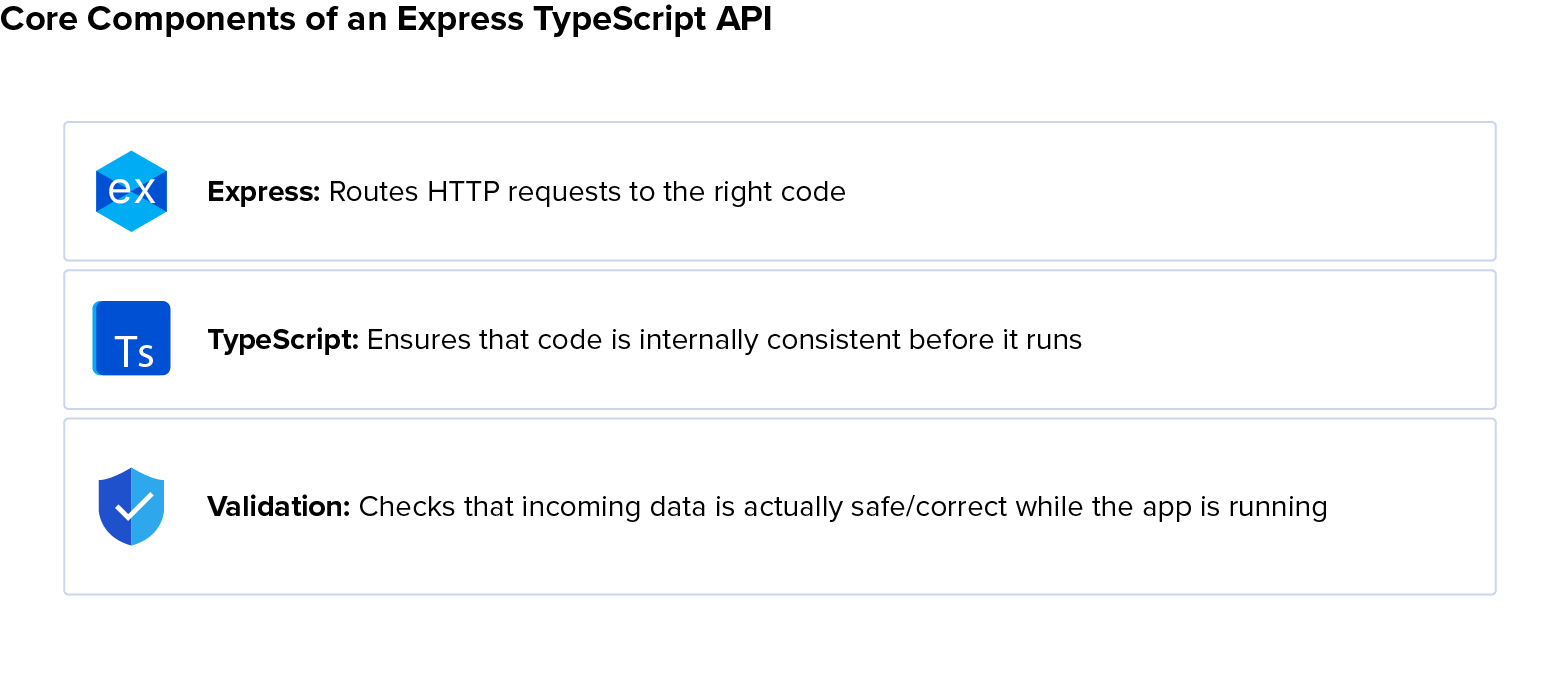
An Express TypeScript API combines three ideas:
- Express maps HTTP requests to middleware and handlers while leaving structure to the developer.
- TypeScript checks compile-time contracts among data transfer objects (DTOs), services, and data access code.
-
REST exposes resources through stateless HTTP operations such as
GET /users/:id,POST /users,PATCH /users/:id, andDELETE /users/:id.
Notably, TypeScript does not validate HTTP input. Request bodies, query strings, headers, webhooks, and even database results can violate TypeScript assumptions, so your app needs to validate untrusted data before the business logic stage.
What You’ll Build and Prerequisites
In building an API with Express that has authentication, authorization, validation, and database integration, you’ll create a request life cycle that passes control from layer to layer: route, middleware, controller, service, data access objects (DAO), and finally MongoDB.
You’ll need to have these installed:
- Node.js 24 LTS
- npm (or another package manager)
- MongoDB
- An API client (such as curl or Postman)
You’ll also need basic familiarity with the command line and Git.
Setup and Tooling (Node.js, TypeScript, ESLint)
A production-ready API starts with a modern, reproducible development baseline; you can avoid headaches by keeping tooling and configuration predictable across local development, CI, and production environments. Besides Node.js 24 LTS, this guide uses native environment-file support, strict TypeScript, ESLint, and security-focused linting.
In today’s fast-changing landscape, you may come across outdated Node.js/Express.js/TypeScript patterns in example repos or AI-generated code; ESLint helps mitigate this to some extent.
If you have a need for speed, consider Biome:
- It’s a worthy and much more performant replacement for ESLint.
- It also replaces Prettier’s functionality (covered below), eliminating a dependency.
- It’s already compatible with TypeScript 7, which itself is much faster than TypeScript 6.
The main downside, however, is that Biome cannot leverage ESLint’s extensive plugin system, including the security plugin this Express/TypeScript tutorial uses. You’d then need to find another dependency or tool to fill that gap.
Project Initialization and Dependencies
Create the project within npm init -y, then install (npm i) production packages separately from their TypeScript type add-ons and other development (-D) dependencies:
npm i express@^5 zod@^4 mongoose@^9 argon2 jsonwebtoken helmet \
  express-rate-limit cors pino pino-http
npm i -D typescript@^6 tsx @types/node @types/express @types/cors \
  @types/jsonwebtoken eslint typescript-eslint prettier \
  eslint-config-prettier eslint-plugin-security
Commit the lockfile rather than copying transient patch versions into application code.
TypeScript 6 is the most recent ESLint-compatible transpiler. If you need to run it manually and don’t want to put tsc on your path, you can use npx tsc, but once you configure the Node.js package.json that you just generated with npm init, you won’t need to.
TypeScript Configuration
In package.json, set "type": "module" to use modern ESM import syntax instead of the default CommonJS and add some handy scripts by replacing "scripts": {...}, with:
"type": "module",
"scripts": {
  "dev": "tsx watch --env-file=.env src/server.ts",
  "typecheck": "tsc --noEmit",
  "build": "tsc",
  "start": "node --env-file=.env dist/server.js",
  "test": "node --test --import=tsx \"test/**/*.test.ts\"",
  "lint": "eslint .",
  "audit": "npm audit --omit=dev --audit-level=high"
},
Production secrets belong in the deployment platform’s secret manager, so keep .env out of version control using .gitignore. (You can always document required variables and any local and/or nonsecret defaults with a version-controlled .env.example.)
Use strict TypeScript settings and separate source from output by putting this in a root tsconfig.json:
{
  "compilerOptions": {
    "target": "ES2025",
    "module": "NodeNext",
    "moduleResolution": "NodeNext",
    "rootDir": "src",
    "outDir": "dist",
    "strict": true,
    "noUncheckedIndexedAccess": true,
    "exactOptionalPropertyTypes": true,
    "sourceMap": true
  },
  "include": ["src/**/*.ts"]
}
It’s worth considering the use of aliases from the beginning, which can take some of the busywork out of any folder-level refactoring you might choose to do later.
Linting, Formatting, and Environment Setup
You can use recommended TypeScript linting, security, and Prettier formatting settings by putting the following in eslint.config.js in the project root:
import tseslint from 'typescript-eslint';
import security from 'eslint-plugin-security';
import prettierConfig from 'eslint-config-prettier';

export default tseslint.config(
  ...tseslint.configs.recommended,
  {
    plugins: { security },
    rules: {
      ...security.configs.recommended.rules,
    },
  },
  prettierConfig,
);
Security lint rules are useful signals, but beware that they don’t prove that code is secure, and putting prettierConfig last gives it precedence for consistency with industry formatting norms.
As for environments, you’re already in good shape: The native --env-file approach from the previous section is more widely compatible than shell-specific export scripts.
Project Structure and API Architecture
Express provides API building blocks; you decide how to organize them. But if you let database queries, validation, and business rules accumulate within route handlers, maintenance becomes painful and even risky.
Your main countermeasure is to separate transport concerns (e.g., the HTTP layer) from application logic. This creates clearer boundaries, makes automated testing of individual layers easier, and leaves room to organize the code by feature as the application grows.
Folder Structure
For a compact service, organize by technical layer:
mkdir -p src/{routes,controllers,services,data,dto,utils,middleware}As the application grows, recreate that structure under each feature directory (e.g., mkdir -p src/{users,auth}/{routes,controllers,...}) while keeping the same boundaries.
It’s not mere convention: It keeps transport code, business decisions, and infrastructure independently testable.
Layered Design (Routes, Controllers, Services, DAO, DTO)
A scalable architecture often involves these layers (sometimes more):
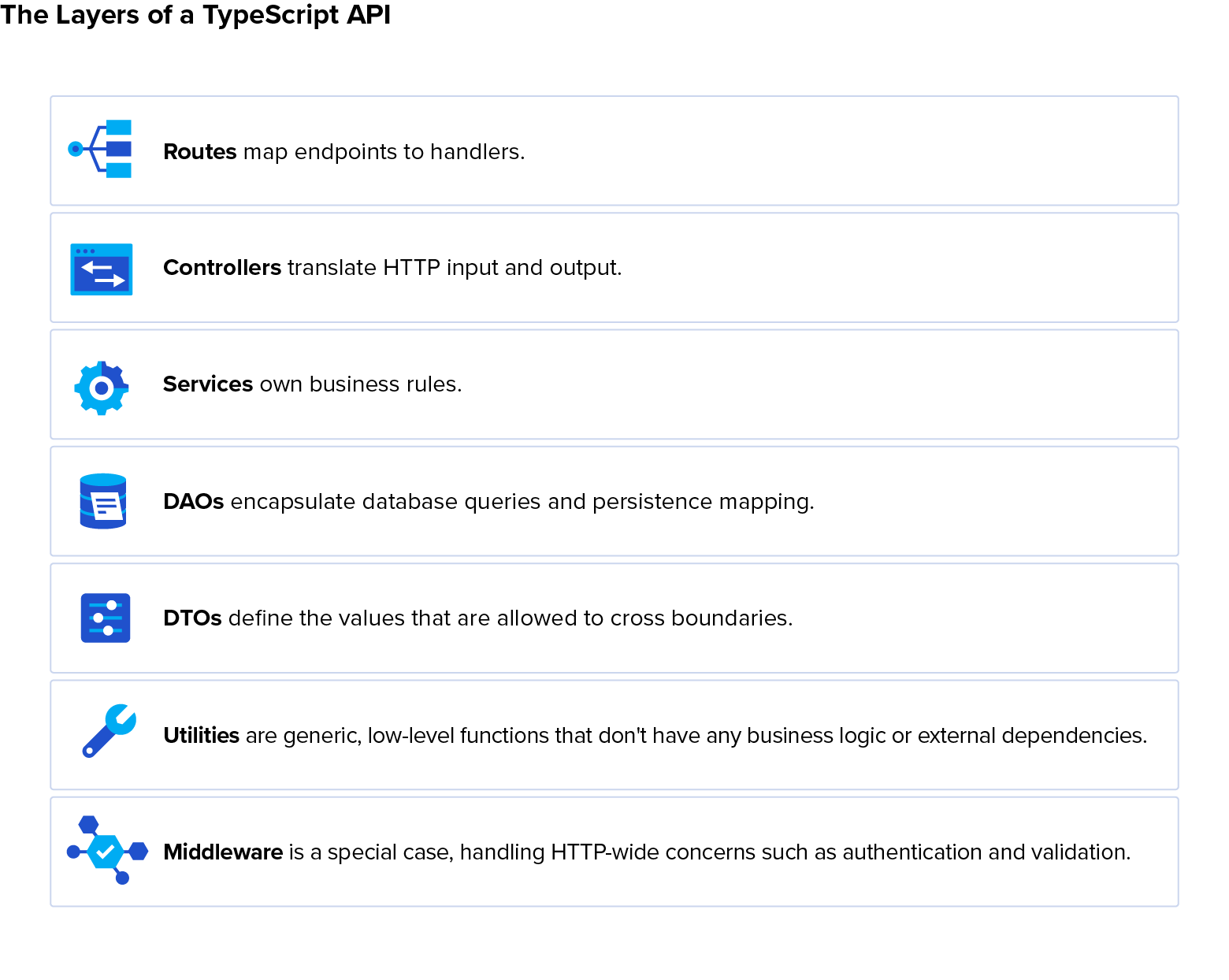
It’s a code smell to cross layers. If you find Express types in your services or database specifics in your controllers, refactor them.
Building the API (Server, Routes, Controllers, Data Layer)
Wiring these layers into a working request pipeline, while keeping each layer minimal and focused, makes the complete request path easier to reason about, test, and change. But you’ll still need an app entry point to kick-start the Express pipeline.
Creating the Express Server
It’s often best to load configuration before bootstrap and connect to the database before listening, failing early so your server doesn’t end up in an unforeseen state if environment variables are missing or external services are down.
Global middleware runs in the order it’s defined, so put general protection upfront and error-handling last:
import express from "express";
import helmet from "helmet";
import pinoHttp from "pino-http";
import mongoose from "mongoose";
import { usersRouter } from "./routes/users.routes.js";
import { errorHandler } from "./middleware/error.middleware.js";

if (!process.env.MONGODB_URI) throw new Error("MONGODB_URI required");
const app = express();
app.use(helmet(), express.json({ limit: "100kb" }), pinoHttp());
// Enable CORS only when browser clients need it; use an explicit origin allowlist.
app.use("/users", usersRouter);
app.use(errorHandler); // last

await mongoose.connect(process.env.MONGODB_URI);
app.listen(Number(process.env.PORT ?? 3000));
For growing teams, consider using @natebourgoin/requiredenv (or your cloud provider’s key vault) to manage environment requirements; as for services that are down despite being correctly configured, you can handle connection failures with bounded retries and exponential backoff. For example, Mongoose doesn’t retry failed connections on startup, even if it will retry a successful connection that later fails.
It’s also best to handle SIGTERM gracefully: Stop accepting requests, drain in-flight work queues, close MongoDB, and exit.
Routing and Controllers
Define one Express Router per resource (users, auth) and keep their route modules declarative (i.e., merely wiring middleware and controllers). Validation and authentication middleware should run before the controller so it receives already-validated input; it then calls a single business operation in the service layer, chooses the HTTP status, and serializes the result.
Data Access (DAO Pattern)
DAOs encapsulate queries, persistence mapping, and database-specific identifiers. They return typed domain entities rather than raw driver responses. This prevents, for example, MongoDB details such as _id and __v from leaking into every layer.
It’s a common mistake to reach for @ts-ignore for nullable results. Instead, let TypeScript narrow the type with guards like if (!user) throw new NotFoundError("User"); (assuming you derived a custom NotFoundError class from Error), which lets the transpiler deduce that user cannot be null after that line. Likewise, for truly dynamic results, sometimes Record<string, string> is as narrow as you can get, but that’s already better than @ts-ignore.
Validation, Middleware, and Error Handling
Crosscutting concerns like validation belong in reusable middleware. This avoids duplication and enforces predictable input handling and response shapes, keeping controllers focused.
DTOs and Zod Validation
A DTO does runtime validation and returns typed data. It should enforce structure and local constraints, not query the database or decide business policy.
Zod lets you define a given schema once for all layers, then infer its DTO:
import * as z from "zod";

export const createUserBody = z.strictObject({
  email: z.email(),
  password: z.string().min(12).max(128),
  name: z.string().trim().min(1).max(100)
});
export type CreateUserDto = z.infer<typeof createUserBody>;
export const createUserRequest = z.object({
  body: createUserBody,
});
Here, the createUserRequest envelope makes it easier for middleware to validate whichever combination of body, params, and query it requires.
Reusable Middleware
The envelope approach lets individual routes validate whichever parts of the request they require via reusable middleware, which then places the parsed, validated, typed result in res.locals:
export const validate =
<T>(schema: z.ZodType<T>) =>
  (req: Request, res: Response, next: NextFunction) => {
    const result = schema.safeParse({
    body: req.body,
    params: req.params,
    query: req.query,
  });

  if (!result.success) {
  return next(new ApiError(400, "Invalid request", result.error.issues));
  }

  res.locals.input = result.data;
  next();
};
This keeps inline validation out of controllers and rejects unexpected body fields. Authorization remains separate, since valid input is not necessarily permitted input.
Apply the same validator factory to request bodies, path parameters, and query values. Authentication, request ID-stamping, and rate limiting are also middleware; each should do one job and either call next() or end the response.
Centralized Error Handling
Express 5 (unlike 4) forwards rejected promises from async handlers to error middleware, neatly avoiding the repetitive controller try-catch blocks that had once been necessary for async approaches. Define application errors with status fields and safe-to-return details, then normalize every failure response as { error: { status, message, details } } in one final four-argument middleware function:
export function errorHandler(err: unknown, req: Request, res: Response, _next: NextFunction) {
  const error = err instanceof ApiError ? err : new ApiError(500, "Internal error");
  req.log.error({ err, code: error.code }, "request failed");
  res.status(error.status).json({
    error: { status: error.status, message: error.message, details: error.details }
  });
}
You can extend this (and your throw statements) to leverage standard error.cause semantics for better logging without changing that normalized response shape.
Authentication and Security
To keep users safe from online attacks, production security requires ensuring that a request contains a valid token. Passwords must have safe storage, authentication middleware must establish the caller’s identity, and authorization must remain a separate business decision. Considering the prevalence of automated hacking, protecting against common HTTP and credential attacks and following best practices for secret management is no longer a “nice to have.”
JWT Authentication and Password Hashing
When a user registers, hash their password with Argon2id and store only the encoded hash. At login, verify the hash and sign a short-lived JWT containing a stable user ID as its sub (subject):
const accessToken = jwt.sign({ sub: user.id }, jwtSecret, {
  expiresIn: "15m", issuer: "users-api", audience: "users-api-client"
});
res.json({ accessToken });
Authentication middleware verifies the token and establishes the authenticated identity for subsequent requests, whereas service-level authorization still decides whether that user may act on a resource.
Security Best Practices (Helmet, Rate Limiting, Secrets)
It’s best to use an appropriate refresh-token strategy, apply Helmet to all HTTP headers, serve only over TLS, and never return stack traces with errors.
Always protect key routes (e.g., login and recovery) with rate limits:
const loginLimiter = rateLimit({ windowMs: 15 * 60_000, limit: 10 });
authRouter.post("/users/login", loginLimiter, validate(loginRequest), loginController);
But when several application instances must enforce one policy, upgrade to a shared limiter store.
As for secrets, never hardcode JWT keys or database credentials, and rotate keys through managed secret storage.
Database Integration (MongoDB)
Database-specific queries and document mapping happen in the DAO, allowing your API to use persistent storage without controllers or services having any awareness of MongoDB specifics.
Connection Setup
As mentioned earlier, it’s best to connect, handling errors with retries, before accepting traffic. This approach helps keep the MongoDB URI and connection options isolated from controllers, services, and DAOs.
CRUD Example
Use a Mongoose schema for storage and a DAO to map documents into domain objects:
export const usersDao = {
  async create(input: Omit<CreateUserDto, "password"> & { passwordHash: string }): Promise<User> {
    const doc = await UserModel.create({ _id: crypto.randomUUID(), ...input });
    return { id: doc._id, email: doc.email, name: doc.name };
  },
  async byId(id: string): Promise<User> {
    const doc = await UserModel.findById(id).lean();
    if (!doc) throw new NotFoundError("User");
    return { id: doc._id, email: doc.email, name: doc.name };
  }
};
It’s left as a reader exercise to similarly implement, update, and delete functionality in this layer using Mongoose’s findByIdAndUpdate and findByIdAndDelete, respectively. Controllers should never depend on raw MongoDB responses.
Testing, Logging, and Dependency Management
A production API needs reliability and maintainability as the service changes over time. Logging adds the observability needed to debug and verify behavior; automated tests are there to consistently enforce it. It’s not just your codebase that evolves: All of its dependencies do, exposing your project to supply-chain attacks if you update dependencies too often, and third-party vulnerabilities if you don’t update them often enough. Audit them often.
Node Test Runner
You can save a dependency by using the built-in node:test runner for unit tests and integration tests organized by feature. Start the app on an ephemeral port, call endpoints with Node’s built-in fetch, and assert status and response shape:
test("POST /users rejects invalid input", async () => {
  const token = await getTestAccessToken();
  const response = await fetch(`${baseUrl}/users`, {
    method: "POST",
    headers: { "content-type": "application/json", authorization: token },
    body: JSON.stringify({ email: "not-email" })
  });
  assert.equal(response.status, 400);
});
Configure your test runner to use an isolated test database so you don’t pollute or destroy production data.
Structured Logging
Pino provides structured JSON logs, which are much easier to analyze than ad hoc console.log or console.debug statements and automatically include a request’s time stamp, ID, HTTP method, status, and duration. For domain workflows, log meaningful state transitions. In general, never log passwords, tokens, authorization headers, cookies, personal data, or raw request bodies.
Dependency Auditing
Run npm audit in CI after npm ci; optionally add Snyk or another scanner. Triage reachability, production impact, patch availability, and upgrade risk. Beware that a green scan means no known issue was detected, not that the supply chain is safe.
Running and Deploying the API
The application should behave predictably across development, CI, and production rather than relying on environment-specific workarounds. Keeping the environment contract consistent across those stages reduces deployment surprises and makes operational behavior easier to reproduce.
Dev vs. Production Setup
Development can optimize for fast feedback with source maps and hot reload via tsx’s watch mode, while production should run compiled output with the only dependencies it needs, use the same environment contract, expose readiness endpoints, and shut down gracefully.
End-to-End Example
A full request walk-through shows how layers interact in practice: Middleware handles authentication and validation, the controller delegates the operation, the service applies business rules, and the DAO persists the result.
Building a Complete Endpoint
After validation, service delegation, and the database layer, returns bubble control back to the controller to deliver the final response to the API consumer:
// in src/routes/users.routes.ts:
usersRouter.post(
  "/",
  requireAuth,
  validate(createUserRequest),
  usersController.create
);

// in src/controllers/users.controller.ts:
async function create(
  req: Request,
  res: Response<unknown, { input: { body: CreateUserDto } }>
) {
  const user = await usersService.create(res.locals.input.body);
  res.status(201).json({ data: user });
}

// in src/services/users.service.ts:
export async function create(input: CreateUserDto) {
  const { password, ...profile } = input;
  const passwordHash = await argon2.hash(password, { type: argon2.argon2id });
  return usersDao.create({ ...profile, passwordHash });
}
The full flow is now: authenticate, validate and normalize, call business logic, hash the password, persist through the DAO, map the stored document, and return a 201 response.
API Best Practices
The patterns in this guide keep an API maintainable as its scope increases. It’s a common mistake to be undisciplined about layer boundaries, which becomes a codebase-wide slippery slope. Another pitfall is to downplay operational concerns, which makes retries, timeouts, and background work hidden failure points.
Code Organization and Scalability
To ensure scalability, keep layers isolated, inject dependencies where tests need substitutes, bound network calls with timeouts, and move important background work to a supervised queue with retries and idempotency keys.
Scaling is more often an architecture and operations problem than an Express performance problem. Measure latency percentiles, traces, resource usage, query plans, indexes, timeouts, and external calls before adding instances. A slow database query or ambiguous retry boundary is a lot easier to fix than technology stacks are to change, and the latter won’t help with the former anyway.
Consider a product-ordering workflow. One route validates, authorizes, writes several records, charges a payment, sends a notification, and formats a response. What if there’s an external failure after the database writes? Retries can then create duplicates.
That’s why it’s best to separate transaction boundaries, use idempotency guards for external operations, and queue notifications. If you mix concerns, it’s not merely a style problem; it’s also a data-consistency problem. Instead, when you strictly adhere to layer boundaries, the next feature’s routes and services are always easier to architect.
Architecture, Security Solutions, and Scaling Forward
A maintainable Express TypeScript API is explicit about boundaries. Middleware handles HTTP-wide concerns, with Zod validating untrusted input, and a centralized error-handler normalizing failures. Controllers translate, services decide, and DAOs persist data. Meanwhile, a production-grade feature baseline consists of authentication, secure headers, rate limits, secret management, structured logs, tests, and dependency checks.
Once these foundations are in place, the user’s API can be extended with pagination, caching, OpenAPI generation, metrics and tracing, role- or policy-based authorization, and idempotent background jobs. The trick is to add each capability at the layer that owns it, rather than growing route handlers. With that, a small example Express API becomes a robust, extensible template with many of the features commonly required in production and far less of the technical debt many projects accumulate.
Further Reading on the Toptal Blog:
Understanding the basics
An Express REST API uses the Express.js framework to expose application resources through stateless HTTP endpoints such as GET, POST, PATCH, and DELETE, while leaving decisions about validation, structure, and error handling to the development team.
REST APIs are commonly grouped into four types based on who can access them and how they are used: public, private, partner, and composite APIs, which combine multiple services into one response.
FastAPI is a Python framework with built-in validation, typing, and documentation. Express is a minimal, unopinionated Node.js framework that leaves structure, validation, and error handling for developers to define.
Express adds routing, middleware, and request handling conveniences on top of Node’s built-in HTTP module. This cuts down on boilerplate, making it faster to build and maintain a structured API.
A common approach pairs a schema library like Zod with reusable middleware that parses the request body, params, and query, then rejects invalid input before it reaches the controller logic.

Prague, Czech Republic
Member since December 9, 2019
About the author
Sergej is a senior full-stack developer with over a decade of experience building scalable APIs and feature-rich applications. He currently works as a software engineer at Microsoft, where he develops and optimizes features within Microsoft Teams, including performance improvements and cross-cloud federated communications. Sergej also specializes in automation and AI integrations and has mentored more than 200 aspiring developers in React.
Expertise
Previous Role
Senior Full-stack DeveloperPREVIOUSLY AT