
React SEO Best Practices: Proven Strategies to Optimize React Apps
React and SEO don’t have to clash. Learn where React apps struggle with search visibility and how rendering strategies like SSR and static generation help crawlers see your content.

React and SEO don’t have to clash. Learn where React apps struggle with search visibility and how rendering strategies like SSR and static generation help crawlers see your content.

Ranier is a senior developer with extensive experience building enterprise web and mobile applications using React and React Native. He has worked across a range of industries, including as a Unity 3D game developer building gameplay systems, content tools, and automation scripts. He has experience in AngularJS, the Google Maps API, and Flask back ends and currently works at AWS on React-focused development projects.
Expertise
Previous Role
Senior Software DeveloperPreviously At

There’s a long-held misconception in the developer community that React makes your pages invisible to search engines.
That made sense in the early single page application (SPA) era, when everything was rendered client-side. From a crawler’s perspective, your landing page, category pages, and product pages all looked like the same empty shell until JavaScript kicked in and rendered the content.
In my time building large-scale React applications, one observation I’ve made is that the “React-equals-invisible-to-Google” thinking is left over from an era before search engines started rendering JavaScript.
Things have changed a lot since then. React and SEO may still not be a perfect match, but today’s React developers have plenty of options for making their apps visible to search engines without giving up the modularity that makes it so useful.
Of course, SEO isn’t a must-have for every project. If your app is behind a login, runs internal dashboards, or is just for internal use, search visibility probably isn’t keeping you up at night. But if you’re selling something and you need people to find it through search, ensuring crawlers can find your page is a big deal.
This article covers React’s core SEO challenges, the rendering strategies that solve them, and the practical steps (from metadata management to performance tuning) to make React search-engine friendly.
Understanding React’s SEO Challenges
Before we get into solutions, let’s take a look at what can go wrong when a search engine crawls a React app, and why some of these issues are unique to how React works, rather than general web performance problems.
The main pain points broadly originate from four areas: what crawlers see when a page first loads, how long it takes for users to see and interact with content, whether metadata is present in the initial HTML response, and how well search engines can find and index JavaScript-heavy pages at scale.
How Google Crawls and Indexes Webpages
Since Google handles the vast majority of online searches, it’s useful to understand its crawling and indexing process. This snapshot from Google’s documentation can help us.
Note: This is a simplified block diagram. The actual Googlebot is far more sophisticated.
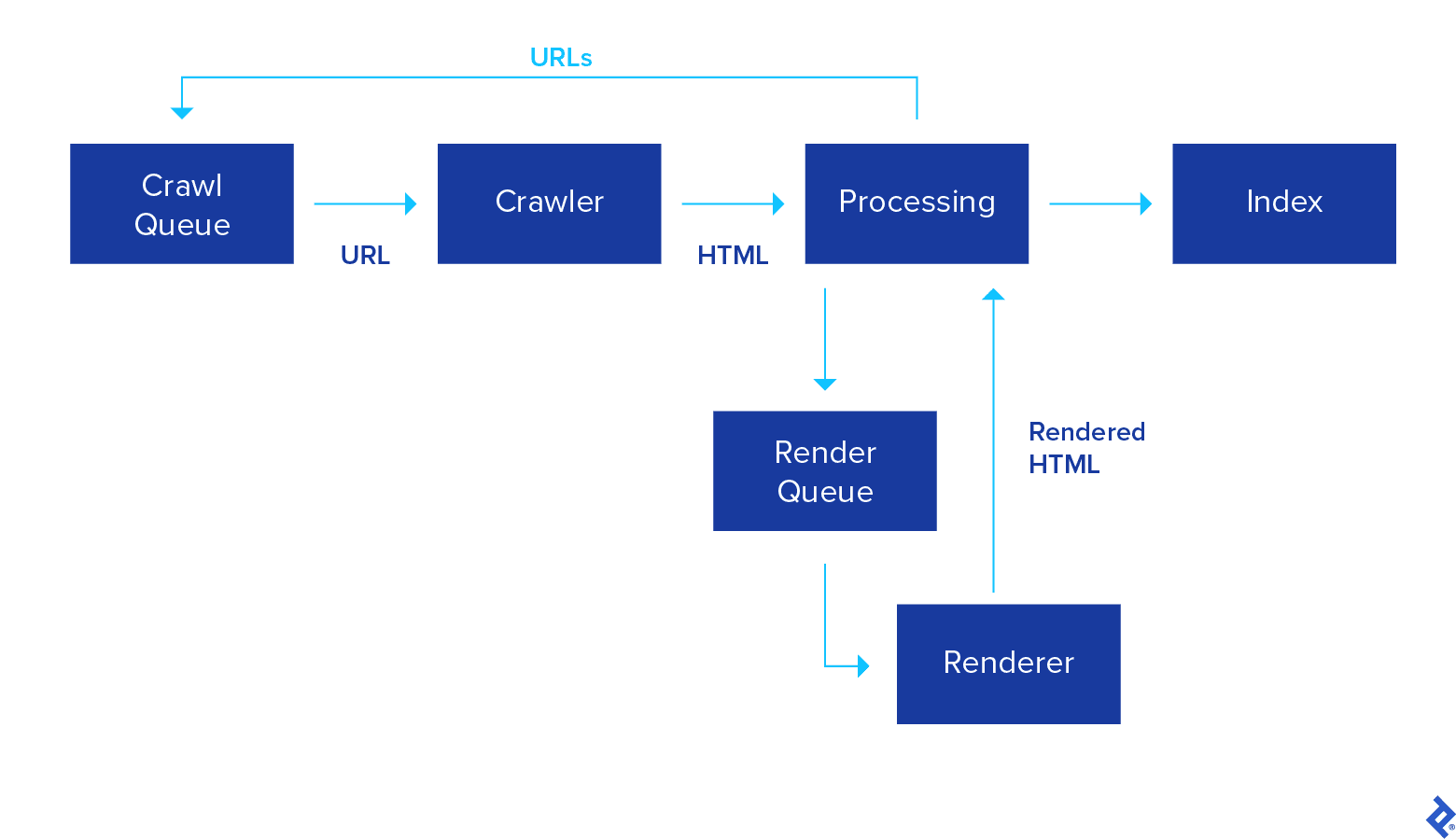
Google Indexing Steps
- Googlebot maintains a crawl queue containing all the URLs it needs to crawl and index in the future.
- When the crawler is idle, it picks up the next URL in the queue, makes a request, and fetches the HTML.
- After parsing the HTML, Googlebot determines if it needs to fetch and execute JavaScript to render the content. If yes, the URL is added to a render queue.
- Later, the renderer fetches and executes JavaScript to render the page and sends the rendered HTML back to the processing unit.
- The processing unit extracts all
<a>tags on the webpage and adds them back to the crawl queue. - The content is added to Google’s index.
Notice that there’s a clear distinction between the Processing stage that parses HTML and the Renderer stage that executes JavaScript. This is because running JavaScript consumes resources, and Googlebot only has so much time and bandwidth to go around.
Google assigns each website a crawl budget, so if you’re running a large, content-heavy website with thousands of JavaScript-heavy pages, Google might not be able to index all of your content.
We cover crawl budget in detail in later sections, and you can read Google’s guidelines for managing your crawl budget for more information.
Empty First-pass Content
React apps lean heavily on JavaScript, which can create issues for search engines. This is because React employs an app shell model by default: The initial HTML is essentially just a <div id="root"></div> and some boilerplate. The browser has to execute JavaScript to view any of the page’s actual content.
This means that Googlebot sees an empty page on its first pass. The meaningful content only appears after the page has passed through the render queue. According to Google’s documentation, this usually takes a few seconds, though it can take longer. When dealing with thousands of pages, small delays add up quickly.
Load Time and Core Web Vitals
Google doesn’t just care whether it can index your content; it also factors in how quickly users can view and interact with it. Google search results are based in part on a site’s performance against a set of three key user experience metrics called Core Web Vitals (CWV), and React apps that rely heavily on JavaScript often struggle to meet the report’s criteria.
Metrics Affected by React
- Largest Contentful Paint (LCP) measures how quickly a page’s largest content element becomes visible. Google recommends keeping this under 2.5 seconds. In a client-side React app, LCP doesn’t begin until the browser has downloaded, parsed, and executed your JavaScript bundle, meaning a good chunk of that 2.5-second budget is already gone before any content appears.
- Interaction to Next Paint (INP) is the new responsiveness metric as of 2024, replacing First Input Delay. It measures how quickly the page responds when a user clicks a button, uses a form, or interacts with your site in some other way. If your React app keeps the main thread busy with JavaScript, INP scores will suffer because the browser can’t respond quickly.
- Time to First Byte (TTFB) measures how fast the server starts sending data after a request. Static React shells usually have good TTFB. But if you switch to server-side rendering to fix empty content, TTFB can deteriorate because the server has to do more work before responding.
Poor scores on these metrics push pages down in rankings. If your LCP is slow, your search performance drops; if INP is bad, Google knows users aren’t having a good experience even after the page loads.
Metadata and Social Previews
Meta tags allow Google and social media platforms to show appropriate titles, thumbnails, and descriptions for your pages. Search engines and social platforms generally rely on metadata from the <head> of the initial HTML response, and metadata added later in the browser can be less reliable, especially for social previews.
In a default React SPA, all content, including meta tags, is rendered in the browser. Your product page, about page, and blog post all share the same title and description that were in index.html when the app was shipped until JavaScript runs and updates them.
It’s easy to miss this one. Developers often focus on the content itself and overlook how pages look to crawlers and social platforms. If your <meta> tags are missing or generic, Google will just extract whatever snippet it can, and social sites like LinkedIn or Twitter might show a blank preview. Either way, your click-through rates will take a hit.
Tools like React Helmet and the Next.js Metadata APIs help by injecting page-specific metadata into the initial HTML response. We’ll cover these in detail in later sections.
Sitemap and Crawl Budget
Google only allocates so much time, bandwidth, and Googlebot resources to each site. If your pages are slow and rely heavily on JavaScript, you’ll burn through that budget fast, and fewer pages will get indexed with each crawl. For a small site, that might not be a big deal. For an e‑commerce catalog with thousands of products, it can mean waiting weeks instead of days for full indexing.
A well-structured sitemap helps Google focus its crawl budget on the most important pages. But React won’t build one for you. If you’re using React Router, you’ll need additional tooling to generate a sitemap from your URL paths. You can use robots.txt to steer crawlers away from pages that don’t need indexing (admin pages, login screens, duplicate filtered views, etc.) and monitor crawl budget in Google Search Console.
Optimizing React Apps for SEO
Now that we’ve covered the main search engine challenges with React, let’s look at the SEO optimization fixes. Good SEO with React is entirely achievable. Most solutions boil down to getting meaningful content into the initial HTML and cutting down the work the browser has to do before users or crawlers see anything.
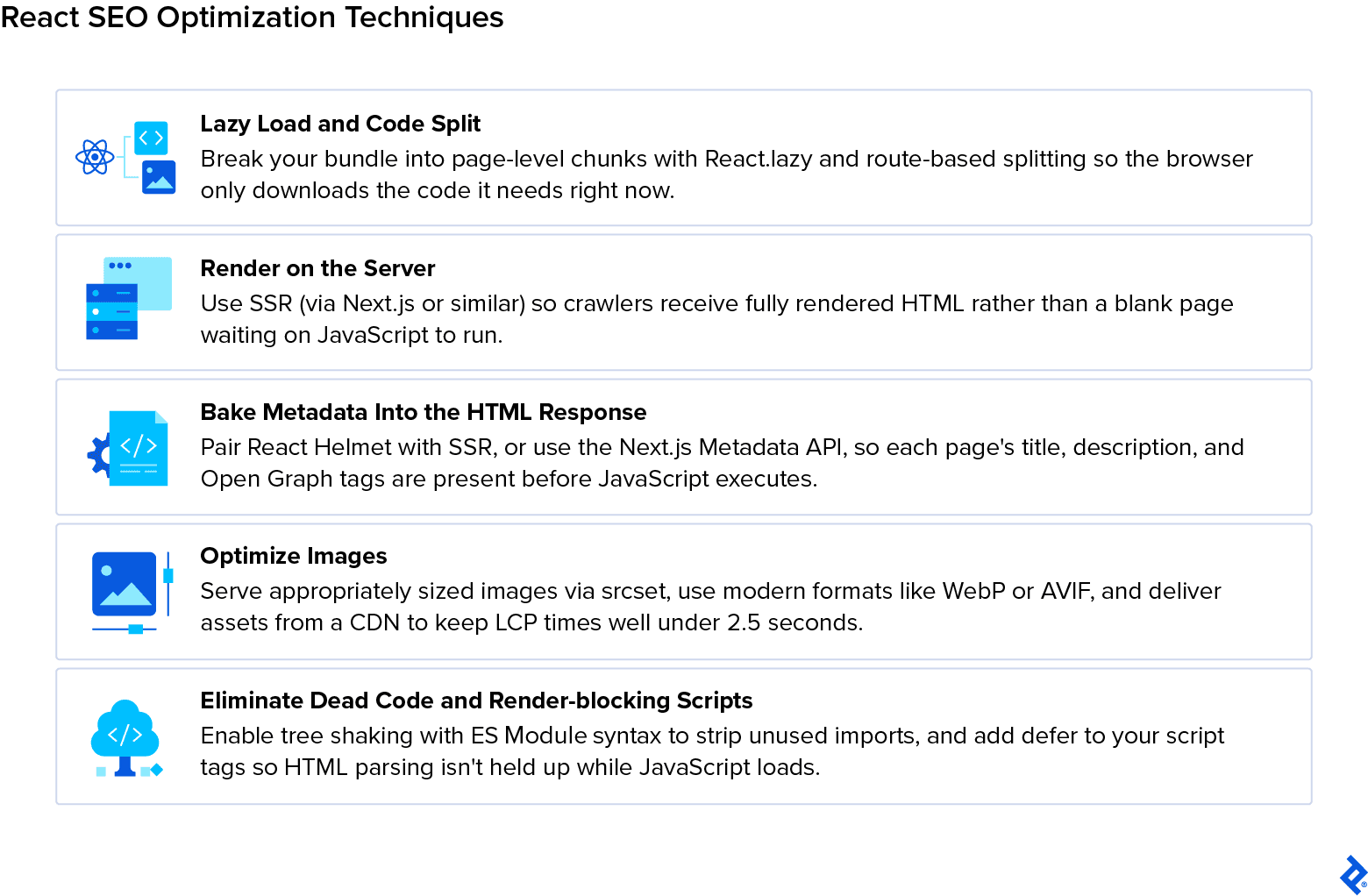
Lazy Loading for React Performance
In large React apps, the JavaScript bundle can be substantial. I’ve worked on apps where the codebase bundle was close to 60MB. The browser has to download, parse, and run all of that before anything renders, which drags down your LCP and INP scores.
Lazy loading addresses this by breaking your application into smaller chunks and deferring anything that isn’t needed for the current page.
React provides several built-in tools for lazy loading, outlined below.
Practical Techniques
-
React.lazy lets you define components that are only loaded when they’re rendered. Instead of importing a component at the top of your file, you wrap it in
React.lazy()and the browser fetches it on demand. - Suspense works alongside React.lazy to show a fallback such as a loading indicator or skeleton screen while the “lazy” component is being fetched. This ensures the user sees something aside from a blank screen while the full bundle loads.
- Route-based code splitting separates your application’s JavaScript by page. If, say, a user lands on an app’s product page, the browser only downloads the code for that page, not the code for account settings or checkout. These bundles are only fetched later, if and when the user navigates to them.
-
Dynamic imports (
import()) let you defer heavier features or third-party libraries until a user needs them. They sit underneath tools likeReact.lazy, but can also be used to conditionally load larger modules. For example, a store locator might only load its map when someone opens the contact page.
Page Speed Optimization
Google’s page experience guidance lays out a few core expectations for any site:
- Users should be able to access content quickly.
- Pages should become interactive early.
- Sites shouldn’t fetch unnecessary data or execute code they don’t need.
Optimizing React apps for speed typically involves three things: reducing how much JavaScript the browser has to load, removing redundant code from what remains, and ensuring scripts don’t block the browser from rendering the page.
- Code splitting, covered in the previous section, breaks your app into smaller bundles so the browser only has to download and execute the JavaScript needed to render the current page.
-
Tree shaking targets dead code during the build process. If you’re importing a utility library but only using two of its functions, a properly configured bundler (e.g., webpack, Vite, esbuild) will exclude what you don’t need. This only works reliably with ES Module syntax (
import/export). If your dependencies use CommonJS, you may be shipping unused code without realizing it. -
Render-blocking scripts hurt page speed. Any script in the
<head>withoutasyncordeferprevents the browser from parsing the rest of the HTML until that script finishes loading. Addingdeferto your main bundle’s script tag allows the browser to continue parsing HTML while JavaScript downloads in parallel, then execute the script once the document has been parsed. - Inlining critical CSS addresses a related problem: It gives the browser the styles it needs to render above-the-fold content right away, without having to wait for a separate stylesheet request.
Metadata and Dynamic Tags
Earlier, we covered why crawlers and social platforms can miss browser-rendered metadata. The fix is to ensure each page’s title, description, and social tags are present in the initial HTML response before JavaScript runs.
Two tools handle this well:
-
React Helmet and related libraries such as
react-helmet-asynclet you manage<title>,<meta>, and Open Graph tags from React components. In a purely client-side app, though, React Helmet still only updates the<head>after JavaScript executes in the browser, so on its own, it doesn’t solve the crawler visibility problem. Paired with server-side rendering, React Helmet can extract metadata from your component tree during the server render and inject it into the HTML response before it reaches the client. That’s where it becomes genuinely useful for React SEO. - Next.js Metadata APIs allow you to export a metadata object or a generateMetadata function directly from your page or layout file. Because Next.js handles server rendering, this metadata is included in the HTML response by default, making it visible to crawlers. It also supports dynamic metadata generation, so a product page can pull its title and description from a database at time of request and have them baked into the response.
The key takeaway is that metadata has to be part of your architecture from the start. Every page that matters for SEO needs its own title, description, and social preview tags, and those tags need to be in the HTML the server sends back.
Image Optimization
Images are often the largest assets on a page and one of the easiest wins for faster load times. A single unoptimized hero image can push your LCP score past Google’s 2.5-second threshold.
Optimization Options
-
Responsive images ensure the browser downloads an appropriately sized file rather than forcing a 2400 px-wide image into a 400 px container. The
srcsetattribute on<img>elements lets you specify multiple resolutions, and the browser selects the best match based on viewport size and device pixel ratio. This means a mobile user on a narrow screen isn’t downloading the same file as someone on a 27-inch monitor. -
WebP and AVIF formats offer significantly better compression than JPEG or PNG at comparable visual quality. WebP has broad browser support at this point; AVIF provides even better compression ratios where supported. The
<picture>element lets you serve AVIF to browsers that support it and fall back to WebP or JPEG for those that don’t. - CDN delivery serves images from edge locations closer to the user, reducing latency. Most CDN providers also offer on-the-fly transformation, including resizing, format conversion, and quality adjustment, so you don’t have to manually account for every image size and format in your build.
If you’re using Next.js, the built-in <image> component handles responsive sizing, lazy loading, and format optimization automatically, provided it’s configured properly. For vanilla React apps, you can achieve similar control with <picture> and srcset, though it requires more manual configuration and markup work.
Rendering Strategies for SEO
Your rendering strategy is the biggest factor in how your React app performs in search. Each approach has trade-offs between development complexity, performance, and crawler visibility. The right choice for you and your team depends on what your app does and how much search rankings matter.
If your content largely stays the same, static generation is likely the best fit. If it’s SEO-critical but updates frequently, server-side rendering makes more sense. And if React SEO isn’t a priority (say, because you’re building an interactive dashboard behind authentication) client-side rendering may be all you need.
Let’s take a look at a few of these in more detail.
Client-side Rendering (CSR)
CSR is the default for a React SPA. The server sends a shell HTML file with no content, and the browser downloads, parses, and runs JavaScript to render the page. Routing happens client-side by managing browser history, so the server always serves the same HTML and the client updates the view after rendering.
We’ve already covered why this is a problem for React app SEO: Crawlers see an empty page on first pass, and any data the page needs gets fetched after components mount. Users usually see a loading indicator while this happens. For search-critical pages, CSR on its own usually isn’t enough.
CSR With Bootstrapped Data (CSRB)
This is the same approach as CSR, but instead of the client fetching data after rendering, the server embeds the data directly into the HTML.
<script id="data" type="application/json">

{"title": "My blog title", "comments":["comment 1","comment 2"]}

</script>
The component then parses this data when it mounts:
var data = JSON.parse(document.getElementById('data').innerHTML);
This eliminates a round-trip to the server, which helps LCP. However, the page still needs JavaScript to display anything, so crawlers face the same empty first-pass problem as with standard CSR.
Server-side Rendering to Static Content (SSRS)
There are cases where you need the server to generate HTML on the fly, but don’t need React on the client at all. An online calculator is a good example: A user hits a URL like /calculate/34+15, and the server evaluates the result and responds with plain HTML.
You can do this with React’s renderToStaticMarkup method.
Routing is handled by the server, since it needs to generate HTML for each request. CDN caching can speed up repeated responses. Since the output is just HTML and CSS with no JavaScript bundle, the browser has nothing extra to parse or execute, so you get fast TTFB, instant LCP, and no INP issues. The trade-off is that you get no client-side interactivity.
Server-side Rendering (SSR/SSRH)
SSR generates the full HTML on the server for each request and sends it to the browser. This ensures the crawler (and the user) sees content immediately.
Once the HTML reaches the browser, React hydrates it, attaching event listeners and taking over DOM management so the page becomes a fully interactive React app. That’s what makes it a universal (or isomorphic) React app. The term isomorphic describes things that are identical or similar in form or structure. In React terms, it means the same components render on the server and then keep working in the browser.
The trade-off is that the server does rendering work on every request, which can increase TTFB. Hydration isn’t free either; if the server-rendered HTML doesn’t match what the client would produce, you’ll see layout changes as React reconciles the differences. This affects your Cumulative Layout Shift (CLS) score.
Code splitting is also more involved with SSR. ReactDOMServer doesn’t support React.lazy, so you’ll need alternatives such as Loadable Components. Frameworks like Next.js abstract much of this complexity, which is a big reason why they’ve become the default for SSR React apps.
Static Site Generation and Prerendering
Static generation takes rendering out of the request cycle entirely. Pages are rendered at build time and cached on a CDN, so when a user or crawler requests a page, they get prebuilt HTML from the nearest edge server.
This yields the best performance scores across the board: fast TTFB (CDN-cached), immediate LCP (content already in the HTML), and minimal bundle size for pages that don’t need client-side interactivity.
The trade-off is that static pages don’t update automatically when content changes. This means you need to rebuild or regenerate them before users and crawlers see the latest version.
That’s usually fine for a blog or documentation site, but less than optimal for an e‑commerce catalog where prices change throughout the day. In these cases, Incremental Static Regeneration (ISR) in Next.js can regenerate individual pages on a schedule or on demand. Pages that need full interactivity after the initial load can combine prerendering with hydration. This is similar to SSR, except the initial HTML is prepared in advance and reused until the page is regenerated.
Streaming SSR and React 18 Features
React 18 introduced new features that change how server rendering works. Instead of generating the whole page and sending it as one response, it can now deliver HTML progressively.
Key Innovations
- Streaming HTML allows the server to send parts of the page as they become ready, rather than waiting for every component to finish rendering. So, if a product description is ready but the reviews section is still loading, the server sends the description immediately and streams the reviews when they’re available.
- Selective hydration lets React prioritize which components become interactive first. A search bar or navigation can be hydrated before a comments section further down the page, so the elements users reach for first are responsive sooner. This helps your INP.
- Server components run on the server and send no component JavaScript to the client. A component that fetches and displays data can render on the server without adding to the browser’s bundle. This cuts bundle size for components that don’t need client-side interactivity.
These features are most mature in the Next.js App Router, which builds on React 18’s architecture.
Performance Comparison
Let’s look at how each of these rendering paths affects web performance metrics. In this matrix, we’ve assigned a score to each rendering path based on its performance on a given metric.
The score ranges from 1 to 5:
1 = Unsatisfactory; 2 = Poor; 3 = Moderate; 4 = Good; 5 = Excellent
Time to First Byte | Largest Contentful Paint | Time to Interactive | Bundle Size | Total | |
|
5
HTML can be cached on a CDN
|
1
Multiple trips to the server to fetch HTML and data
|
2
Data fetching + JS execution delays
|
2
All JS dependencies need to be loaded before render
| 10 | |
|
4
HTML can be cached given it does not depend on request data
|
3
Data is loaded with application
|
3
JS must be fetched, parsed, and executed before interactive
|
2
All JS dependencies need to be loaded before render
| 12 | |
|
3
HTML is generated on each request and not cached
|
5
No JS payload or async operations
|
5
Page is interactive immediately after first paint
|
5
Contains only essential static content
| 18 | |
|
3
HTML is generated on each request and not cached
|
4
First render will be faster because the server rendered the first pass
|
2
Slower because JS needs to hydrate DOM after first HTML parse + paint
|
1
Rendered HTML + JS dependencies need to be downloaded
| 10 | |
|
5
HTML is cached on a CDN
|
5
No JS payload or async operations
|
5
Page is interactive immediately after first paint
|
5
Contains only essential static content
| 20 | |
|
5
HTML is cached on a CDN
|
4
First render will be faster because the server rendered the first pass
|
2
Slower because JS needs to hydrate DOM after first HTML parse + paint
|
1
Rendered HTML + JS dependencies need to be downloaded
| 12 |
Frameworks That Improve React SEO
Vanilla React doesn’t prescribe how you render your app or manage metadata. That’s your problem to solve. On the plus side, frameworks exist to make these decisions less painful.
Next.js
Next.js has become the default framework for React SEO because it supports the main rendering strategies covered above, including CSR, SSR, static generation, ISR, and streaming. It also lets developers apply different strategies to different pages within the same application. A blog post can be statically generated, a product page can use ISR, and an account page can be server-rendered.
The App Router and Metadata APIs are now the standard approach for handling SEO in new Next.js projects. They make it easier to include page-specific metadata in the initial HTML response, while still supporting dynamic content and interactive React components.
Gatsby
Gatsby remains a solid option for content-heavy sites. Its plugin ecosystem and GraphQL data layer make it straightforward to pull content from a content management system (CMS) and APIs, and prerender pages as static HTML. For projects that need a mix of static and dynamic rendering, Next.js now offers more flexibility, which is why most React SEO work has shifted in that direction.
Factors to Consider
The trade-off with any framework is that you’re adopting its conventions. Isomorphic components can look very different from standard React components. For an existing SPA, moving to Next.js or Gatsby is an architectural decision, not a quick optimization fix. For new projects where SEO matters, starting with a framework that handles rendering, metadata, and performance is usually the safer bet.
Tools and Resources for React SEO
Achieving good SEO with React involves covering a lot of ground: rendering, metadata, crawlability, performance, and production monitoring. No single tool does it all, so make sure browser diagnostics, Google data, crawler testing, and React-specific profiling are all part of your toolchain.
- Lighthouse: Audits page performance in a lab environment, reporting scores for metrics like LCP, CLS, and Total Blocking Time (TBT) (the lab proxy for responsiveness). Available in Chrome DevTools, as a CLI tool, and through a continuous integration (CI) pipeline. Usually the first place to look when diagnosing performance issues.
- Google Search Console: Shows how Google sees your site, including which pages are indexed, where you rank for specific queries, and whether crawl errors are blocking content.
- React DevTools: A browser extension for profiling component renders and identifying bottlenecks in your React tree. Useful for tracking down re-renders and heavy main-thread work that hurt INP.
- WebPageTest: Runs real-browser tests from multiple locations with detailed waterfall charts showing exactly where time is spent during page load. More granular than Lighthouse for diagnosing specific bottlenecks.
- Screaming Frog: A desktop crawler that audits your site the way a search engine would. Flags missing metadata, broken links, duplicate content, and pages returning empty HTML.
- CrUX (Chrome User Experience Report): Real-world performance data collected from Chrome users visiting your site. Unlike Lighthouse, which runs in a lab environment, CrUX shows how actual users are experiencing your pages.
Measuring Impact and Finding Areas for Improvement
SEO audits are important. After all, you need a clear way of determining whether your React SEO efforts are paying off. Once the technical fixes are in place, the next step is measuring whether search engines can discover your pages, index the right content, and serve those pages to users without performance issues getting in the way.
What to Track
- LCP: Is your main content appearing within 2.5 seconds? This is the single most visible indicator of whether your rendering strategy is working.
- INP: Are interactive elements responding quickly, or is the main thread overloaded with hydration and re-rendering?
- CLS: Is content shifting after the initial render? Hydration mismatches between server and client HTML are a common cause in SSR apps.
- TTFB: How quickly is the server responding? If you’ve moved to SSR, watch for this getting worse under load.
How to Audit
- Run Lighthouse regularly, as part of your CI pipeline. Set thresholds for key metrics in your CI pipeline (i.e., performance budgets) so regressions get flagged before they reach production.
- Monitor Google Search Console weekly: Check which pages are indexed, look for crawl errors, and track whether ranking positions change after you ship rendering or metadata updates.
- Compare lab data with field data. Lighthouse gives you lab scores under controlled conditions. CrUX gives you what real users experience. If the two diverge significantly, your lab setup isn’t reflecting real-world conditions.
What to Look for Over Time
- Are new pages being indexed within days, or sitting in the render queue for weeks?
- Did switching rendering strategies actually improve your Core Web Vitals scores?
- Are metadata changes showing up in search results and social previews?
- Is your crawl budget being spent on the pages that matter, or wasted on admin routes and duplicate views?
For a more comprehensive framework, check out Toptal’s article, “The Executive’s Guide to Using an SEO Audit for Strategic Growth.”
React and SEO: Case Studies and Examples
Theory is one thing, but it helps to see what these changes actually look like in production. The following examples show how React search engine optimization strategies played out for real sites.
- SearchPilot ran a controlled test comparing server-side-rendered React product pages with existing templates on an e-commerce site and reported a 13% uplift in organic traffic. The content itself didn’t change. The gain came entirely from how the pages were rendered.
- Dream Code Labs documented a Next.js migration for a B2B client whose WordPress site was loading in 6.8 seconds on mobile, with a Lighthouse performance score of 31. After rebuilding on Next.js with Sanity as a headless CMS, LCP dropped to 1.4 seconds on mobile, and Lighthouse mobile score reached 94. At 90 days, organic traffic was up 52% year-over-year, seven keywords reached page one for the first time, and inbound lead submissions increased 40%.
- Canadian internet provider WaveDirect rebuilt its marketing site with Gatsby. According to Gatsby’s published case study, the share of URLs rated “good” for Core Web Vitals rose from 25% to 98%, first-page keyword rankings increased from around 30 to 153, and core keyword traffic tripled. Website-to-lead conversion rose from 1.8% to 10.2%.
Key Takeaways
So, is React good for SEO? It depends on how you look at it. React itself isn’t the problem; it’s relying entirely on the browser to render your content. If every page on your site needs JavaScript before a crawler can see anything, you’re adding latency to every step of the indexing process.
Every rendering strategy involves trade-offs between development complexity, server costs, content freshness, and performance. The right choice depends on what your app does and who it’s for. A product catalog has different needs from an internal dashboard, and both have different needs from a blog.
The key is making sure your team understands those trade-offs and makes an informed architectural call. That choice shapes everything downstream, from how fast content reaches users to how efficiently Google spends its crawl budget on your site.
If there’s one practical takeaway, it’s this: Get real content into the initial HTML response. Every technique in this guide serves that goal in one way or another.
Additional Resources and Considerations
This article covers the most widely used techniques, but it’s not exhaustive. Google’s developers have written about advanced approaches like streaming server rendering and trisomorphic rendering that push these ideas further. Note that dynamic rendering, serving different responses to crawlers and users, is now deprecated by Google.
Most of the investment right now is going into server-side rendering. Frameworks are racing to make SSR faster and easier, especially as infrastructure providers add edge rendering. With ISR and streaming, you don’t have to pick between freshness and responsiveness. That competition is good for developers because it means tooling is improving quickly.
For teams building content-heavy React applications, two other decisions are worth thinking about early on. First, a headless CMS like Sanity, Contentful, or Strapi makes it far easier for nondevelopers to publish and update content without triggering full rebuilds.
Second, your choice of architecture affects long-term maintainability as much as it affects SEO. A framework that handles rendering, routing, and metadata today will save your team significant effort as your React SEO strategy grows.
Further Reading on the Toptal Blog:
Understanding the basics
Yes. React applications benefit from structured data just like any site. Schema markup helps search engines understand articles, products, or FAQs and unlock rich results. But since crawlers rely on the initial HTML response, that markup needs to be rendered server side. This applies broadly.
Single page sites load one HTML shell and render everything client-side, which can leave crawlers with a blank first pass. Multipage sites serve distinct HTML per route, giving each page its own URL, title, and content to index. This is easier for search engines to crawl and rank individually.
Dynamic pages, like a product page built from a database, still need clean, descriptive URL structures. For example, /products/blue-shoes, not /products?id=482. Clear URLs help search engines understand page hierarchy and give users a readable sense of where they are, even when content is generated on the fly.
Create React App is largely unmaintained and ships a pure client-side shell, so it doesn’t solve SEO on its own. Hash routing (URLs like /#/about) is even worse for crawlers, since everything after the # is often ignored. Stick to standard paths and a framework built for server rendering instead.
Yes, both are essential. Meta descriptions influence click-through rates from search results and need to be in the initial HTML. Canonical tags tell search engines which URL is the authoritative version when duplicate or filtered pages exist, which prevents indexing confusion.
Social media crawlers, like most bots, only read the initial HTML response. However, they don’t execute JavaScript. If a web application relies on client-side rendering to inject its title, image, and description, platforms like LinkedIn or X will find nothing there and show a blank or generic preview.
Web developers should focus on cutting JavaScript bundle size first, since it drives most site speed issues in React apps. Code splitting, tree shaking, and deferring noncritical scripts are helpful. Pair that with optimized images, and you’ll see gains in LCP and overall page responsiveness.

Vancouver, BC, Canada
Member since August 22, 2016
About the author
Ranier is a senior developer with extensive experience building enterprise web and mobile applications using React and React Native. He has worked across a range of industries, including as a Unity 3D game developer building gameplay systems, content tools, and automation scripts. He has experience in AngularJS, the Google Maps API, and Flask back ends and currently works at AWS on React-focused development projects.
Expertise
Previous Role
Senior Software DeveloperPREVIOUSLY AT