
Guide to Data Synchronization in Microsoft SQL Server
Sharing related information among isolated systems has become increasingly important. There are many methods to choose from to perform that task for SQL Server, but it’s important to know which is better for each use case.

Sharing related information among isolated systems has become increasingly important. There are many methods to choose from to perform that task for SQL Server, but it’s important to know which is better for each use case.

With a Master’s degree in Service Science, Management, and Engineering, Andrej works on projects of all sizes for clients around the world.
Expertise
Sharing related information among isolated systems has become increasingly important to organizations, as it allows them to improve the quality and availability of data. There are many situations where it is useful to have a data set that is available and consistent in more than one directory server. That’s why knowing the common methods for performing SQL Server data synchronization is important.
Data availability and consistency can be achieved by data replication and data synchronization processes. Data replication is the process of creating one or more redundant copies of a database for the purpose of fault tolerance or accessibility improvement. Data synchronization is the process of establishing data consistency between two or more databases, and the subsequent continuous updates to maintain said consistency.
In many organizations, performing data synchronization across diverse systems is both desirable and challenging. We can find many use cases where we need to perform data synchronization:
- Database migration
- Regular synchronization between information systems
- Importing data from one information system into another
- Moving data sets between different stages or environments
- Importing data from a non-database source
There is no unique way or unanimously agreed-upon method for data synchronization. This task differs from case to case, and even data synchronizations that should be simple at first glance can be complicated, due to the complexity of data structures. In real scenarios, data synchronization consists of many complex tasks, which can take a long time to perform. When a new requirement comes up, database specialists usually have to reimplement the whole synchronization process. Since there are no standard ways of doing this, besides replication, the implementations of data synchronization are rarely optimal. This results in difficult maintenance and higher expenses. Implementation and maintenance of data synchronization is such a time-consuming process that it can be a full-time job by itself.
We can implement architecture for data synchronization tasks manually, using SQL scripts or SQL Server features such as change data capture (CDC), or we can benefit from already created solutions for managing Microsoft SQL Server. We will try to describe the most common methods and tools that can be used to solve data synchronization on Microsoft SQL Server databases and try to give some recommendations.
Based on the structure of the source and destination (e.g., databases, tables) we can differentiate use cases when structures are similar or different.
Source and Destination Have Very Similar Structures
This is very often the case when we use data in various stages of the software development lifecycle. For example, the data structure in the testing and production environments is very similar. The common requirement is to compare data between the testing and production database and import data from the production into the testing database.
Source and Destination Have Different Structures
If the structures are different, synchronization is more complicated. This is also a more frequently recurring task. A common case is importing from one database into another. The most common case is when a piece of software needs to import data from another piece of software, which is maintained by another company. Usually, imports need to run automatically on a scheduled basis.
The method used depends on personal preferences and the complexity of the problem you need to solve.
Regardless of how similar the structures are, we can choose four different ways to solve data synchronization:
- Synchronization using manually created SQL scripts
- Synchronization using CDC
- Synchronization using the data compare method (can be used only when the source and target have a similar structure)
- Synchronization using SQL Server Integration Services (SSIS)
Source and Destination Have the Same or Very Similar Structures
Using Manually Created SQL Scripts
The most straightforward and tedious solution is to manually write SQL scripts for synchronization.
Advantages
- Can be performed by free and open source (FOSS) tools.
- If the table has indexes, it is very fast.
- The SQL script can be saved into a stored procedure, or run periodically as a job for SQL Server.
- Can be used as an automatic import, even on continuously changed data.
Disadvantages
- Creating such a SQL script is quite tedious, because three scripts are usually needed for each table:
INSERT,UPDATE, andDELETE. - You can only synchronize data that is available via SQL queries, so you can’t import from sources like CSV and XML files.
- It is hard to maintain—when database structure is changed, it is necessary to modify two or three scripts (
INSERT,UPDATE, and sometimes alsoDELETE).
Example
We’ll do synchronization between the table Source, with columns ID and Value, and the table Target, with the same columns.
If tables have the same primary key, and the target table doesn’t have an auto-incrementing (identity) primary key, you can execute the following synchronization script.
-- insert
INSERT INTO Target (ID, Value)
SELECT ID, Value FROM Source
WHERE NOT EXISTS (SELECT * FROM Target WHERE Target.ID = Source.ID);

-- update
UPDATE Target
SET Value = Source.Value
FROM Target INNER JOIN Source ON Target.ID = Source.ID

-- delete
DELETE FROM Target
WHERE NOT EXISTS (SELECT * FROM Source WHERE Target.ID = Source.ID)
Using Change Data Capture (CDC)
Change data capture (CDC) is a built-in SQL Server feature that tracks row-level changes by reading the transaction log. Instead of scanning and comparing whole tables, CDC records only what has changed since the last sync. This makes it a good option when tables are large, but few rows change between sync cycles.
When CDC is enabled on a table, SQL Server writes change records to system tables. A synchronization process reads these records and applies only the changed rows to the target database.
SQL Server also includes temporal tables, which automatically keep a full history of row changes. Temporal tables are usually used for auditing and historical queries, but they can also be useful when validating synchronization results.
Advantages
- CDC is built into SQL Server, and no additional licensing is required for the feature itself.
- Only changed rows are processed, so performance is good even on large tables.
- Changes that happen between sync runs are captured, including rows that are inserted and then deleted before the next scan.
- Can be used for continuous or near-real-time synchronization.
Disadvantages
- CDC must be enabled on each source table, and the transaction log must be kept long enough for the capture job to run.
- Initial setup is more work than writing a simple sync script, and the system tables need monitoring and periodic cleanup.
- Source and target schemas must still be compatible. CDC does not handle mapping between different structures.
- Cannot be used to import from non-SQL sources such as CSV or XML files.
Example
The following example reads CDC changes for a table.
DECLARE @from_lsn binary(10), @to_lsn binary(10);

-- Replace 'dbo_Source' with the capture instance name configured
-- when CDC was enabled for the table (default: schema_table).
SET @from_lsn = sys.fn_cdc_get_min_lsn('dbo_Source');
SET @to_lsn   = sys.fn_cdc_get_max_lsn();

SELECT *
FROM cdc.fn_cdc_get_all_changes_dbo_Source(
    @from_lsn, @to_lsn, N'all'
);
The __$operation column in the result identifies the change type: 1 = delete, 2 = insert, and 4 = update. A synchronization job reads this output and applies the corresponding INSERT, UPDATE, or DELETE to the target.
Using the Data Compare Method
In this method, we can use a tool to compare between source and target data. The comparison process generates SQL scripts that apply the differences from the source database into the target database.
There are a number of programs for data comparison and synchronization. These programs mostly use the same approach. The user selects the source and the target database, but other alternatives could be a DB backup, a folder with SQL scripts, or even a connection to a source control system.
Below are the most popular tools that use the data compare approach:
In the first step, the data is read, or just checksums of larger data from the source and from the target are read. Then the comparison process is executed.
These tools also offer additional settings for synchronizing.
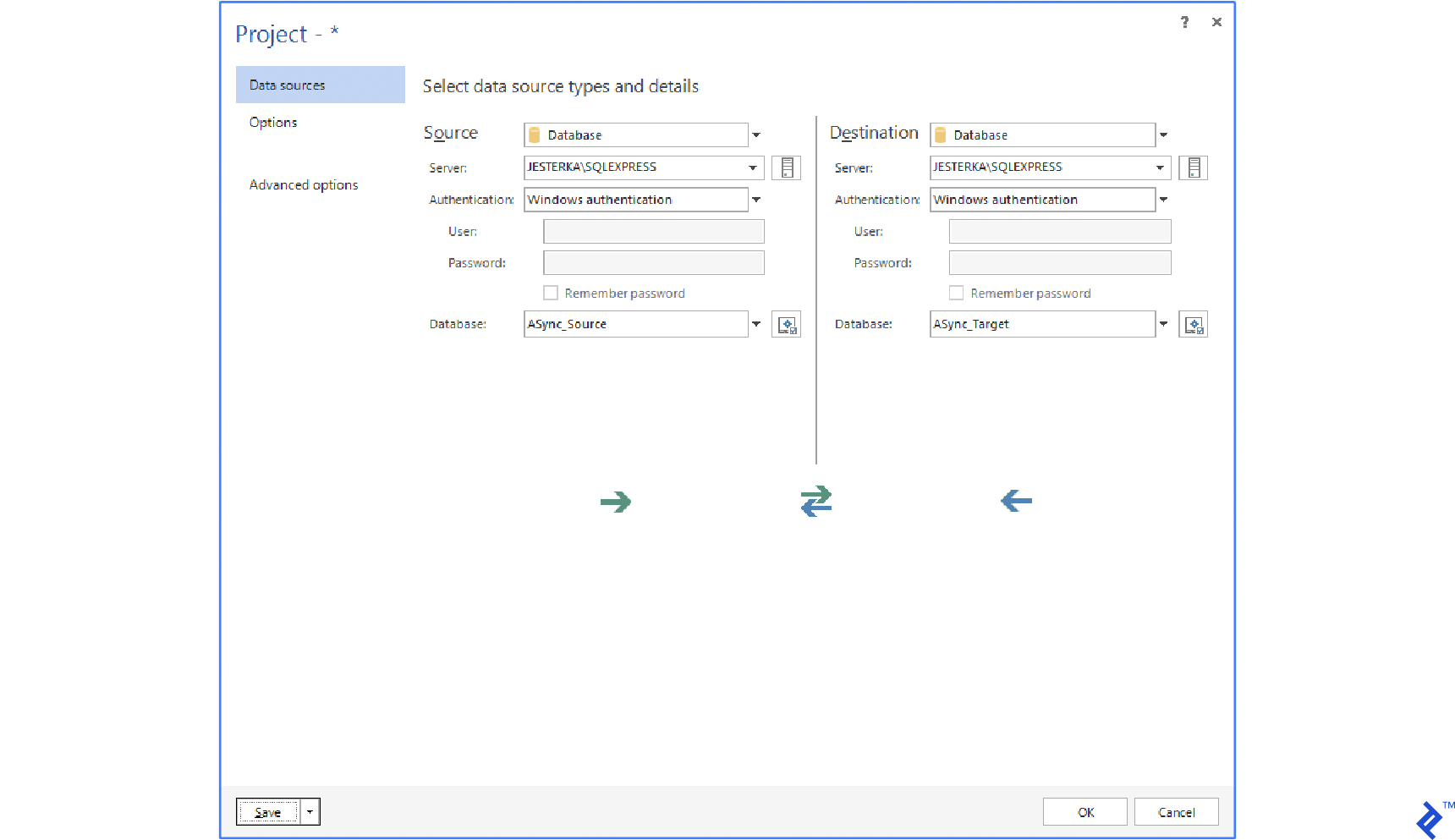
We need to set up the following configuration options that are necessary for data synchronization:
Sync Key
By default, the primary key or a UNIQUE constraint is used. If there is no primary key, you can choose a combination of columns. The Sync key is used to pair rows of the source with rows of the target.
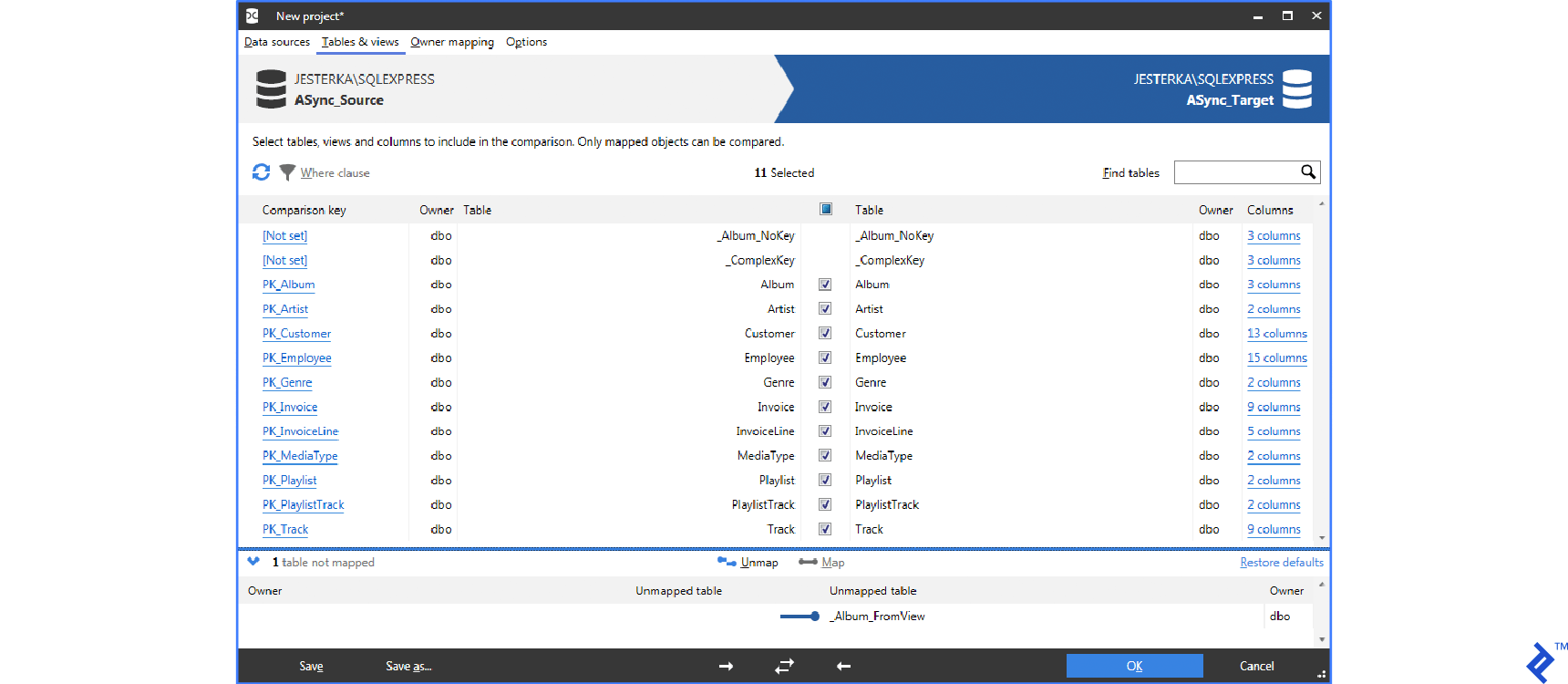
Table Pairing
By default, tables are paired by name. You can change this, and pair them according to your own needs. In the dbForge Data Compare software, you can choose SQL query to be the source or destination.
Synchronization Process
After confirming, the tool compares source and target data. The whole process consists of downloading all of the source and target data and comparing them based on specified criteria. By default, values from equally named tables and columns are compared. All tools support mapping column and table names. Also, there is the possibility to exclude IDENTITY (autoincrement) columns or to do some transformations before comparing values (round float types, ignore character case, treat NULL as an empty string, etc.) Data download is optimized. If the data volume is large, only checksums are downloaded. This optimization is helpful in most cases, but time requirements for performing operations increase with the volume of data.
In the next step, there is a SQL script with generated migrations. This script can be saved or run directly. To be safe, we can even make a database backup before running this script. ApexSQL Data Diff tool can create an executable program which runs the script on a selected database. This script contains data which needs to be changed, not the logic how to change it. This means that the script cannot be run automatically to provide a recurring import. That is the biggest disadvantage of this approach.
Advantages
- Advanced knowledge of SQL is not required, and can be done via GUI.
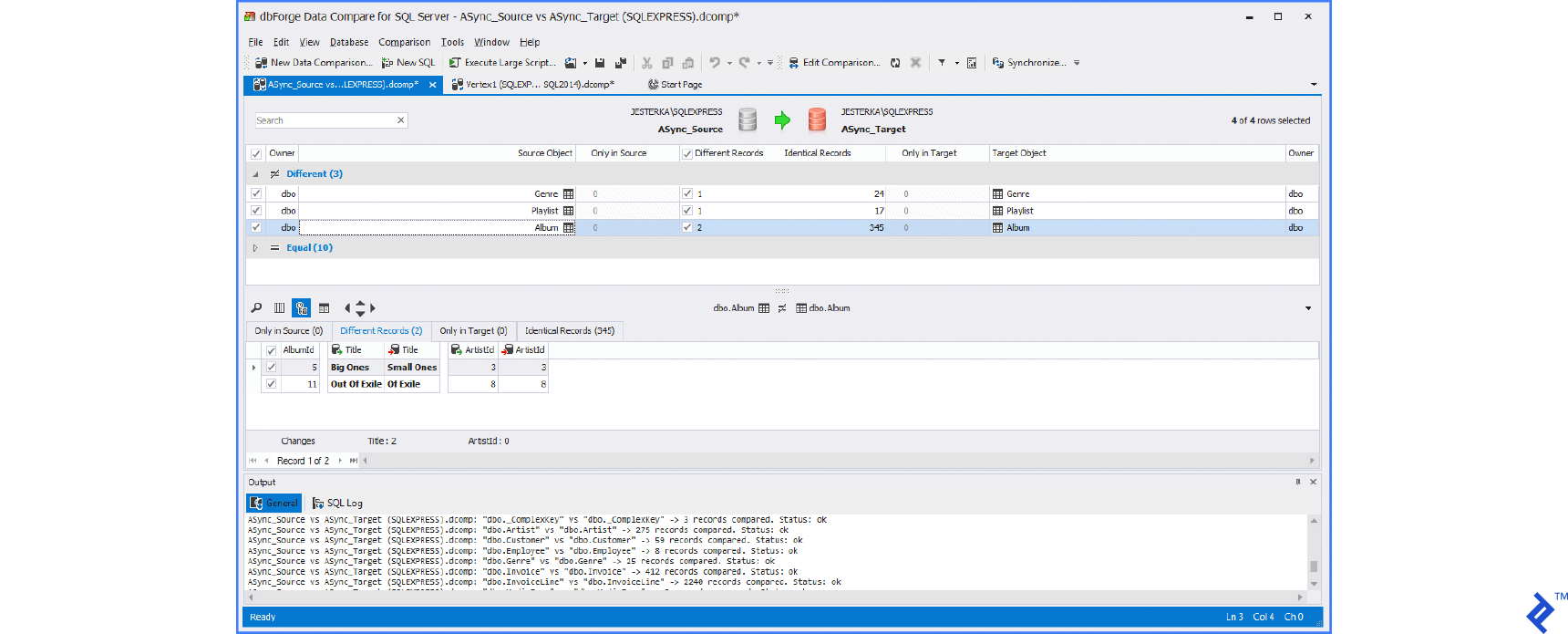
- You have the ability to visually check differences between databases before synchronization.
Disadvantages
- It’s an advanced feature of commercial products.
- Performance decreases when transferring enormous volumes of data.
- Generated SQL script contains only differences, and thus cannot be reused for automatically synchronizing future data.
Below you can see the typical UI of these tools.
Using SQL Server Integration Services (SSIS)
SQL Server Integration Services (SSIS) provides a different approach to synchronization than the data compare method. Instead of generating scripts based on data differences, SSIS packages contain synchronization and transformation logic that can be executed repeatedly. Because the same package can be saved and run on a schedule (e.g., each night), this approach is useful for recurring imports and synchronization between databases.
SSIS is particularly well-suited to cases where the source and destination have different structures. It can map columns from a wide source table into multiple related destination tables, and can import from external file formats such as CSV and Excel. For straightforward synchronization between identically structured databases, however, SSIS may bring more complexity than the task warrants.
Advantages
- Can be scheduled and run automatically as a SQL Server Agent job.
- The same package can be reused for recurring imports.
- Part of the SQL Server ecosystem.
- Can handle structural mapping between wide source tables and multiple related destination tables.
- Can import from many source formats, including CSV and Excel files.
Disadvantages
- Steeper learning curve than the data compare tools.
- Differences can’t be checked manually before synchronization runs.
- Requires SQL Server Data Tools (SSDT) for development, which adds tooling overhead.
- More complex to maintain than a simple stored procedure for straightforward imports.
Performance Considerations
Performance depends on many factors, including SQL Server version, hardware, storage, indexing, and network configuration. For that reason, benchmark results should be considered illustrative rather than absolute.
In recent SQL Server versions:
- CDC-based synchronization typically performs better than full-table comparison for large tables, because only changed rows are processed.
- Native SQL synchronization logic performs best when source and target databases are on the same SQL Server instance.
- Data comparison tools require more resources as table sizes grow, because differences must be identified before a synchronization script can be generated.
- Cloud-native platforms such as Azure Data Factory and AWS DMS can simplify synchronization in hybrid or cross-cloud scenarios and reduce the amount of custom synchronization logic that must be maintained.
Always test synchronization performance using your own data and environment before choosing a method.
Source and destination have a different structure
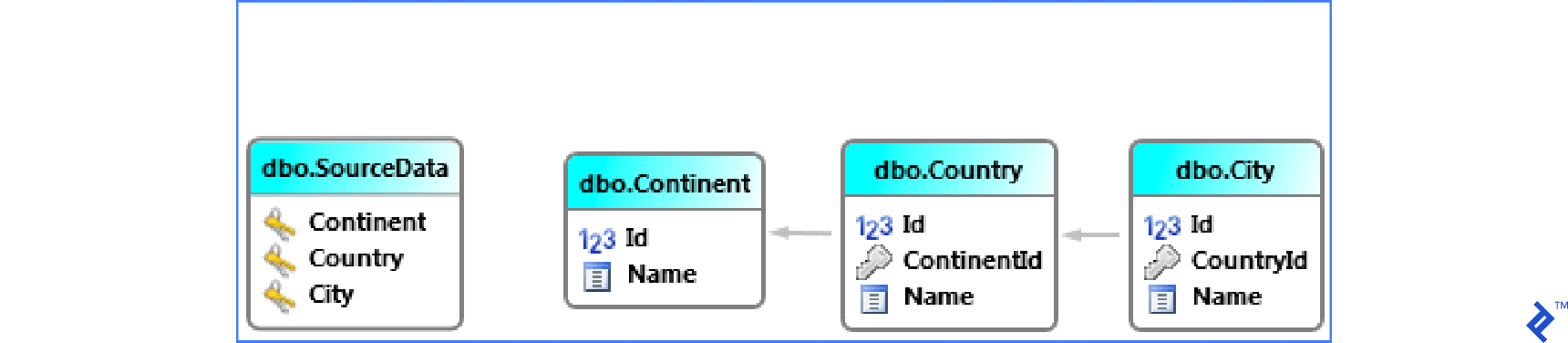
There are also situations when one wide table has to be synchronized into many small related tables.
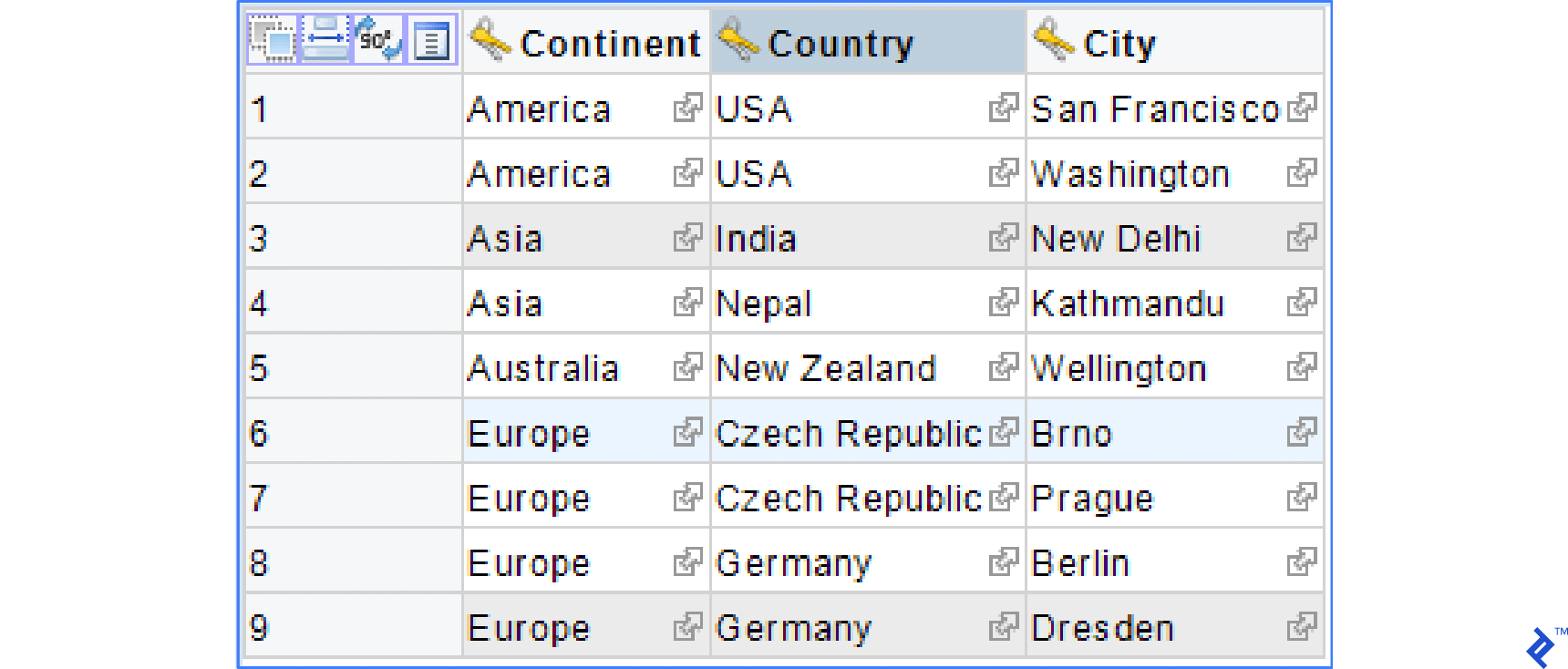
This example consists of one wide table SourceData which needs to be synchronized into small tables Continent, Country, and City. The scheme is given below.
Data in SourceData could be like the one in the image below.
Using manually created SQL scripts
Script Synchronizing Continent Table
INSERT INTO Continent (Name)
SELECT SourceData.Continent
FROM SourceData
WHERE (SourceData.Continent IS NOT NULL
        AND NOT EXISTS (SELECT * FROM Continent tested WHERE tested.Name =SourceData.Continent ))
GROUP BY SourceData.Continent;
Script Synchronizing City Table
INSERT INTO City (Name, CountryId)
SELECT SourceData.City,
    Country.Id
FROM SourceData
    LEFT JOIN Continent ON SourceData.Continent = Continent.Name
    LEFT JOIN Country ON SourceData.Country = Country.Name AND Continent.Id = Country.ContinentId
WHERE SourceData.City IS NOT NULL
        AND Country.Id IS NOT NULL
        AND NOT EXISTS (SELECT * FROM City tested
            WHERE tested.Name = SourceData.City AND tested.CountryId = Country.Id)
GROUP BY
    SourceData.City,
    Country.Id;
This script is more complicated. It is because records in the tables Country and Continent have to be found. This script inserts missing records into City and fills ContryId correctly.
The UPDATE and DELETE scripts could also be written the same way if needed.
Advantages
- You do not need any commercial products.
- The SQL script can be saved into stored procedure or run periodically as a job for SQL Server.
Disadvantages
- Creating such a SQL script is difficult and complicated (for each table, three scripts—
INSERT,UPDATE, andDELETE—are usually necessary). - It is very hard to maintain.
Comparing the Solutions
At its core, data synchronization involves keeping INSERT, UPDATE, or DELETE operations consistent across databases. There are multiple ways to approach this, and in this article, we looked at several.
One option is to create everything manually. It is feasible (but takes too much time), it requires complex understanding of SQL, and it’s difficult to create and maintain.
A second option is to use SQL Server features such as CDC. These features can simplify synchronization by tracking only changed rows, which makes them well-suited to recurring synchronization workloads where source and target structures are compatible.
SSIS, a third option, is particularly useful for recurring synchronization tasks and situations where source and destination structures differ, such as imports from external files or transformations between related tables.
Finally, we also looked at the following commercial tools:
- dbForge Data Compare for SQL Server
- RedGate SQL Data Compare
- Apex SQL Data Diff
These tools work very similarly. They compare data, let the user analyze differences, and can synchronize selected differences (even automatically or from command line). They are beneficial for these usage scenarios:
- Databases are out of sync due to various errors.
- You need to avoid replication while transferring data between environments.
- Data comparison reports in Excel or HTML are needed.
The best synchronization approach depends on the specific problem you need to solve. What works well for a one-time migration may not be the best choice for a recurring synchronization process. Choosing the right method at the beginning can significantly reduce implementation effort and ongoing maintenance costs.
Further Reading on the Toptal Blog:
Understanding the basics
You can use tools such as RedGate Data Compare, ApexSQL Data Diff, and dbForge Data Compare, which use the data compare method. You can use SQL Database Studio, which automatically generates reusable SQL scripts.
Comparison based on data can be done automatically using third-party tools, which come at a price. Alternatively, you can write comparative SQL scripts that show you differences, but that is much more time consuming and less reusable.
You can manually synchronize SQL databases by writing SQL scripts (INSERT, DELETE, UPDATE) or you can use third-party tools which come at a price. Third-party tools work by comparing data and generating synchronization SQL scripts, or you can set up synchronization logic and generate SQL scripts based on it.

Prague, Czech Republic
Member since August 31, 2016
About the author
With a Master’s degree in Service Science, Management, and Engineering, Andrej works on projects of all sizes for clients around the world.