
On-demand Reactivity in Vue 3
The release of Vue 3 brought about substantial performance improvements, but they should not overshadow the introduction of new features and paradigms.
In this article, Toptal Full-stack Developer Luka Mikec introduces you to the new Composition API and explains what Vue 3 means for code expressiveness, organization, and reuse.

The release of Vue 3 brought about substantial performance improvements, but they should not overshadow the introduction of new features and paradigms.
In this article, Toptal Full-stack Developer Luka Mikec introduces you to the new Composition API and explains what Vue 3 means for code expressiveness, organization, and reuse.

Luka has extensive experience in academia and full-stack software development. He is a cotutelle Ph.D. candidate in mathematics and computer science.
Expertise
Vue 3 offers several features that simplify the development of complex applications. Arguably, the most significant is the Composition API. In the first part of this article, we recap the standard motivation for the Composition API: better code organization and reuse. In the second part, we focus on less-discussed aspects of using the API, such as implementing reactivity-based features that are difficult to achieve with the traditional Options API.
We will refer to this as on-demand reactivity. After introducing these features, we will build a simple spreadsheet application to demonstrate the expressive power of Vue’s reactivity system. At the very end, we will discuss the real-world applications of this approach to on-demand reactivity.
What Is Vue 3’s Composition API
Vue 3 was a major rewrite of Vue 2, introducing a plethora of improvements and admirable performance advantages while retaining backward compatibility with the Options API almost in its entirety. When the Composition API was first discussed publicly, however, it sparked considerable debate, in part because many developers questioned the need for a different approach to organizing component logic. In case you are not already familiar with the Composition API, we’ll first describe the motivation behind it.
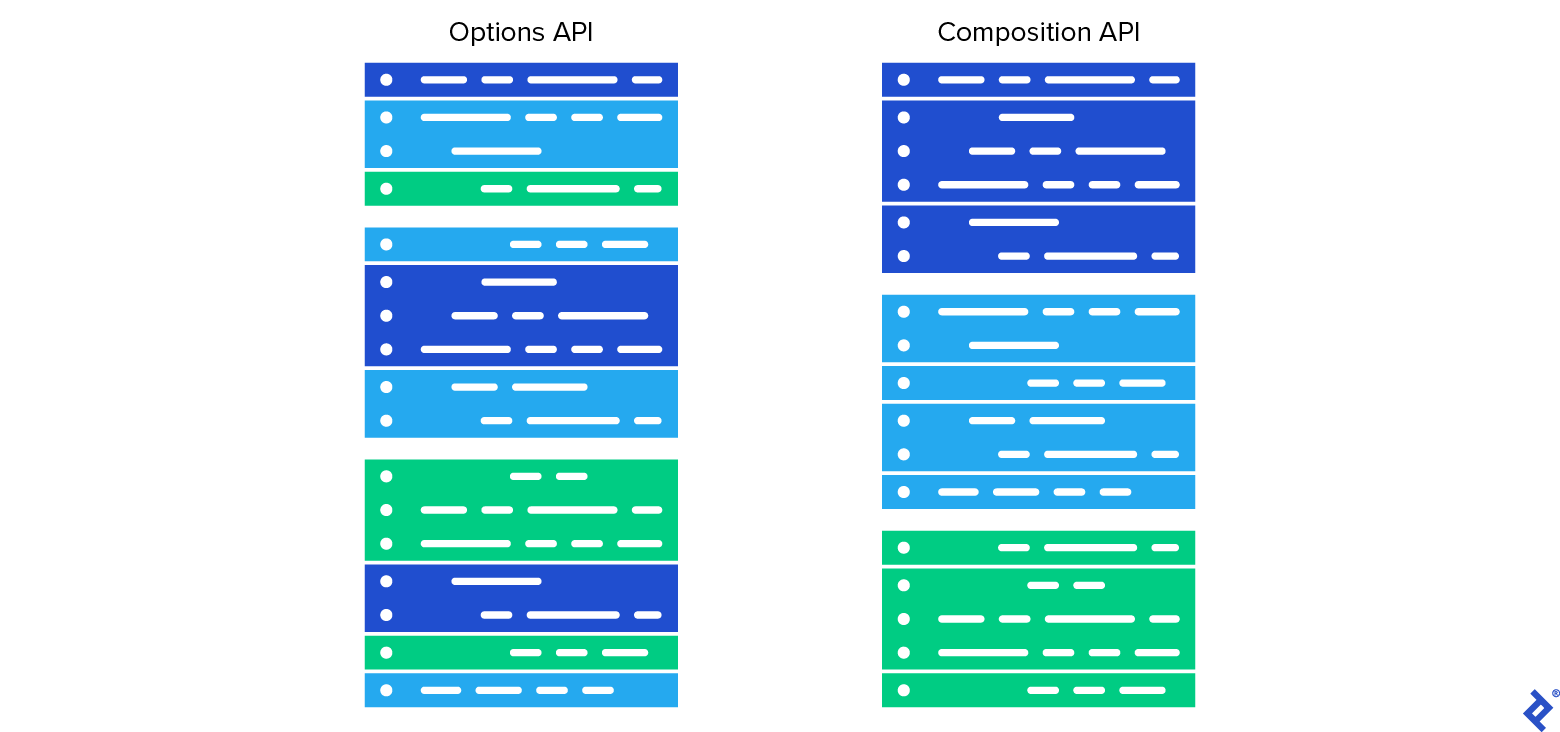
The usual unit of code organization is a JavaScript object whose keys represent various possible types of a piece of a component. Thus the object might have one section for reactive data (data), another section for computed properties (computed), one more for component methods (methods), etc.
Under this paradigm, a component can have multiple unrelated or loosely related functionalities whose inner workings are distributed among the aforementioned component sections. For example, we might have a component for uploading files that implements two essentially separate functionalities: file management and a system that controls the upload status animation.
The <script> portion might contain something like the following:
export default {
  data () {
    return {
      animation_state: 'playing',
      animation_duration: 10,
      upload_filenames: [],
      upload_params: {
        target_directory: 'media',
        visibility: 'private',
      }
    }
  },
  computed: {
    long_animation () { return this.animation_duration > 5; },
    upload_requested () { return this.upload_filenames.length > 0; },
  },
  ...
}
There are benefits to this traditional approach to code organization, mainly in the developer not having to worry about where to write a new piece of code. If we’re adding a reactive variable, we insert it in the data section. If we’re looking for an existing variable, we know it must be in the data section.
This traditional approach of splitting the functionality’s implementation into sections (data, computed, etc.) is not suitable in all situations.
The following exceptions are cited often:
- Dealing with a component with a large number of functionalities. If we want to upgrade our animation code with the ability to delay the start of the animation, for example, we will have to scroll/jump between all the relevant sections of the component in a code editor. In the case of our file-uploading component, the component itself is small and the number of functionalities it implements is small, too. Thus, in this case, jumping between the sections is not really a problem. This issue of code fragmentation becomes relevant when we deal with large components.
- Another situation where the traditional approach is lacking is code reuse. Often we need to make a specific combination of reactive data, computed properties, methods, etc., available in more than one component.
The Options API offers a solution to most of the code organization and reuse issues: mixins.
Pros and Cons of Mixins
Mixins allow the functionalities of a component to be extracted in a separate unit of code. Each functionality is put in a separate mixin and every component can use one or more mixins. Pieces defined in a mixin can be used in a component as if they were defined in the component itself. The mixins are a bit like classes in object-oriented languages in that they collect the code related to a given functionality. Like classes, mixins can be inherited (used) in other units of code.
However, reasoning with mixins is harder since, unlike classes, mixins need not be designed with encapsulation in mind. Mixins are allowed to be collections of loosely bound pieces of code without a well-defined interface to the outer world. Using more than one mixin at a time in the same component might result in a component that is difficult to comprehend and use.
Most object-oriented languages (e.g., C# and Java) discourage or even disallow multiple inheritance despite the fact that the object-oriented programming paradigm has the tools to deal with such complexity. (Some languages do allow multiple inheritance, such as C++, but composition is still preferred over inheritance.)
A more practical issue that may occur when using mixins in Vue is name collision, which occurs when using two or more mixins declaring common names. It should be noted here that if Vue’s default strategy for dealing with name collisions is not ideal in a given situation, the strategy can be adjusted by the developer. This comes at the cost of introducing more complexity.
Another issue is that mixins do not offer something akin to a class constructor. This is a problem because often we need functionality that is very similar, but not exactly the same, to be present in different components. This can be circumvented in some simple cases with the use of mixin factories.
Therefore, mixins are not the ideal solution for code organization and reuse, and the larger the project, the more serious their issues become. Vue 3 provides a different way of solving these same issues concerning code organization and reuse.
Composition API: Vue 3’s Answer to Code Organization and Reuse
The Composition API allows us (but does not require us) to completely decouple the pieces of a component. Every piece of code—a variable, a computed property, a watch, etc.—can be defined independently.
For example, instead of having an object that contains a data section that contains a key animation_state with the (default) value “playing,” we can write (anywhere in our JavaScript code):
const animation_state = ref('playing');
The effect is almost the same as declaring this variable in the data section of some component. The only essential difference is that we need to make the ref defined outside of the component available where we intend to use it. With <script setup>, we can do this by importing it directly into the component. We’ll skip this procedure for now and just focus on the Composition API for a moment. Reactivity in Vue 3 doesn’t require a component; it’s actually a self-contained system.
We can use the variable animation_state in any scope that we import this variable to. After constructing a ref, we get and set its actual value using ref.value, for example:
animation_state.value = 'paused';
console.log(animation_state.value);
We need the .value suffix since the assignment operator would otherwise assign the (non-reactive) value “paused” to the variable animation_state. Reactivity in JavaScript (both when it is implemented through the defineProperty as in Vue 2, and when it’s based on a Proxy as in Vue 3) requires an object whose keys we can work with reactively.
Unless and until the JavaScript language standard introduces the ability to overload the assignment operator, reactive expressions will require an object and a key (e.g., animation_state and value as above) to appear on the left-hand side of any assignment operation where we wish to preserve reactivity.
In templates, we can omit .value since Vue has to preprocess the template code and can automatically detect references:
<animation :state='animation_state' />
Sometimes, we have an entity (for example, a JavaScript object or an array) that we never intend to replace with a completely different instance. Instead, we might only be interested in modifying its keyed fields. There is a shorthand in this case: using reactive instead of ref allows us to dispense with the .value:
const upload_params = reactive({
  target_directory: 'media',
  visibility: 'private',
});

upload_params.visibility = 'public';    // no `.value` needed here

// if we did not make `upload_params` constant, the following code would compile but we would lose reactivity after the assignment; it is thus a good idea to make reactive variables `const` explicitly:
upload_params = {
  target_directory: 'static',
  visibility: 'public',
};
Decoupled reactivity with ref and reactive is not unique to Vue 3. It was partly introduced in Vue 2.6, where such decoupled instances of reactive data were called “observables.” For the most part, one can replace Vue.observable with reactive. One of the differences is that accessing and mutating the object passed to Vue.observable directly is reactive, while reactive returns a proxy object, so mutating the original object will not have reactive effects.
Another important capability of Vue 3 is that other reactive pieces of a component can be defined independently, in addition to reactive data. Computed properties are implemented in an expected way:
const x = ref(5);
const x_squared = computed(() => x.value * x.value);
console.log(x_squared.value); // outputs 25
Similarly, one can implement various types of watches, lifecycle methods, and dependency injection. For the sake of brevity, we won’t cover those here.
Suppose we use the standard SFC approach to Vue development. We might even be using the Options API, with separate sections for data, computed properties, etc. How do we integrate the Composition API’s small bits of reactivity with SFCs? Modern Vue development typically uses the <script setup> syntax, which allows us to use the Composition API directly within an SFC with less boilerplate.
Here is an example of a complete component that uses the Composition API with <script setup>:
<template>
  <input v-model="x" />
  <div>Squared: {{ x_squared }}, negative: {{ x_negative }}</div>
</template>

<script setup>
import { ref, computed } from 'vue'

const x = ref(0)
const x_squared = computed(() => x.value * x.value)
const x_negative = computed(() => -x.value)
</script>
Things to take away from this example:
- All the Composition API code is in the
<script setup>block. You might want to create a separate file for each functionality and import it into the SFC as a reusable composable. Any top-level bindings used in the template are automatically available without an explicit return statement. - Refs do not require
.valuewhen used in a template. Notice thatx, even though it’s a reference, can be used directly because Vue automatically unwraps refs in templates. - Last but not least, notice we have two root DOM nodes in our template; the ability to have multiple root nodes is another feature of Vue 3.
Reactivity is More Expressive in Vue 3
In the first part of this article, we touched upon the standard motivation for the Composition API, which is improved code organization and reuse. Indeed, the Composition API’s main selling point is not its power, but the organizational convenience that it brings: the ability to structure the code more clearly. It might seem like that is all—that the Composition API enables a way of implementing components that avoids the limitations of the already existing solutions, such as mixins.
However, there is more to the Composition API. The Composition API actually enables reactive systems that are not just better organized but also more powerful. The key ingredient is the ability to dynamically add reactivity to the application. With the Options API, all the data, computed properties, and other reactive pieces typically had to be defined before a component was loaded. Why would adding reactive objects at a later stage be useful? In what follows, we take a look at a more complex example: spreadsheets.
The Challenge of Building a Reactive Spreadsheet
Spreadsheet tools such as Microsoft Excel, LibreOffice Calc, and Google Sheets all have some sort of a reactivity system. These tools present a user with a table, with columns indexed by A–Z, AA–ZZ, AAA–ZZZ, etc., and rows indexed numerically.
Each cell may contain a plain value or a formula. A cell with a formula is essentially a computed property, which may depend on values or other computed properties. With standard spreadsheets (and unlike the reactivity system in Vue), these computed properties are even allowed to depend on themselves! Such self-reference is useful in some scenarios where the desired value is obtained by iterative approximation.
Once a cell’s content changes, all the cells that depend on the cell in question will trigger an update. If further changes occur, further updates might be scheduled.
If we were to build a spreadsheet application with Vue, it would be natural to ask if we can put Vue’s own reactivity system to use and make Vue the engine of a spreadsheet app. For each cell, we could remember its raw editable value, as well as the corresponding computed value. Computed values would reflect the raw value if it’s a plain value, and otherwise, the computed values are the result of the expression (formula) that is written instead of a plain value.
One way to implement a spreadsheet is to have raw_values, a two-dimensional array of strings, and computed_values, a computed two-dimensional array of cell values.
If the number of cells is small and fixed before the appropriate Vue component loads, we could have one raw and one computed value for every cell of the table in our component definition. Aside from the aesthetic monstrousness that such an implementation would cause, a table with a fixed number of cells at compile-time probably doesn’t count as a spreadsheet.
There are problems with the two-dimensional array computed_values, too. A computed property is always a function whose evaluation, in this case, depends on itself (calculating the value of a cell will, in general, require some other values to already be computed). Even if Vue allowed self-referential computed properties, updating a single cell would cause all cells to be recomputed (regardless of whether there are dependencies or not). This would be extremely inefficient. Thus, we might end up using reactivity to detect changes in the raw data, but everything else reactivity-wise would have to be implemented from scratch.
Modeling Computed Values With Dynamic Reactivity
With dynamic reactivity, we can introduce a new computed property for every cell. If the table grows, new computed properties are introduced.
Suppose we have cells A1 and A2, and we wish for A2 to display the square of A1 whose value is the number 5. A sketch of this situation:
let A1 = computed(() => 5);
let A2 = computed(() => A1.value * A1.value);
console.log(A2.value); // outputs 25
Suppose we stay in this simple scenario for a moment. There is an issue here; what if we wish to change A1 so that it contains the number 6? Suppose we write this:
A1 = computed(() => 6);
console.log(A2.value); // outputs 25 if we already ran the code above
This didn’t merely change the value 5 to 6 in A1. The variable A1 has a completely different identity now: the computed property that resolves to the number 6. However, the variable A2 still reacts to changes of the old identity of the variable A1. So, A2 shouldn’t refer to A1 directly, but rather to some special object that will always be available in the context, and will tell us what is A1 at the moment. In other words, we need a level of indirection before accessing A1, something like a pointer. There are no pointers as first-class entities in JavaScript, but it’s easy to simulate one. If we wish to have a pointer pointing to a value, we can create an object pointer = {points_to: value}. Redirecting the pointer amounts to assigning to pointer.points_to, and dereferencing (accessing the pointed-to value) amounts to retrieving the value of pointer.points_to. In our case, we proceed as follows:
let A1 = reactive({points_to: computed(() => 5)});
let A2 = reactive({points_to: computed(() => A1.points_to * A1.points_to)});
console.log(A2.points_to); // outputs 25
Now we can substitute 5 with 6.
A1.points_to = computed(() => 6);
console.log(A2.points_to); // outputs 36
On Vue’s Discord server, the user redblobgames suggested another interesting approach: instead of using computed values, use references that wrap regular functions. This way, one can similarly swap the function without changing the identity of the reference itself.
Our spreadsheet implementation will have cells referred to by keys of some two-dimensional array. This array can provide the level of indirection we require. Thus in our case, we won’t require any additional pointer simulation. We could even have one array that does not distinguish between raw and computed values. Everything can be a computed value:
const cells = reactive([
  computed(() => 5),
  computed(() => cells[0].value * cells[0].value)
]);

cells[0] = computed(() => 6);
console.log(cells[1].value); // outputs 36
However, we really want to distinguish raw and computed values since we want to be able to bind the raw value to an HTML input element. Furthermore, if we have a separate array for raw values, we never have to change the definitions of computed properties; they will update automatically based on the raw data.
Implementing the Spreadsheet
Let’s start with some basic definitions, which are for the most part self-explanatory.
const rows = ref(30), cols = ref(26);

/* if a string codes a number, return the number, else return a string */
const as_number = raw_cell => /^[0-9]+(\.[0-9]+)?$/.test(raw_cell)
    ?  Number.parseFloat(raw_cell)  :  raw_cell;

const make_table = (val = '', _rows = rows.value, _cols = cols.value) =>
    Array(_rows).fill(null).map(() => Array(_cols).fill(val));

const raw_values = reactive(make_table('', rows.value, cols.value));
const computed_values = reactive(make_table(undefined, rows.value, cols.value));

/* a useful metric for debugging: how many times did cell (re)computations occur? */
const calculations = ref(0);
The plan is for every computed_values[row][column] to be computed as follows. If raw_values[row][column] doesn’t start with =, return raw_values[row][column]. Otherwise, parse the formula, compile it to JavaScript, evaluate the compiled code, and return the value. To keep things short, we’ll cheat a bit with parsing formulas and we won’t do some obvious optimizations here, such as a compilation cache.
We will assume that users can enter any valid JavaScript expression as a formula. We can replace references to cell names that appear in user’s expressions, such as A1, B5, etc., with the reference to the actual cell value (computed). The following function does this job, assuming that strings resembling cell names really always identify cells (and are not a part of some unrelated JavaScript expression). For simplicity, we will assume column indices consist of a single letter.
const letters = Array(26).fill(0)
    .map((_, i) => String.fromCharCode("A".charCodeAt(0) + i));

const transpile = str => {
    let cell_replacer = (match, prepend, col, row) => {
        col = letters.indexOf(col);
        row = Number.parseInt(row) - 1;
        return prepend + ` computed_values[${row}][${col}].value `;
    };
    return str.replace(/(^|[^A-Z])([A-Z])([0-9]+)/g, cell_replacer);
};
Using the transpile function, we can get pure JavaScript expressions out of expressions written in our little “extension” of JavaScript with cell references.
The next step is to generate computed properties for every cell. This procedure will occur once in the lifetime of every cell. We can make a factory that will return the desired computed properties.
To keep our spreadsheet example simple, we use JavaScript’s new Function() constructor to evaluate user-entered formulas. This approach should not be used with untrusted input in a production application, as it can allow arbitrary code execution. A real-world implementation should instead use a dedicated expression parser or formula engine that evaluates a restricted set of operations without executing arbitrary JavaScript.
const computed_cell_generator = (i, j) => {
    const computed_cell = computed(() => {
        // we don't want Vue to think that the value of a computed_cell depends on the value of `calculations`
        nextTick(() => ++calculations.value);

        let raw_cell = raw_values[i][j].trim();
        if (!raw_cell || raw_cell[0] != '=')
            return as_number(raw_cell);

        let user_code = raw_cell.substring(1);
        let code = transpile(user_code);
        try {
            // the constructor of a Function receives the body of a function as a string
            let fn = new Function(['computed_values'], `return ${code};`);
            return fn(computed_values);
        } catch (e) {
            return "ERROR";
        }
    });
    return computed_cell;
};

for (let i = 0; i < rows.value; ++i)
    for (let j = 0; j < cols.value; ++j)
        computed_values[i][j] = computed_cell_generator(i, j);
With <script setup>, the top-level bindings defined above are automatically available to the component’s template.
Below, we present the complete component, together with a basic user interface.
You can also check out the live demo.
<template>
  <div>
    <div style="margin: 1ex;">Calculations: {{ calculations }}</div>
    <table class="table" border="0">
      <tr class="row">
        <td id="empty_first_cell"></td>

        <td class="column"
            v-for="(_, j) in cols" :key="'header' + j"
        >
          {{ letters[j] }}
        </td>
      </tr>

      <tr class="row"
          v-for="(_, i) in rows" :key="i"
      >
        <td class="column">
          {{ i + 1 }}
        </td>

        <td class="column"
            v-for="(__, j) in cols" :key="i + '-' + j"
            :class="{ column_selected: active(i, j), column_inactive: !active(i, j) }"
            @click="activate(i, j)"
        >
          <div v-if="active(i, j)">
            <input :ref="el => set_input_ref(el, i, j)"
                   v-model="raw_values[i][j]"
                   @keydown.enter.prevent="ui_enter()"
                   @keydown.esc="ui_esc()"
            />
          </div>
          <div v-else>{{ computed_value_formatter(computed_values[i][j].value) }}</div>
        </td>
      </tr>
    </table>
  </div>
</template>

<script setup>
import { ref, reactive, computed, nextTick } from "vue";

const rows = ref(30), cols = ref(26);

/* if a string codes a number, return the number, else return a string */
const as_number = raw_cell => /^[0-9]+(\.[0-9]+)?$/.test(raw_cell)
    ? Number.parseFloat(raw_cell) : raw_cell;

const make_table = (val = '', _rows = rows.value, _cols = cols.value) =>
    Array(_rows).fill(null).map(() => Array(_cols).fill(val));

const raw_values = reactive(make_table('', rows.value, cols.value));
const computed_values = reactive(make_table(undefined, rows.value, cols.value));

/* a useful metric for debugging: how many times did cell (re)computations occur? */
const calculations = ref(0);

const letters = Array(26).fill(0)
    .map((_, i) => String.fromCharCode("A".charCodeAt(0) + i));

const transpile = str => {
    let cell_replacer = (match, prepend, col, row) => {
        col = letters.indexOf(col);
        row = Number.parseInt(row) - 1;
        return prepend + ` computed_values[${row}][${col}].value `;
    };
    return str.replace(/(^|[^A-Z])([A-Z])([0-9]+)/g, cell_replacer);
};

const computed_cell_generator = (i, j) => {
    const computed_cell = computed(() => {
        // we don't want Vue to think that the value of a computed_cell depends on the value of `calculations`
        nextTick(() => ++calculations.value);

        let raw_cell = raw_values[i][j].trim();
        if (!raw_cell || raw_cell[0] != '=')
            return as_number(raw_cell);

        let user_code = raw_cell.substring(1);
        let code = transpile(user_code);

        try {
            // the constructor of a Function receives the body of a function as a string
            let fn = new Function(['computed_values'], `return ${code};`);
            return fn(computed_values);
        } catch (e) {
            return "ERROR";
        }
    });
    return computed_cell;
};

for (let i = 0; i < rows.value; ++i)
    for (let j = 0; j < cols.value; ++j)
        computed_values[i][j] = computed_cell_generator(i, j);

const ui_editing_i = ref(null);
const ui_editing_j = ref(null);
const input_refs = {};

const set_input_ref = (el, i, j) => {
    const key = 'input' + i + '-' + j;

    if (el)
        input_refs[key] = el;
    else
        delete input_refs[key];
};

const get_dom_input = (i, j) => {
    return input_refs['input' + i + '-' + j];
};

const activate = (i, j) => {
    ui_editing_i.value = i;
    ui_editing_j.value = j;
    nextTick(() => get_dom_input(i, j)?.focus());
};

const active = (i, j) => {
    return ui_editing_i.value === i && ui_editing_j.value === j;
};

const unselect = () => {
    ui_editing_i.value = null;
    ui_editing_j.value = null;
};

const computed_value_formatter = str => {
    if (str === undefined || str === null)
        return 'none';
    return str;
};

const ui_enter = () => {
    if (ui_editing_i.value < rows.value - 1)
        activate(ui_editing_i.value + 1, ui_editing_j.value);
    else
        unselect();
};

const ui_esc = () => {
    unselect();
};
</script>

<style>
.table {
  margin-left: auto;
  margin-right: auto;
  margin-top: 1ex;
  border-collapse: collapse;
}

.column {
  box-sizing: border-box;
  border: 1px lightgray solid;
}

.column:first-child {
  background: #f6f6f6;
  min-width: 3em;
}

.column:not(:first-child) {
  min-width: 4em;
}

.row:first-child {
  background: #f6f6f6;
}

#empty_first_cell {
  background: white;
}

.column_selected {
  border: 2px cornflowerblue solid !important;
  padding: 0px;
}

.column_selected input, .column_selected input:active, .column_selected input:focus {
  outline: none;
  border: none;
}
</style>
What About Real-world Use?
We saw how the decoupled reactivity system of Vue 3 enables not only cleaner code but also more complex reactive systems. The practical value of this increased expressiveness, however, may not be immediately obvious.
The spreadsheet example is a straightforward demonstration of Vue’s capabilities, and you can also check out the live demo.
But as a real-world example, it is somewhat niche. In what sort of situations might this flexibility come in handy? The most obvious use case for on-demand reactivity might be performance gains in complex applications.
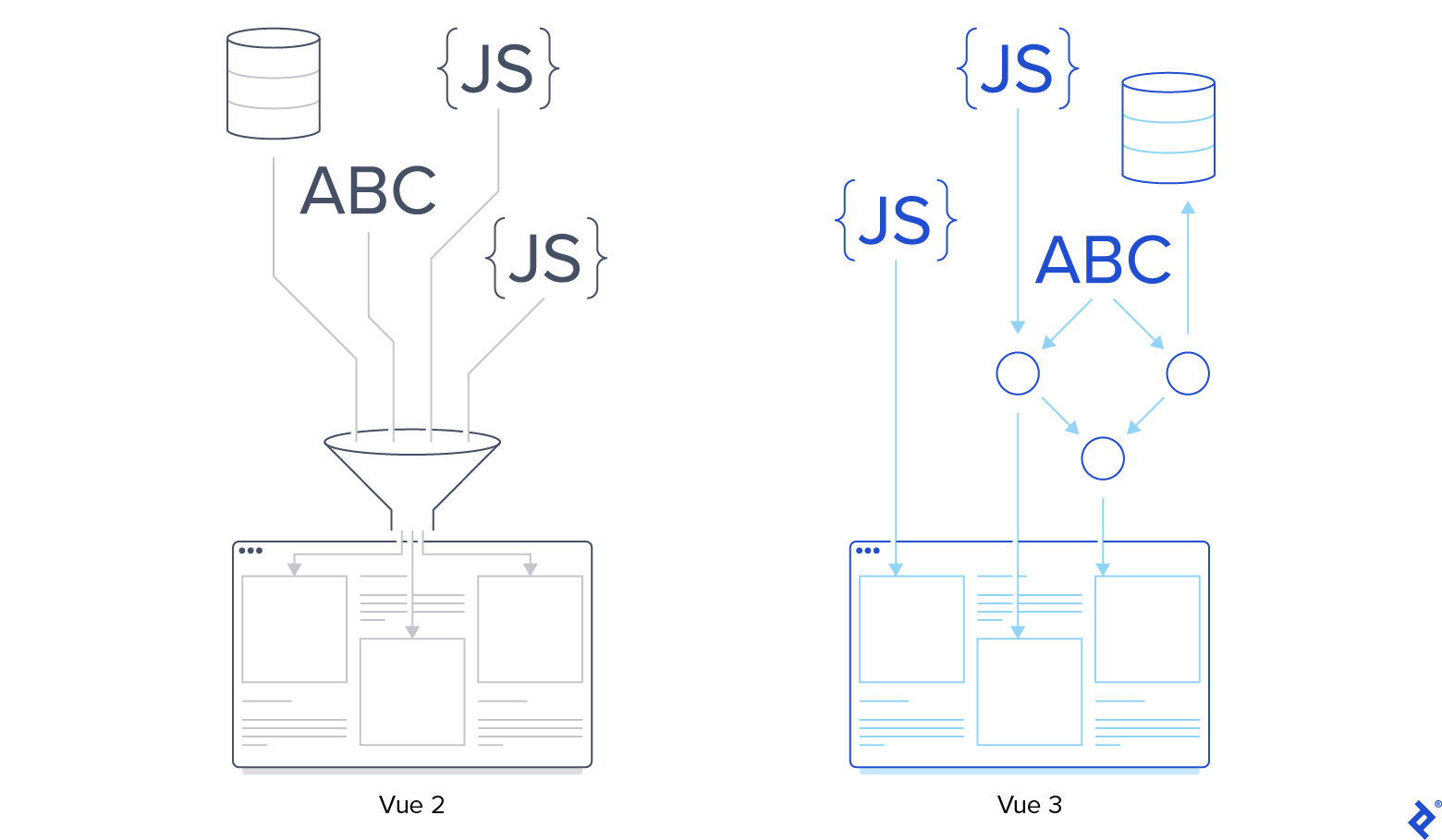
In front-end applications that work with a large amount of data, the overhead of using poorly thought-through reactivity might have a negative impact on performance. Suppose we have a business dashboard application that produces interactive reports of the company’s business activity. The user can select a time range and add or remove performance indicators in the report. Some indicators may display values that depend on other indicators.
One way to implement report generation is through a monolithic structure. When the user changes an input parameter in the interface, a single computed property, e.g., report_data, gets updated. The computation of this computed property happens according to a hardcoded plan: first, calculate all the independent performance indicators, then those that depend only on these independent indicators, etc.
A better implementation will decouple bits of the report and compute them independently. There are some benefits to this:
- The developer does not have to hardcode an execution plan, which is tedious and error-prone. Vue’s reactivity system will automatically detect dependencies.
- Depending on the amount of data involved, we might get substantial performance gains since we are only updating the report data that logically depended on the modified input parameters.
If all performance indicators that may be a part of the final report are known before the Vue component gets loaded, the proposed decoupling is relatively straightforward. Otherwise, if the backend is the single source of truth (which is usually the case with data-driven applications), or if there are external data providers, we can generate on-demand computed properties for every piece of a report.
Vue 3’s reactivity system makes this not only possible but easy to do.
Further Reading on the Toptal Blog:
Understanding the basics
Vue 3 is the latest major version of Vue. The framework continues to receive regular minor and patch releases.
Yes, Vue 3 is the stable, recommended version of Vue for new projects.
Vue 3 retains many of the familiar APIs and concepts from Vue 2, but it also includes breaking changes. Existing Vue 2 applications may require code changes when migrating to Vue 3.
Vue was first made public in February 2014, and Vue 1.0 was released in October 2015. Vue 3.0, the current major version of the framework, was released in September 2020.

Zagreb, Croatia
Member since September 3, 2020
About the author
Luka has extensive experience in academia and full-stack software development. He is a cotutelle Ph.D. candidate in mathematics and computer science.