
A Beginner’s Guide to Managing Software Development With Kanban and Trello
While the success of your project depends on many factors, one of the most common reasons projects fail is a lack of management or downright bad project management.
In this post, Lead Engineering Editor Demir Selmanovic teaches you the basics of Agile project management using Kanban and Trello.

While the success of your project depends on many factors, one of the most common reasons projects fail is a lack of management or downright bad project management.
In this post, Lead Engineering Editor Demir Selmanovic teaches you the basics of Agile project management using Kanban and Trello.

Demir is a developer and project manager with over 15 years of professional experience in a wide range of software development roles.
Expertise
Everyone is a project manager. Whether you’re managing the development of a new application and growing your startup, working on a new billion-dollar enterprise project, or just trying to liven up your yard with some DIY landscaping, you’re always managing a project.
The success of your project depends on many factors, but one of the most common reasons projects fail is a lack of management or outright bad project management. No matter how small your team is, or how clearly your requirements are documented, if you do not manage your team properly, your project is bound to fail. Every minute you spend managing your project is time well spent, bringing you closer to the successful completion of your work.
Agile project management is a widely accepted method of approaching modern software development projects. But what does Agile really mean? Agile projects accept frequent changes in scope and requirements as an integral part of the process. For a deeper dive into Agile principles, I suggest reading our Ultimate Guide to Agile Project Management.
In this post, we will explain the basics of Agile project management with Kanban.
Agile Project Management With Kanban
Even if you are an experienced project manager who understands Agile principles inside and out, you should refresh your memory and remind yourself of core concepts. Innovation cycles in software development are constantly speeding up, making project management more complex with each iteration. Going back to fundamental principles and solidifying core Agile concepts is always important. After all, repetition is the mother of all knowledge.
Kanban is one of the easiest methods of managing any Agile software development project. You can easily handle a development team that works from the same office or a distributed team spread out through several time zones.
Kanban is not a process. It’s a way to manage any process with minimal changes to the team’s established operational activities.
In order to apply Kanban principles to your work, you must apply two simple rules:
- Visualize your process.
- Limit work in progress.
Visualize Your Process
Data visualization is a quick, easy way to convey information in a universal and easy-to-understand manner. When looking at pictures, the human brain can process several pieces of information simultaneously. Some researchers say that this can be up to 60,000 times faster than reading text.
The most popular way to visualize a process is a Kanban board, which is divided into several vertical columns, each representing a state in your process.
Let’s take a look at how a simple software development board would look. First, we need to define states for our development features:
- To-Do - feature is waiting for development
- Development - feature is assigned to a developer and he/she is working on it
- Quality Assurance - feature is in review
- Deployed - feature is accepted and included in application release
Based on this, your board should have the following layout:
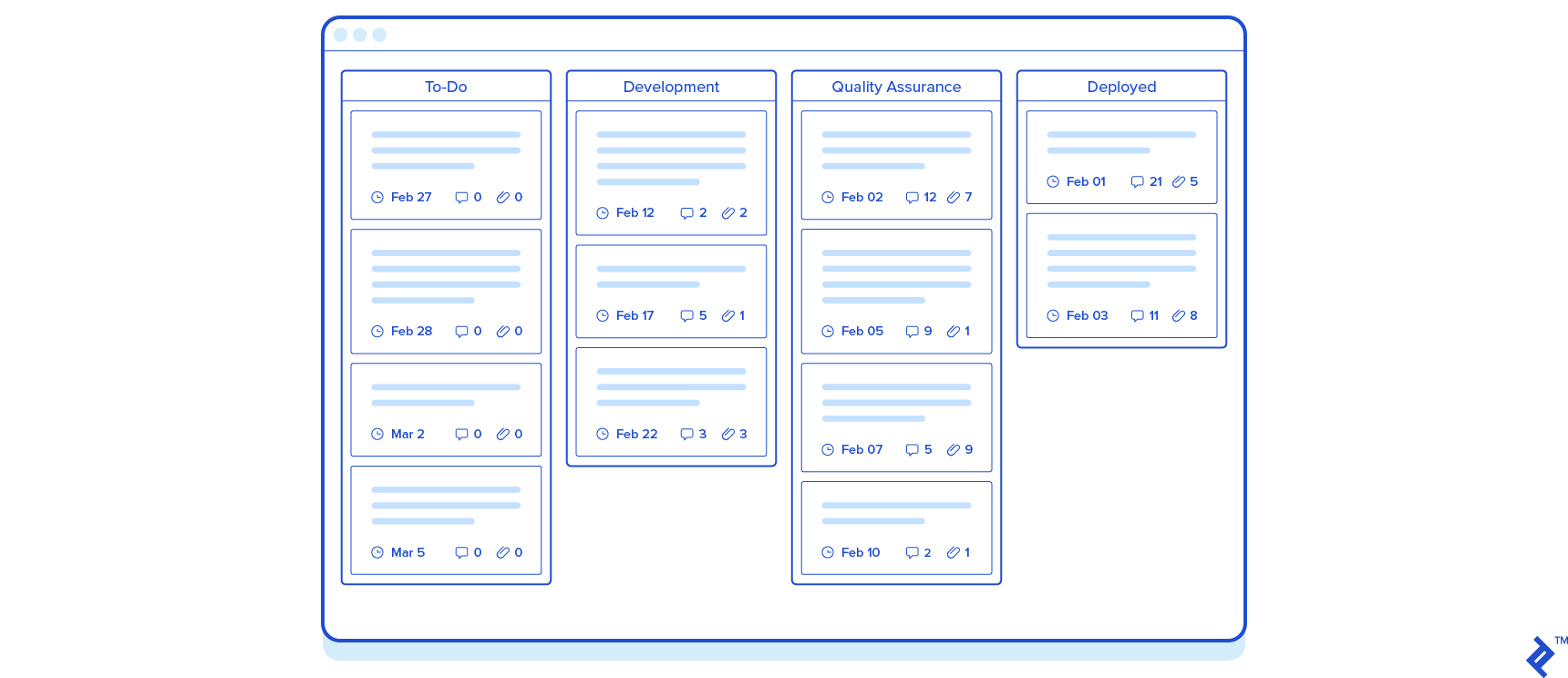
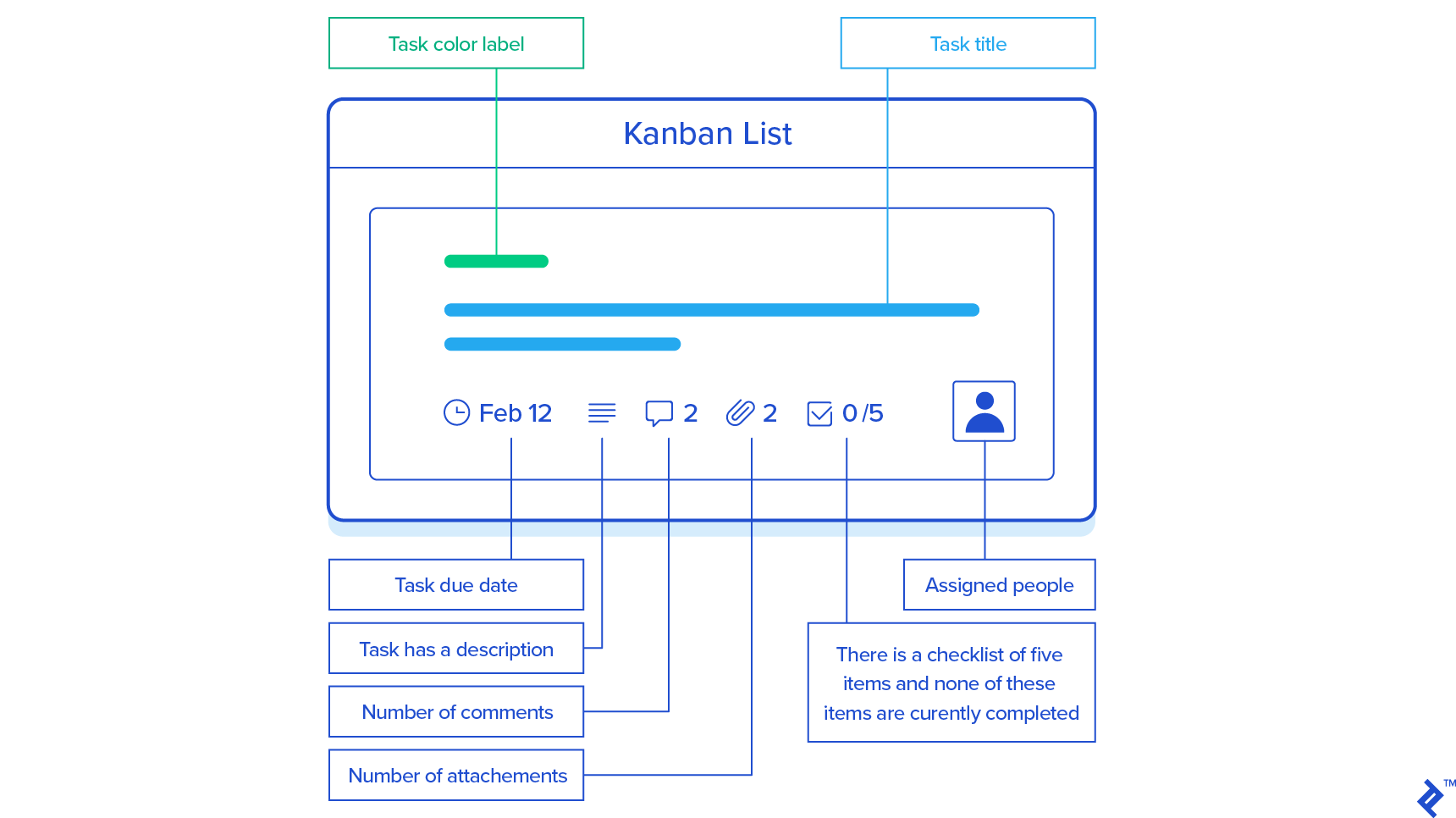
Visualizing individual tasks is as easy as creating a simple card (much like a Post-it) that represents work that needs to be done. You can name the task, add the name of the assigned developer, due date, and any other relevant information to this card.
When you add that card to a column on the Kanban Board, you have visualized that, for example, a specific developer is working on a particular task that is due at a certain date and is currently in development.
Limit Work In Progress (WIP)
Human multitasking is a delusion. Instead of paying attention to one or two things simultaneously, our brains are switching between them very rapidly.
This is more visible in software development than anywhere else. Developers can work only on one piece of code at one time, and switching to another feature will cause delays and affect their concentration and performance.
This does not mean that you must limit the number of assignments to just one at a time. Development is complex and creative work; some tasks take more time to complete, while others take less; there is always a delay while a developer waits for something or someone. The important thing is to limit assigned tasks to a reasonable number that will not produce chaos (this is usually three to five assignments at a time).
Assuming that your development team is comprised of two developers and a QA engineer, your board might have the following WIP limits:
- To-Do - Unlimited
- Development - Six-card limit (Two developers each limited to a maximum of three tasks)
- Quality Assurance - Three-card limit (1 QA engineer limited to a maximum of three cards)
- Deployed - Unlimited
Do not expect developers to limit their WIP on their own. If you throw everything from the To-Do list at developers at once, chaos will quickly follow. Constantly switching between tasks affects focus, slows development, and makes it harder to maintain momentum. It is your job, as a project manager, to ensure that the To-Do list is prioritized properly and that tasks are assigned to developers no sooner than needed.
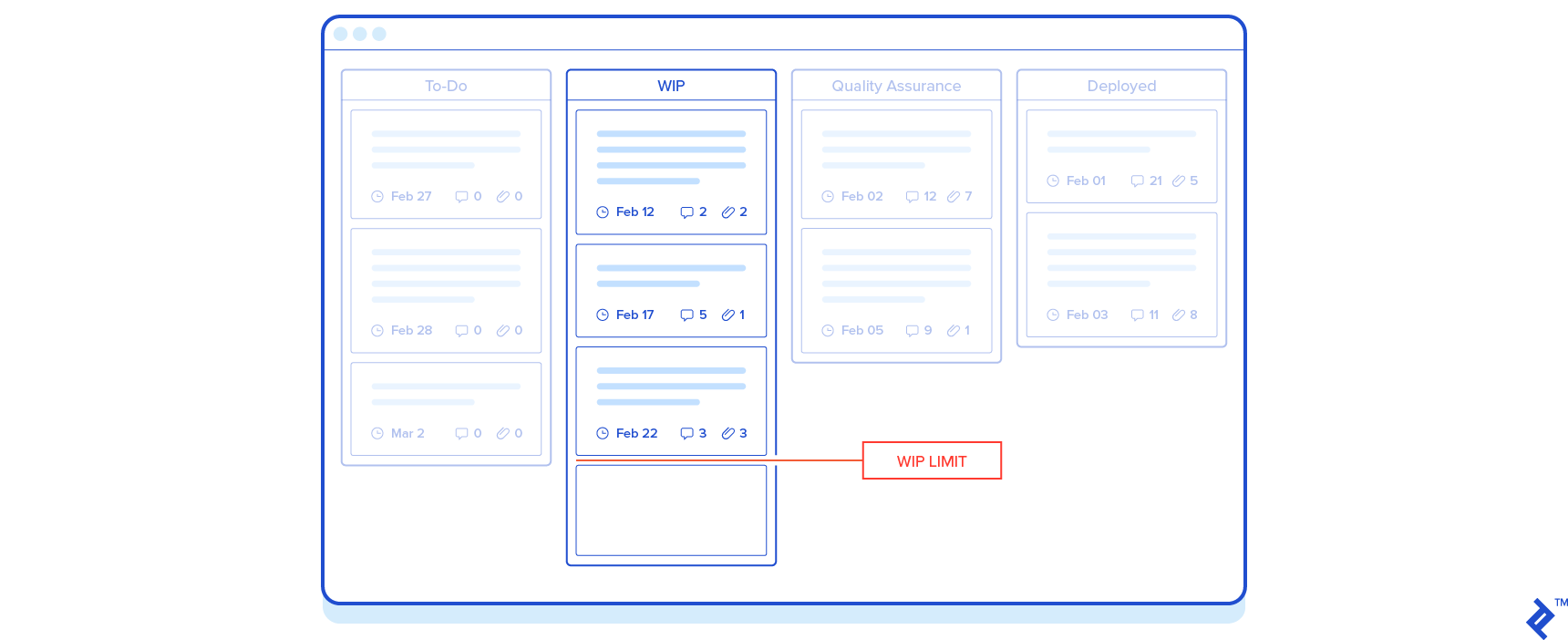
A properly managed Kanban board will give you a clear picture of your project status at a glance. You can see that your developers have enough work, that you have prepared new tasks they can take over once their assignments are done, and that your QA engineer is waiting for new tasks to review.
Use Trello to Manage Your Kanban Board
Trello is a web-based Kanban project management application. It enables easy, real-time collaboration between team members and even multiple teams and projects.
To create a board in Trello:
- Create a new board within your Workspace and give it a title for your project. You can start from scratch or use one of Trello’s built-in Kanban templates to hit the ground running.
- Create lists in the board that represent the different states in your workflow, such as To-Do, Development, Quality Assurance, and Deployed.
- Within each list, create cards representing work that needs to be done.
Once created, Trello cards are highly flexible. You can:
- Assign team members responsible for executing a task
- Color-code them with labels depending on specific groupings you would like to add
- Add cover images or colors to card fronts for quick visual identification
- Set due dates
- Add attachments
- Add a checklist to track the progress of smaller elements that comprise a task
- Add custom fields—such as text, numbers, dropdowns, or dates—to capture structured data specific to your workflow (available on paid plans)
- Comment on cards to collaborate with team members
- Automate repetitive workflow actions using Trello’s built-in automation engine, Butler, which lets you create rules, card buttons, and due-date triggers without writing any code
Visualization is everything in Kanban, so even without opening the detailed view of a card, you can quickly understand the current state of a task directly from the board.
For example, just by looking at a card, you can see that:
- A task to set up a GitHub code repository is waiting to be started in the To-Do list
- The task is due by a certain date
- The task has a description
- There are comments on the task
- There is a checklist tracking progress
- The task is assigned to a specific team member
- The task belongs to a specific category or workflow grouping indicated by its labels
A properly organized Kanban board gives the entire team a clear picture of project status at a glance.
Estimate Time And Complexity of Development Work
Planning and managing a project is impossible without understanding the effort and time needed to complete a certain task. However, one of the hardest things to do in software development is to determine how long it will take to deliver a new software product or feature.
Scrum, one of the most popular Agile frameworks, relies heavily on estimations, whether they are based on time or “complexity points.”
The team should spend significant time scoping out the task.
This is because Scrum is based on time-boxed intervals, during which a certain group of tasks is expected to be completed. In order to plan delivery, you need to have a full understanding of all the work planned for that time-box.
Kanban does not rely on time-boxed deliveries, and you can plan daily delivery if you want to. It relies on optimizing the flow, which means that the team’s focus is to complete and empty the WIP column as soon as possible.
The team doesn’t usually spend significant time estimating work far in advance. A developer will pick up the next item from To-Do, complete it as soon as possible, and pick up another task.
This doesn’t mean that a team should not estimate the volume of their workload.
You can use your weekly or daily calls to update and verify due dates. Project management tools like Trello can also help teams organize work more efficiently and improve visibility into delivery timelines.
However, for a small team, it’s more important to ensure that developers are working on the highest-priority task at any given moment and that there are no bottlenecks that force a developer to pause their work.
Eventually, your project will grow, and you will need to start estimating the amount of development work in more detail. When you reach this point, spend some time reading our guide for Software Costs Estimation in Agile Project Management.
Must-have Management Practices
So far, you’ve learned about the importance of visualizing your process and limiting WIP, and how to use Trello to manage your project.
However, a software project can’t only be managed with cards and columns. It’s important to implement Agile best practices as well:
- Organize a regular team meeting. Do this at least weekly to review what was done and refine and prioritize the backlog (To-Do list) if needed. This way, the entire team will get updates at the same time, and ideas can be shared. In these meetings, it’s important to have a project stakeholder (client, company CTO, or anyone from the product team who can make a decision and answer questions) to eventually provide non-technical feedback.
-
Assure constant communication with individual team members. This will make everyone’s daily work much easier. Keep these meetings or sync-ups very short and simple; in many cases, a quick update in your team communication platform will do. It’s useful to have daily check-ins, which could be a short 15-minute meeting with your team. In this meeting, each team member provides a quick update, covering three things:
- What they worked on yesterday.
- What they plan to work on today.
- Any challenges or bottlenecks they’re facing.
Take notes during the call and pay attention to possible issues (blockers, wrong focus on the task, unexpected technical challenges), and work on them with the team. Modern collaboration tools can also help summarize meetings and track action items automatically.
Bootstrap Your Software Development Project
While every software development project is different, there are certain tasks you’ll find in almost all of them. Here are some of the tasks you should plan when starting a software development project:
- Set up code versioning and a repository. Tracking changes and monitoring code is extremely important, especially when collaborating on projects where multiple people will be updating the same code. One of the most popular services for code versioning is GitHub, a web-based platform built around Git that provides distributed version control and source code management (SCM) functionality. It also provides access control and several collaboration features, such as bug tracking, feature requests, task management, and wikis for every project.
- Define a database backup policy. Using services such as GitHub will ensure that your code is backed up on a regular basis. Databases are usually not part of your versioning system, so it’s important to ensure that automated backups are configured properly as well. The development process is error-prone, and it is easy to accidentally modify or delete the wrong data during development. Modern cloud platforms typically provide automated backups and snapshots that simplify this process and reduce the risk of data loss. Even when using managed infrastructure, however, teams should regularly verify that backups can be restored successfully.
- Set up collaboration tools and file sharing. Project documentation, functional specifications, design files, and any other documentation and files that are used during project development are constantly updated and should be distributed to your team. You can use a number of different services to share these files. Google provides a simple and cost-effective solution to this problem. Use Google Drive, Google Docs, Google Sheets, and other Google apps to share and collaborate on files.
- Set up separate development, testing, and staging environments. The development process must continue at all times. Developers should not wait for the results of application testing, and they should continue to work on their assignments while Quality Assurance reviews completed features. At the same time, the client should be able to check the current state of the application at any time, without waiting for the development team. Having dedicated testing and staging environments that are regularly updated will help reduce bottlenecks in this process and ensure your team runs uninterrupted. Teams often manage these environments using cloud infrastructure, containers, or automated deployment pipelines.
- Define a fixed time for weekly team calls and a fixed time for daily team catch-up calls or chats. Get all your team members to schedule a time in their calendars for calls and meetings. This gives your team a steady schedule with no work interruptions.
Takeaway
Project management is a complex and, all too often, highly stressful activity. Adding structure to it and making the project status visible and accurate at all times alleviates much of this stress. Employing the Kanban method and Agile principles, combined with the proper tools, will save you a lot of time.
With that being said, there is no tool or methodology that will compensate for the time you, as the project manager, must dedicate to managing the project. And just because a project is small, it doesn’t necessarily mean it requires less of your time. This mentality is a great recipe for a big headache down the line.
Here’s a simple checklist to help you verify whether or not your project is being properly managed:
- Is your process properly visualized?
- Is WIP for each team member limited and minimized?
- Does your team have a consistently scheduled meeting—either weekly or daily?
- Is your Kanban board updated regularly?
- Do you have a code repository in place?
- Have you scheduled database backups?
- Have you set up team communication and collaboration tools?
- Are your development, testing, and staging environments properly separated?
Keep in mind this list is far from definitive and done; it’s just the beginning.
Please leave your comments, and share your tips and practices with project managers who are just beginning their never-ending journey of empowering software development teams.
Further Reading on the Toptal Blog:

Sarajevo, Federation of Bosnia and Herzegovina, Bosnia and Herzegovina
Member since July 8, 2014
About the author
Demir is a developer and project manager with over 15 years of professional experience in a wide range of software development roles.